-

Google Drive: Search Folder
This item searches for a folder with a specific name, directly under the specified folder on Google Drive.
-

Google Drive #File_Permissions: Remove AnyoneWithLink
Deletes AnyoneWithLink permission (a Reader permission to anyone who has the link) from the file. There is no change in the other permissions for the file.
-

Google Drive #File_Permissions: Remove Reader
Deletes a Reader permission. The permissionId is required.
-
Google Drive #File: Convert
Converts any file in Google Drive to another MimeType file and saves as a new one. Supports not only Google files but also common files. Converting image files…
-

Google Drive #File: Download
Imports any file in Google Drive as Workflow data. It is also possible to change the file name. If a Google file (Docs/Sheets/Slides, etc.) is specified, an error…
-

Google ドライブ #Gファイル: Textエクスポート
Stores a Google file as Workflow data after converting it to a Text file. It is also possible to change the file name. If a file other than…
-
Google Drive #GFile: Export as MS-Office
Stores a Google file as Workflow data after converting it to an MS-Office file. It is also possible to change the file name. If a file other than…
-
Google Drive #File: Copy
Creates a copy of a file and saves it in Google Drive. You can save it with any name you like. Note that the name of the file…
-

Create a PDF File Using Google Drive
Learn how to create PDF files using automated steps in Google Drive.
-
Google Drive: Delete Shared Link
This item deletes the shared link accessible by anyone with the link or within the domain from the specified file or folder on Google Drive. Permissions for users…
-
Google Drive: Create Shared Link
This item creates a shared link for the specified file or folder on Google Drive. An error occurs when the file/folder is already shared with anyone or within…
-
Google Drive: Delete File / Folder
This item deletes files or folders on Google Drive.
-
Google Drive: Create Folder
This item creates a new folder in the specified folder on Google Drive.
-
Google Drive: Download File
This item downloads the specified files on Google Drive. You can download multiple files at once. When you download multiple files, you should write one File ID per…
-

Document Publishing App, Using Google Drive
This workflow allows files on Google Drive to be made publicly available for a limited time. Register the file URL and the publication period. After registration, the file…
-
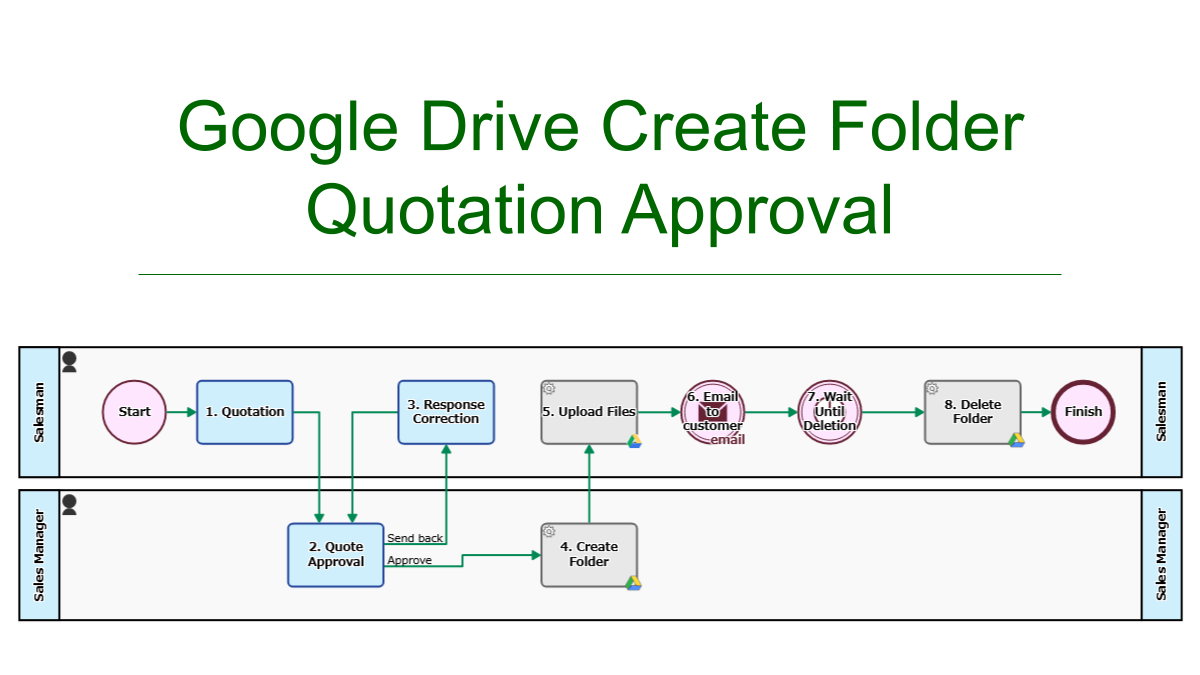
Quote Approval, Google Drive Create Folder
When quotes are approved, a folder will be created in Google Drive. The quotes are uploaded to the folder and its browsing URL is emailed to the customer.…
-
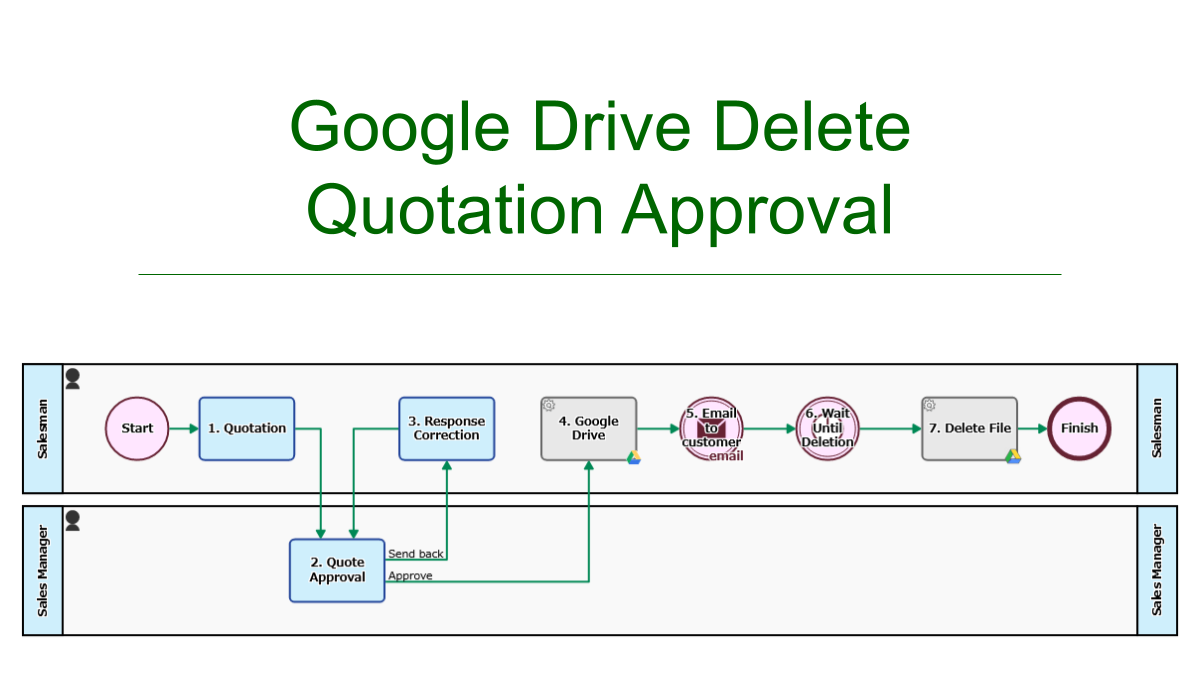
Quote Approval, Google Drive Delete
An approved quote will be automatically uploaded to Google Drive. The file viewing/downloading URL will be emailed to the customer. The quote file is automatically deleted on the…
-
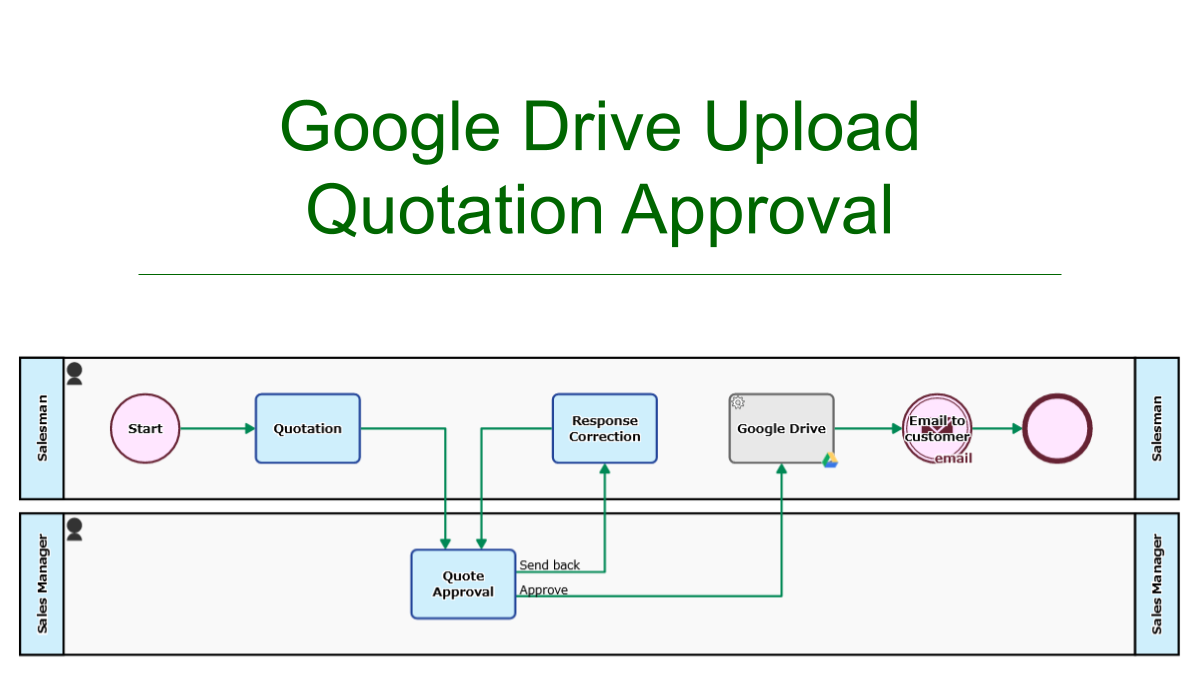
Quote Approval, Google Drive Upload
An approved quote will be automatically uploaded to Google Drive. The file viewing/downloading URL will be emailed to the customer.
-
Google Drive #File: Copy
Creates a copy of a file and saves it in Google Drive. You can save it with any name you like. Note that the name of the file…
-
Google Drive #GFile: Export as PDF
Stores a Google file as Workflow data after converting it to a PDF file. It is also possible to change the file name. If a file other than…
-
Google Drive #GFile: Export as MS-Office
Stores a Google file as Workflow data after converting it to an MS-Office file. It is also possible to change the file name. If a file other than…