-
●
Google Docs #Document: Replace All
Replaces all instances of text matching FindWhat string with ReplaceWith string in a case-sensitive way. It is also possible to replace multiple replacement patterns at once. If to replace the template file, duplicate the file in the upstream step.
-
●

Google Drive #File_Permissions: Remove AnyoneWithLink
Deletes AnyoneWithLink permission (a Reader permission to anyone who has the link) from the file. There is no change in the other permissions for the file.
-
●

Google Drive #File_Permissions: Remove Reader
Deletes a Reader permission. The permissionId is required.
-
●
-
●

Google Drive #File: Convert
Converts any file in Google Drive to another MimeType file and saves as a new one. Supports not only Google files but also common files. Converting image files (JPEG, PNG, GIF, PDF) to “Google Docs” will perform OCR text extraction.
-
●

Google Drive #File: Download
Imports any file in Google Drive as Workflow data. It is also possible to change the file name. If a Google file (Docs/Sheets/Slides, etc.) is specified, an error will occur (use GFile Export addon instead).
-
●

Google ドライブ #Gファイル: Textエクスポート
Stores a Google file as Workflow data after converting it to a Text file. It is also possible to change the file name. If a file other than a Google file (Docs/Slides) is specified an error will occur.
-
●

Google Drive #GFile: Export as MS-Office
Stores a Google file as Workflow data after converting it to an MS-Office file. It is also possible to change the file name. If a file other than a Google file (Docs/Sheets/Slides, etc.) is specified,an error will occur.
-
●

Google Drive #File: Copy
Creates a copy of a file and saves it in Google Drive. You can save it with any name you like. Note that the name of the file does not necessarily have to be unique within the folder.
-
●
Google Sheets: ValueRanges, Sum
Sums the numerical data in a specified range. Cells that cannot be recognized as numbers are considered zero. It also supports simultaneous calculation of two ranges. For example, you can sum debits and credits at the same time.
-
●
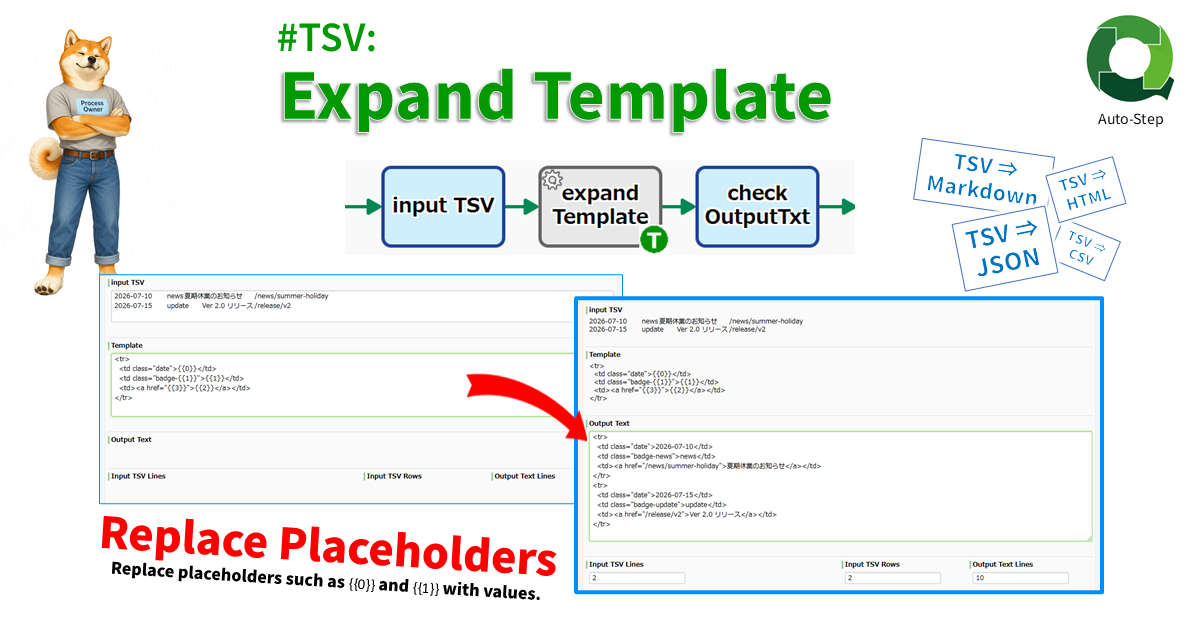
#TSV: Expand Template
Generates text from a template containing placeholders (e.g. “{{0}}”, “{{1}}”, …). The template is applied to each row in the TSV, making it useful for batch-generating Markdown, HTML, JSON arrays, and AI prompts.
-
●

Microsoft 365 OneDrive for Business: Create PDF
This process converts files on OneDrive to PDF for data item.
-
●

Date #TSV: Create Pivot by Quarter
Creates quarterly pivot tables (count, sum, avg) by parsing a date column as Y-axis and another column as X-axis from the input TSV string. Date column need not be col-A (id=0). Datetime supported.
-
●

Date #TSV: Create Pivot by Month
Creates monthly pivot tables (count, sum, avg) by parsing a date column as Y-axis and another column as X-axis from the input TSV string. Date column need not be col-A (id=0). Datetime supported.
-
●
Microsoft 365 Excel: Find Row Number By Specified Value
Searches the Excel sheet for the specified value and obtains the row number.
-
●

Microsoft 365 Excel: Append New Row
Adds a row to the end of an Excel sheet and enters data in each of its cells. The input range can be up to 10 columns.
-
●

Converter: #CSV String to #TSV String
Converts a CSV string to a TSV string. Line breaks and tab characters within cells enclosed in double quotes are replaced with half-width spaces. Excel-style double-quote escaping (consecutive double quotes) is replaced with a single character.
-
●
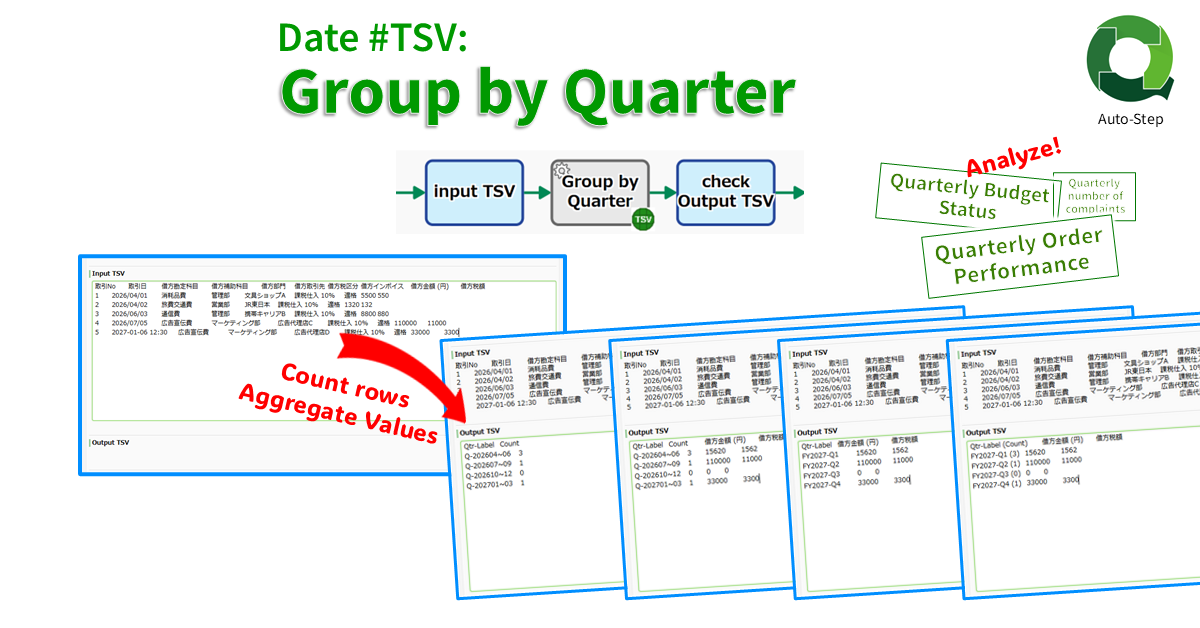
Date #TSV: Group by Quarter
Counts TSV rows by quarter from a date column and outputs a 2-col TSV (“Q-202604~06″,”3”). If numeric columns exist, quarterly totals are also summarized (“Q-202604~06″,”3″,”12000″,”1200”). Date column need not be col-A (id=0). Datetime supported.
-
●

Microsoft365: Get Group Member List
Retrieves a list of members of a Microsoft365 group. Up to 999 lists can be retrieved.
-
●
-
●

Microsoft 365 OneDrive for Business: Create JPG image
This process converts files on OneDrive to JPG image for data item.
Add-ons
-
Google Docs #Document: Replace All
Replaces all instances of text matching FindWhat string with ReplaceWith string in a case-sensitive way. It is also possible to replace multiple replacement patterns at once. If to…
-
Google Drive #File_Permissions: Remove AnyoneWithLink
Deletes AnyoneWithLink permission (a Reader permission to anyone who has the link) from the file. There is no change in the other permissions for the file.
-
Google Drive #File_Permissions: Remove Reader
Deletes a Reader permission. The permissionId is required.
-

Microsoft365: Get Group ID
Gets a Microsoft365 group ID by specifying the display name.
-
Google Drive #File: Convert
Converts any file in Google Drive to another MimeType file and saves as a new one. Supports not only Google files but also common files. Converting image files…
-
Google Drive #File: Download
Imports any file in Google Drive as Workflow data. It is also possible to change the file name. If a Google file (Docs/Sheets/Slides, etc.) is specified, an error…
-
Google ドライブ #Gファイル: Textエクスポート
Stores a Google file as Workflow data after converting it to a Text file. It is also possible to change the file name. If a file other than…
-
Google Drive #GFile: Export as MS-Office
Stores a Google file as Workflow data after converting it to an MS-Office file. It is also possible to change the file name. If a file other than…
-
Google Drive #File: Copy
Creates a copy of a file and saves it in Google Drive. You can save it with any name you like. Note that the name of the file…
-
Google Sheets: ValueRanges, Sum
Sums the numerical data in a specified range. Cells that cannot be recognized as numbers are considered zero. It also supports simultaneous calculation of two ranges. For example,…
-
#TSV: Expand Template
Generates text from a template containing placeholders (e.g. “{{0}}”, “{{1}}”, …). The template is applied to each row in the TSV, making it useful for batch-generating Markdown, HTML,…
-
Microsoft 365 OneDrive for Business: Create PDF
This process converts files on OneDrive to PDF for data item.
-
Date #TSV: Create Pivot by Quarter
Creates quarterly pivot tables (count, sum, avg) by parsing a date column as Y-axis and another column as X-axis from the input TSV string. Date column need not…
-
Date #TSV: Create Pivot by Month
Creates monthly pivot tables (count, sum, avg) by parsing a date column as Y-axis and another column as X-axis from the input TSV string. Date column need not…
-
Microsoft 365 Excel: Find Row Number By Specified Value
Searches the Excel sheet for the specified value and obtains the row number.
-
Microsoft 365 Excel: Append New Row
Adds a row to the end of an Excel sheet and enters data in each of its cells. The input range can be up to 10 columns.
-
Converter: #CSV String to #TSV String
Converts a CSV string to a TSV string. Line breaks and tab characters within cells enclosed in double quotes are replaced with half-width spaces. Excel-style double-quote escaping (consecutive…
-
Date #TSV: Group by Quarter
Counts TSV rows by quarter from a date column and outputs a 2-col TSV (“Q-202604~06″,”3”). If numeric columns exist, quarterly totals are also summarized (“Q-202604~06″,”3″,”12000″,”1200”). Date column need…
-
Microsoft365: Get Group Member List
Retrieves a list of members of a Microsoft365 group. Up to 999 lists can be retrieved.
-

Outlook Calendar Event Attendees Add
Add Attendees of Outlook Calendar Event.
-
Microsoft 365 OneDrive for Business: Create JPG image
This process converts files on OneDrive to JPG image for data item.