-
Google Sheets: Append New Row
This item adds a row at the last of the sheet, and fills each cell of that row with data.
-
Google Sheets: Add New Sheet
This item adds a new sheet to a Google Sheet.
-
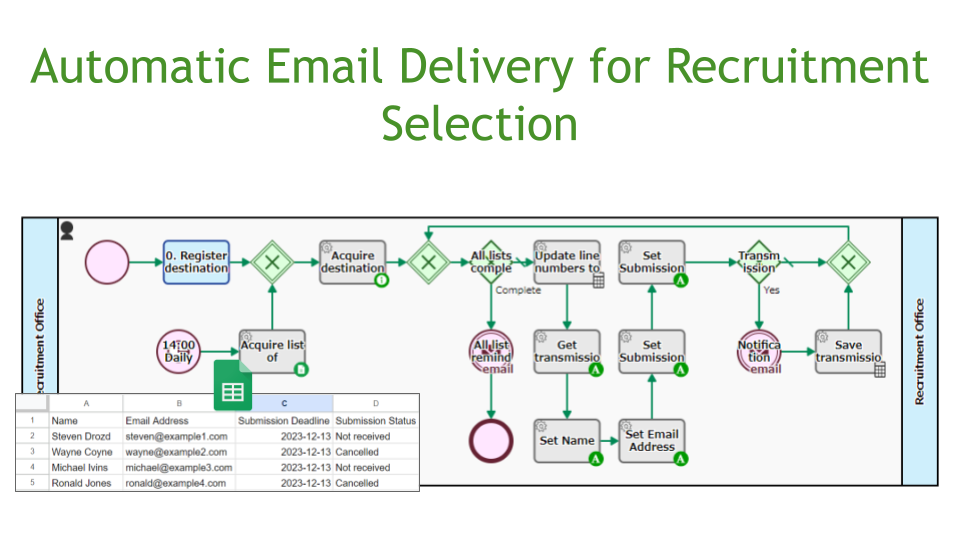
Automatic Email Delivery for Recruitment Selection
This workflow automatically reminds vacancy applicants to submit their documents. Information such as address, deadline, etc. is read from the applicant list (TSV format) one by one. Based…
-

Approval Flow
This approval flow determines approvers based on an externally managed list. Approver information is obtained from an external list based on the project selected by the applicant and…
-

Customer Master Synchronisation App, Google Sheet Integration
This workflow automatically imports the latest customer master. The master data held on Google Sheets is automatically synchronised to the choice master in Questetra. Regardless of whether you…
-
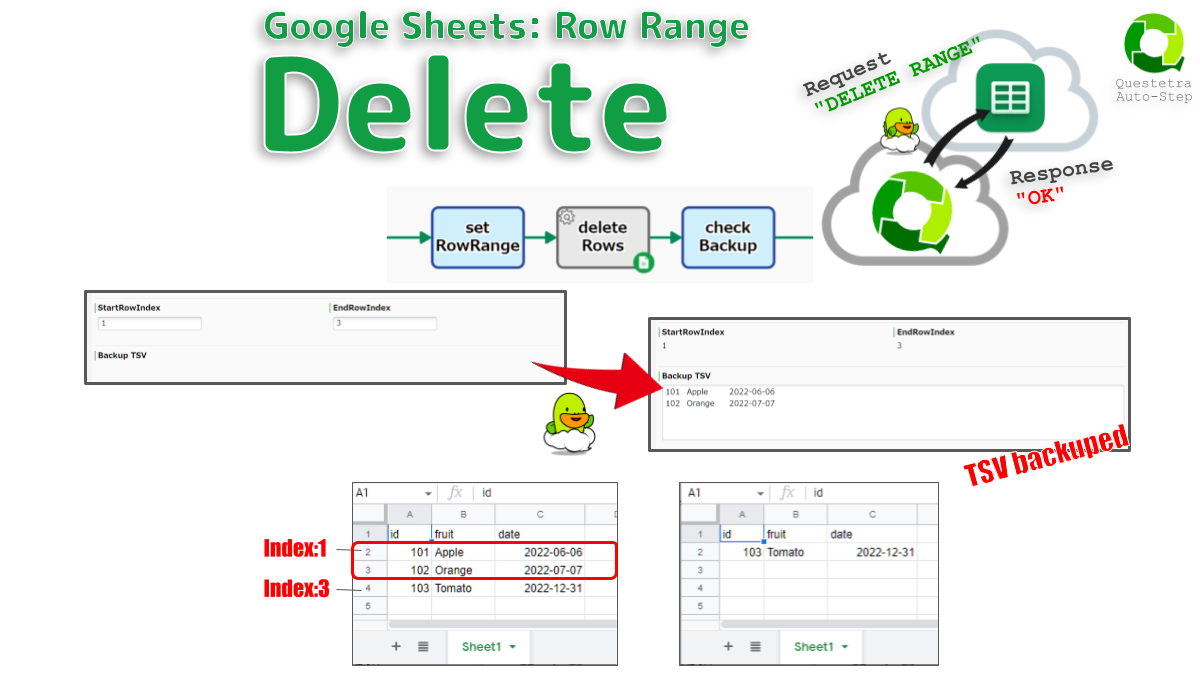
Google Sheets #Row_Range: Delete
Deletes rows in the specified range. Existing cells will be shifted upward. Both the start and end rows are specified by zero-based index. For example, “startIndex: 0, endIndex:…
-
Managing Employee Information in Google Spreadsheets with Workflow Apps
Introducing an application to manipulate employee information managed in Google Spreadsheets from Questetra.
-
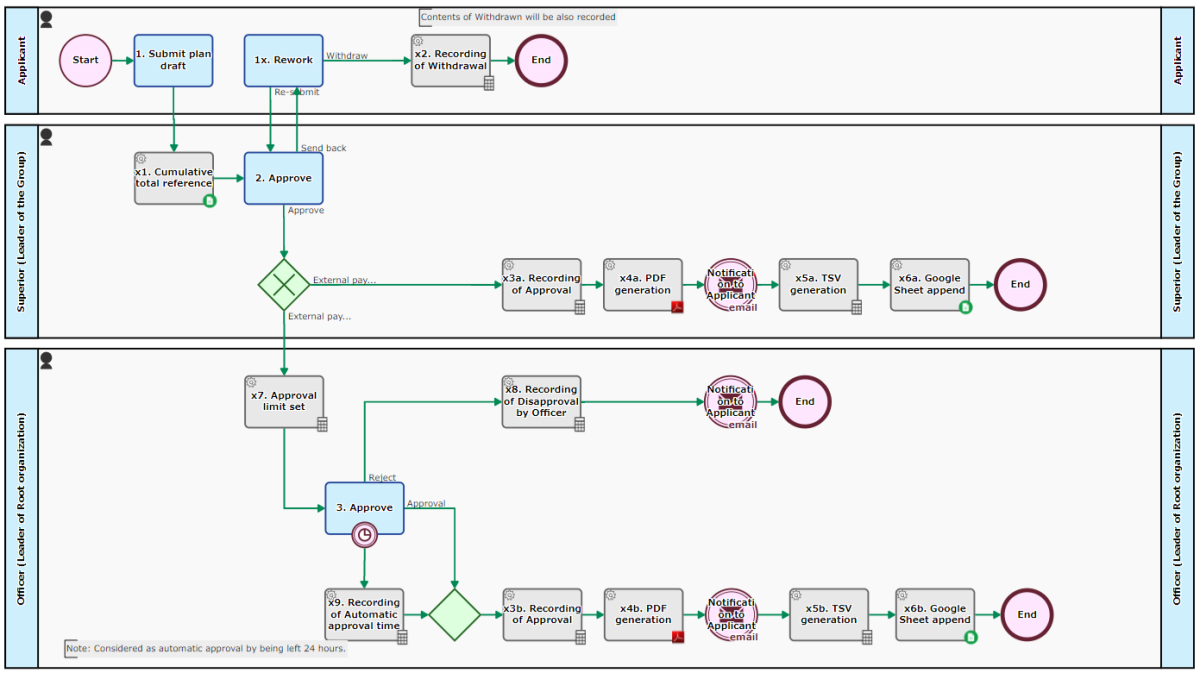
Approval Flow-Budget Control
A Proposal-approval flow that automatically records the approved spending in a Google Sheet. When a new Issue is entered at the [1. Submit plan draft] Step, the “Budget…
-
Adding Table Values to Google Sheets and Getting the Aggregate Value
Adds the contents of a Table-type Data Item to a Google Sheet and retrieves the aggregated value. Various aggregations can be performed automatically depending on the spreadsheet settings.
-

Google Sheets: ValueRanges, Export as TSV
Stores a specified rectangular range of data as a TSV String. Empty cells are regarded as an empty string. Exporting two ranges at the same time is also…
-
Google Sheets: ValueRanges, Sum
Sums the numerical data in a specified range. Cells that cannot be recognized as numbers are considered zero. It also supports simultaneous calculation of two ranges. For example,…
-
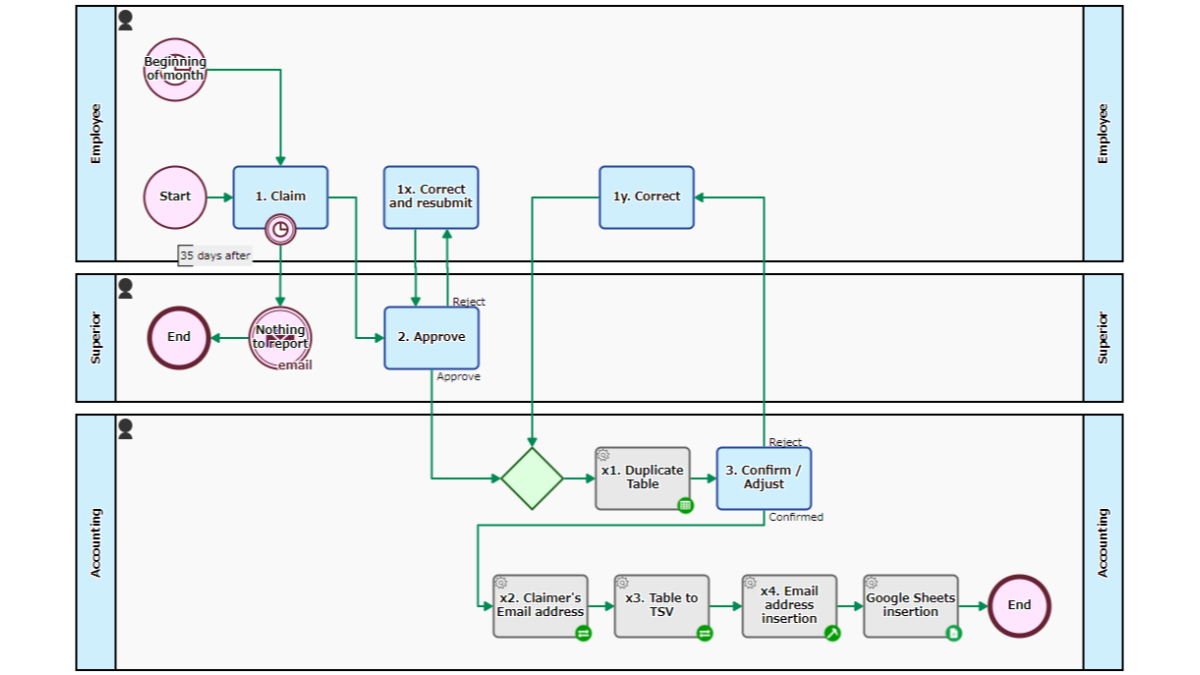
Expense Record Flow
Reports and records expenses after approval/correction. The Process for all employees is automatically started at the beginning of every month. The employee holds the [1. Report] Task until…
-
Google Sheets: Spreadsheets Value, Update
Overwrites a cell of a spreadsheet. The value will be parsed as if user typed text into the Google Sheets UI. For example, if date formatted, the value…
-

Google Sheets: Values, Export as TSV
Exports the values in the rectangular range as TSV text, which has the same number of tab delimiters on each line. Empty cells are regarded as the null…
-
Google Sheets: Sheet Row, Update with Singleline TSV
Updates a Google Sheet with a single line of TSV data. Searches for an A-Column cell that exactly matches the first value of the TSV and overwrite only…
-

Google Sheets: Sheet, Append TSV
Adds the TSV dataset after the last row. New rows will be inserted into the sheet if necessary. Only the specified columns of TSV are added, column ID…
-
Google Sheets: Spreadsheets, Add Sheet
Adds a new sheet to the end of the spreadsheet. If the specified sheet name already exists, this Automated Task will end with an error. If needed, SheetId…
-
Utilize Customer Data on Google Sheets as Choices
Get the Customer List stored in Google Sheet via API, and save/use it as the Options Master.