-

Box: Search File / Folder
This item searches for an item (such as a file or a folder) with a specific name directly under the specified folder on Box. The search result status…
-
(Deprecated) Box: Search Folder
This item searches for a folder with a specific name directly under the specified folder on Box.
-
Utilising Box From Your Workflow
Describes the automatic Steps that links Questetra to Box. You can Upload files, Create folders, and so on.
-
Start: Box: File Uploaded
This item starts a process when a file has been uploaded on a specified Box folder.
-
Box: Move Folder
This item moves a folder to the specified folder. The Folder ID and URL won’t change.
-
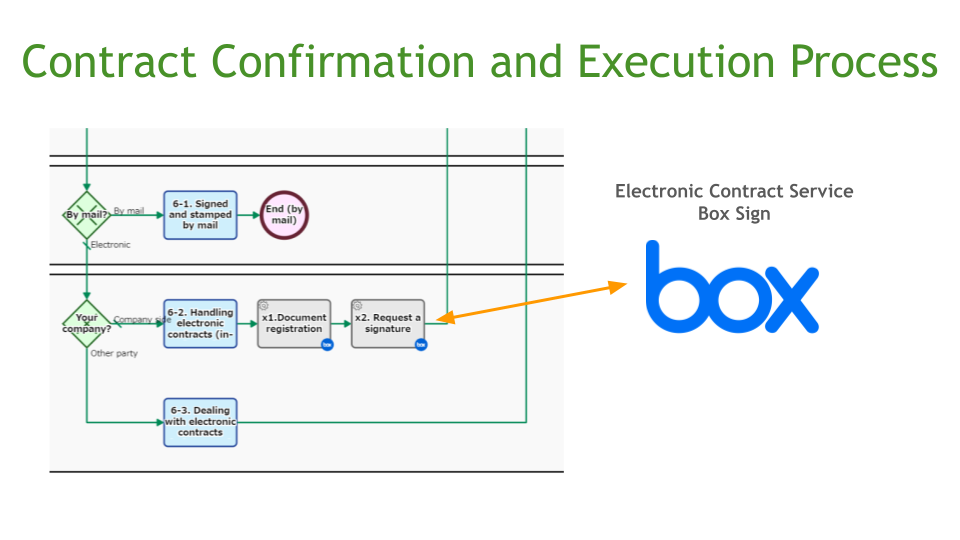
Contract Confirmation and Execution Process, Box Sign Connected
This is a process that centrally manages everything from pre-contract checks to the contract conclusion procedures. After pre-contract checks and coordination with the client are complete, the contract…
-
Box: Delete Collaboration
This item deletes a collaboration with the specified user from the specified file or folder on Box. The user is specified by the email address. If all the…
-
Box: Delete Folder
This item deletes folders on Box.
-
Box: Apply Watermark to Folder
This item applies a watermark to all files in the specified folder on Box.
-
Box: Create Folder
This item creates a new folder in the specified folder on Box, and saves the folder ID and URL. When there is a folder with the same name,…
-
Box: Apply Watermark to File
This item applies a watermark to the specified file on Box.
-
Box: Upload File
This item uploads files to the specified folder on Box.
-
Box: Download File as PDF/Text/Image
This item downloads the specified file on Box in the specified file format.
-

Box: Move File
This item moves the File to the specified Folder. File ID and URL won’t change.
-

Box: Delete Shared Link of File
This item deletes a Shared Link URL of the specified file on Box. An error will occur if there is no shared link.
-

Box: Download File
This item downloads the specified file on Box. If you do not specify a file name, it will be saved with the file name on Box.
-
Box: Copy File
This item copies the File and saves it in the specified Folder.
-

Box: Delete Shared Link of Folder
This item deletes a Shared Link URL of the specified folder on Box. An error will occur if no shared link.
-
Box: Create Shared Link to Folder
This item creates a URL to access the specified folder on Box. If no expiration date is specified, the URL will be created indefinitely. If no password is…
-
Box: Create Shared Link to File
This item creates a URL to access the specified file on Box. Created with no expiration and/or no password requests if you leave them blank.
-
Box: Add Collaboration
This item adds a collaboration for the specified user to the specified file or folder on Box. The user is specified by the email address.