// GraalJS Script (engine type: 2)

//////// START "main()" /////////////////////////////////////////////////////////////////
main();
function main(){

//// == Config Retrieving / 工程コンフィグの参照 ==
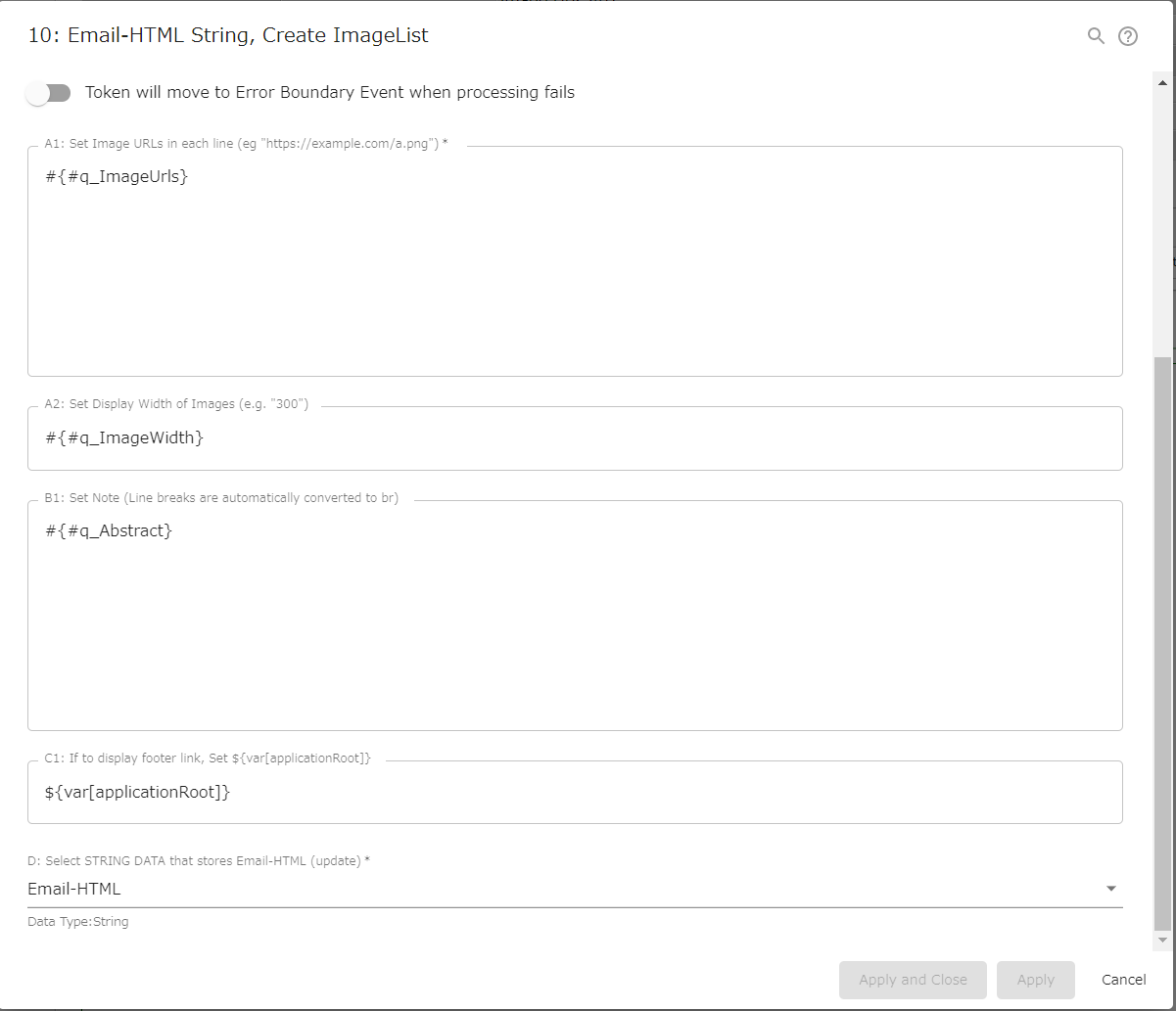
const strImageUrls         = configs.get( "StrConfA1" );          /// REQUIRED
  if( strImageUrls       === "" ){
    throw new Error( "\n AutomatedTask ConfigError:" +
                     " Config {A1: ImageUrls} is empty \n" );
  }
let   strImageWidth        = configs.get( "StrConfA2" );          // NotRequired
  if( strImageWidth      === "" ){
    engine.log( " AutomatedTask ConfigWarning: " +
                " {A2: ImageWidth} is empty (default '300px' applied)" );
      strImageWidth        = "300px";
  }
let   strAbstract          = configs.get( "StrConfB1" );          // NotRequired
      strAbstract          = encodeHTML( strAbstract ).replace(/\n/g, '<br>\n');
  if( strAbstract        === "" ){
    engine.log( " AutomatedTask ConfigWarning: " +
                " {B1: Abstract} is empty" );
  }
let   strApplicationRoot     = configs.get( "StrConfC1" );         // NotRequired
const strPocketHtml          = configs.getObject( "SelectConfD" ); /// REQUIRED


//// == Data Retrieving / ワークフローデータの参照 ==
// (Nothing. Retrieved via Expression Language in Config Retrieving)


//// == Calculating / 演算 ==


/// Build HTML String
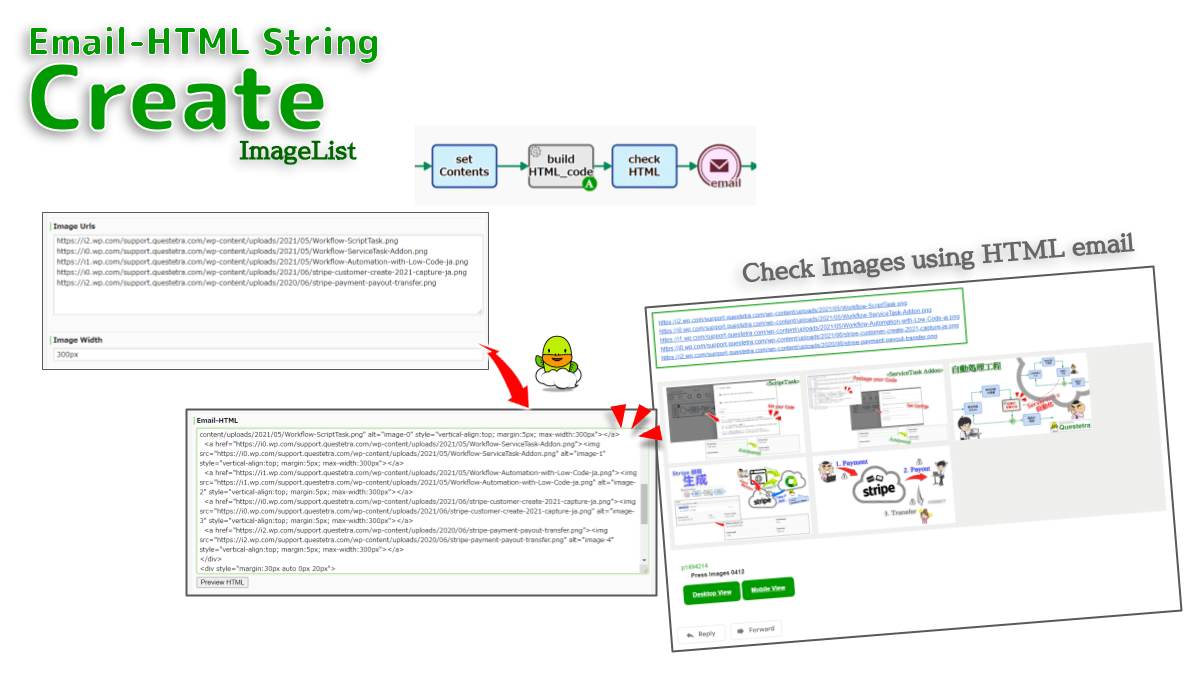
let strBlockHeader = `<!DOCTYPE HTML PUBLIC "-//W3C//DTD HTML 4.01 Transitional//EN" "http://www.w3.org/TR/html4/loose.dtd">
<head>
<meta http-equiv="Content-Type" content="text/html; charset=UTF-8">
<meta http-equiv="Content-Style-Type" content="text/css">
<meta name="viewport" content="width=device-width, initial-scale=1.0">
<title>Image List</title>
</head>
<body bgcolor="#ffffff" style="background-color:#ffffff; margin:0 auto; padding:0; width:100%">
`;

// for Note
let strBlockAbstract = `<div style="margin:0 auto 30px 0px; padding:10px;
  display:inline-block; border:medium solid #009900; background-color:#ffffff">
  ${strAbstract}
</div>
`;

// for ImageTags
let strBlockImages = "<div style=\"margin:0; padding:5px; background-color:#eeeeee\">"; // start
// Regular Expression - Named Capturing group - ES2018
let strReUri = "^((?<protocol>[^:/?#]+):)?"; // end with ":", eg. "https:", "http:",,
    strReUri += "(//(?<host>[^/?#]*))?";     // start with "//", not include "/" "?" "#"
    strReUri += "(?<pathname>[^?#]*)";       // not include "?" "#"
    strReUri += "(\\?(?<query>[^#]*))?";     // start with "?", not include "#"
    strReUri += "(#(?<anchor>.*))?";         // start with "#"
const regUri  = new RegExp( strReUri );
const arrImageUrls = strImageUrls.split("\n");
for( let i = 0; i < arrImageUrls.length; i++ ){
  if( regUri.test( arrImageUrls[i] ) ){
    strBlockImages  += '  <a href="' + arrImageUrls[i] + '"><img src="' + arrImageUrls[i] + '"';
    strBlockImages  += ' alt="image-' + i + '"';
    strBlockImages  += ' style="vertical-align:top; margin:5px; max-width:' + strImageWidth + '"></a>\n';
  }else{
    engine.log( " AutomatedTask ConfigWarning:" +
                " Not URL (skipped): " + arrImageUrls[i] );
  }
}
strBlockImages  += '</div>\n'; // end

// for FooterLink
const strProcessInstanceId    = processInstance.getProcessInstanceId() + "";
const strProcessInstanceTitle = processInstance.getProcessInstanceTitle() + "";
let strBlockFooter = `<div style="margin:30px auto 0px 20px">
  <span style="color:#009900">p${strProcessInstanceId}</span><br>
  <span style="padding-left:20px; font-weight:bold">${strProcessInstanceTitle}</span>
</div>
<div style="margin:10px auto 10px 20px">
<a href="${strApplicationRoot}PE/Workitem/list?processInstanceId=${strProcessInstanceId}"
  style="display:inline-block; font-weight:bold; border-radius:8px; padding:8px 16px;
  color:#ffffff; background:#009900; border:solid 4px #009900">Desktop View</a>
<a href="${strApplicationRoot}SP/PE/ProcessInstance/view?processInstanceId=${strProcessInstanceId}"
  style="display:inline-block; font-weight:bold; border-radius:8px; padding:8px 16px;
  color:#ffffff; background:#009900; border:solid 4px #009900">Mobile View</a>
</div>
`;

/// Assembles
let strHtml  = strBlockHeader;
  if( strAbstract !== "" ){
    strHtml   += strBlockAbstract;
  }
  strHtml   += strBlockImages;
  if( strApplicationRoot !== "" ){
    strHtml += strBlockFooter;
  }
  strHtml   += "</body></html>";


//// == Data Updating / ワークフローデータへの代入 ==
engine.setData( strPocketHtml, strHtml );

} //////// END "main()" /////////////////////////////////////////////////////////////////


function encodeHTML( str ){
  return str.replace(/&/g, '&')
            .replace(/</g, '<')
            .replace(/>/g, '>')
            .replace(/"/g, '"')
            .replace(/'/g, ''');
}


/*
Notes:
- When a token reaches the automated step, the code for HTML mail is automatically generated.
    - The generated code can be set in "Message Sending Intermediate Event (Email)" (v13.1) as it is.
    - https://support.questetra.com/bpmn-icons/throwing-message-intermediate-event-email/
    - It is also effective to add a human step in downstream to add decorative tags such as strong and span.
- Each URL is set to the `href` attribute of the `img` tag.
    - The URL must be a website accessible to email recipients.
    - Strings that do not start with `http(s)` will be skipped.
    - Before being set, the URL is validated by a regular expression.
APPENDIX
- The generated HTML code is not guaranteed to be displayed properly in all mailers.
- Set the display width according to the expected number of images and mailer.
    - For work that checks 10 or more images in Desktop, a width of 300px or less is recommended.
    - For work that checks 2 or 3 images in Desktop, a width of about 600px is recommended.
Notes-ja:
- 案件が自動処理工程に到達した際、HTMLメール用のコードが自動的に生成されます。
    - 生成されたコードは、そのまま『メッセージ送信中間イベント(メール)』(v13.1)にセットできます。
    - https://support.questetra.com/ja/bpmn-icons/throwing-message-intermediate-event-email/
- すべての URL がそれぞれ、`img` タグの `href` 属性にセットされます。
    - URL はメール受信者がアクセスできるWebサイトでなければなりません。
    - `http(s)` で始まらない文字列などは、スキップされます。
    - セットされる前に、URL の妥当性は正規表現によって検証されます。
APPENDIX-ja
- 生成されるHTML コードは、全てのメーラで正常に表示されることが保証されている訳ではありません。
- 想定される画像数やメーラに応じて、表示幅を設定します。
    - 10点以上の画像をDesktop環境でチェックする業務であれば、300px 以下の幅が推奨されます。
    - 2~3点の画像をDesktop環境でチェックする業務であれば、600px 程度の幅を持たせても良いと言えます。
*/