-
●

Google Drive #File: Download
Imports any file in Google Drive as Workflow data. It is also possible to change the file name. If a Google file (Docs/Sheets/Slides, etc.) is specified, an error will occur (use GFile Export addon instead).
-
●
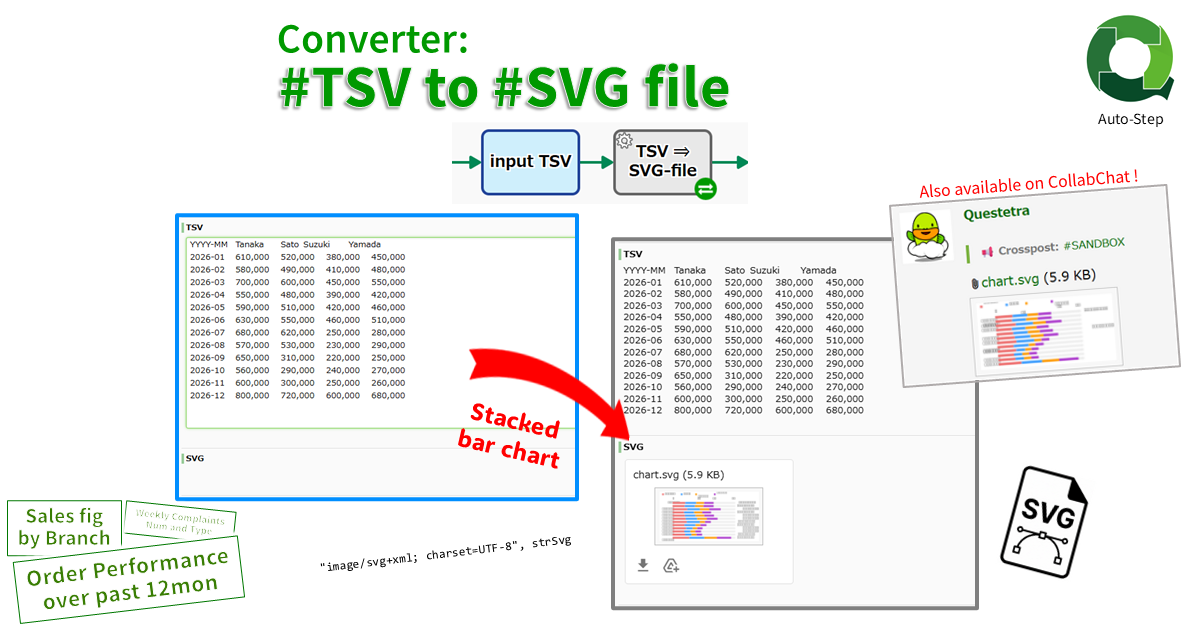
Converter: #TSV String to #SVG File
Converts a numeric TSV string into a stacked bar chart SVG file. The first TSV column is used as the aggregation unit, such as “YYYYMM”, and the first row as data series, such as “Sales Representative” or “Client”.
-
●

#Files: Filter by FileName
Extract only files to match the conditions from the files stored in FILE type. The conditions can be specified as “equal to”, “contains”, “starts with”, or “ends with”. A case-insensitive can be specified. You can also store the remaining files.
-
●
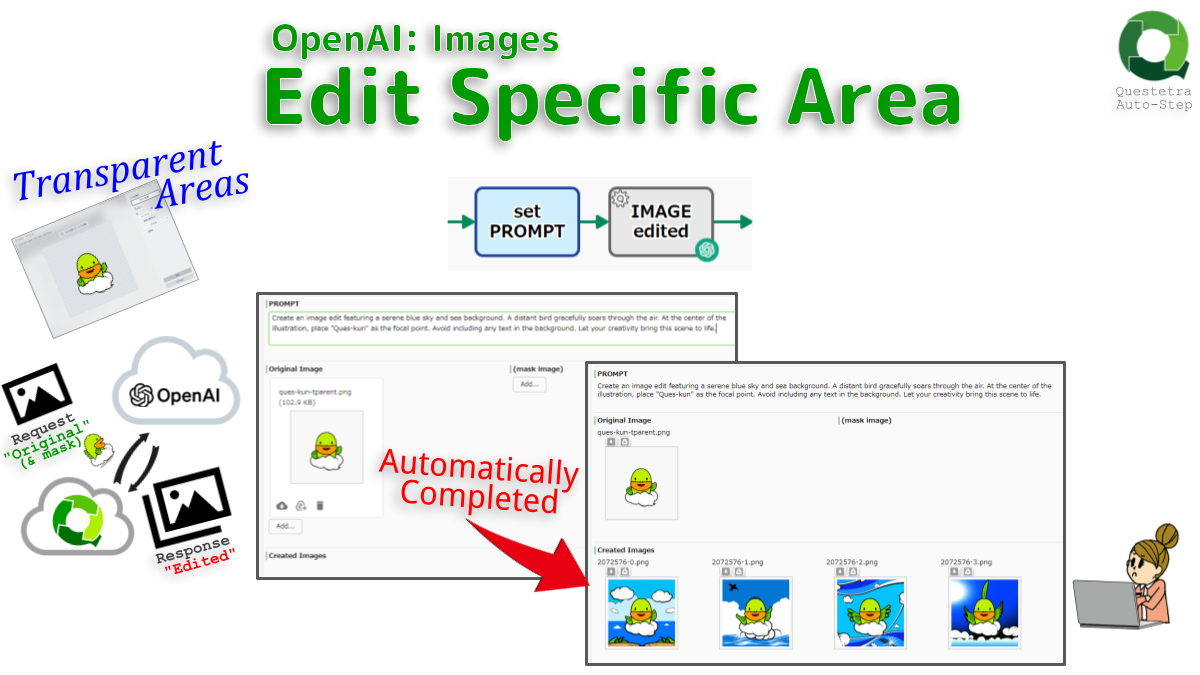
OpenAI #Images: Edit Specific Area
Completes the transparent areas of an original image with a PROMPT, by default 1024×1024. The areas to be edited can also be specified in another file. The given image must be square less than 4MB. The maximum number created at once is…
-
●
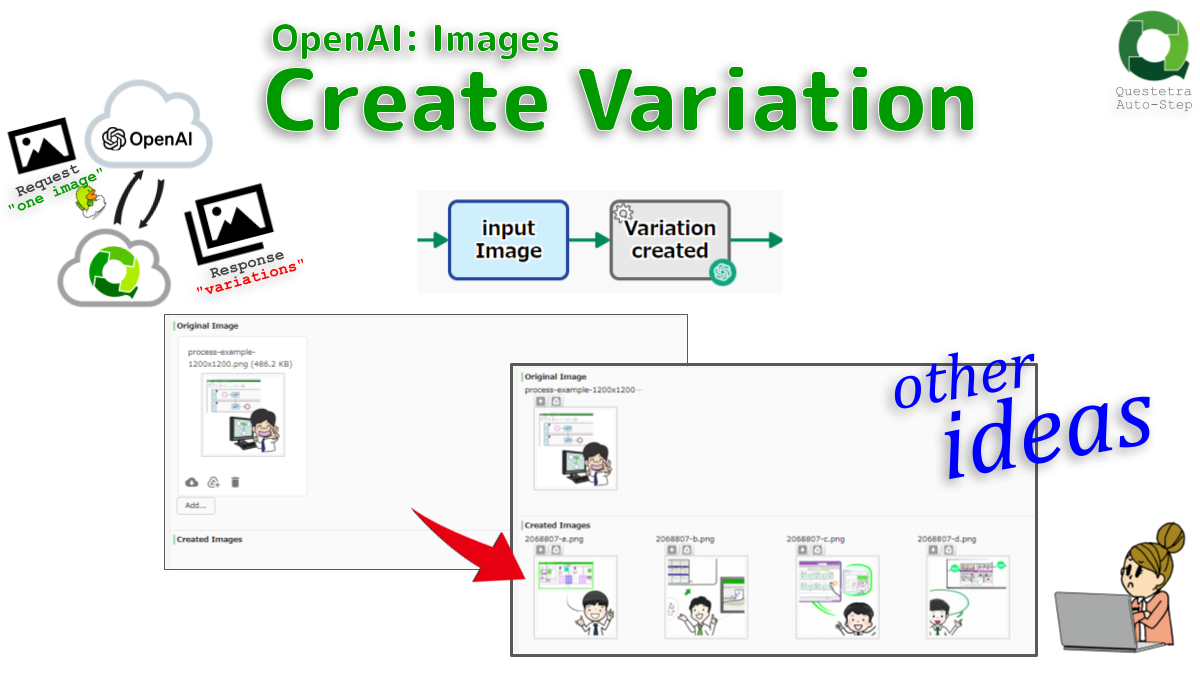
OpenAI #Images: Create Variation
Creates a variation of a given image. By default a 1024×1024 image is created. 256×256 or 512×512 are also creatable. The given image must be a square image less than 4MB. The maximum number that can be created at once is 10.
-
●

OpenAI #Images: Generate
Creates an image given a prompt. By default a 1024×1024 image is generated, but you can change it to 256×256 or 512×512. Note that PROMPT must be defined within 1000 characters.
-
●

OpenAI #Audio: Transcribe to WebVTT
Transcribes audio and video files in caption format WebVTT, using the OpenAI API “whisper-1” model by default (configurable) to convert audio data into text data. Set abbreviations and technical terms as PROMPT for more accurate transcription.
-
●
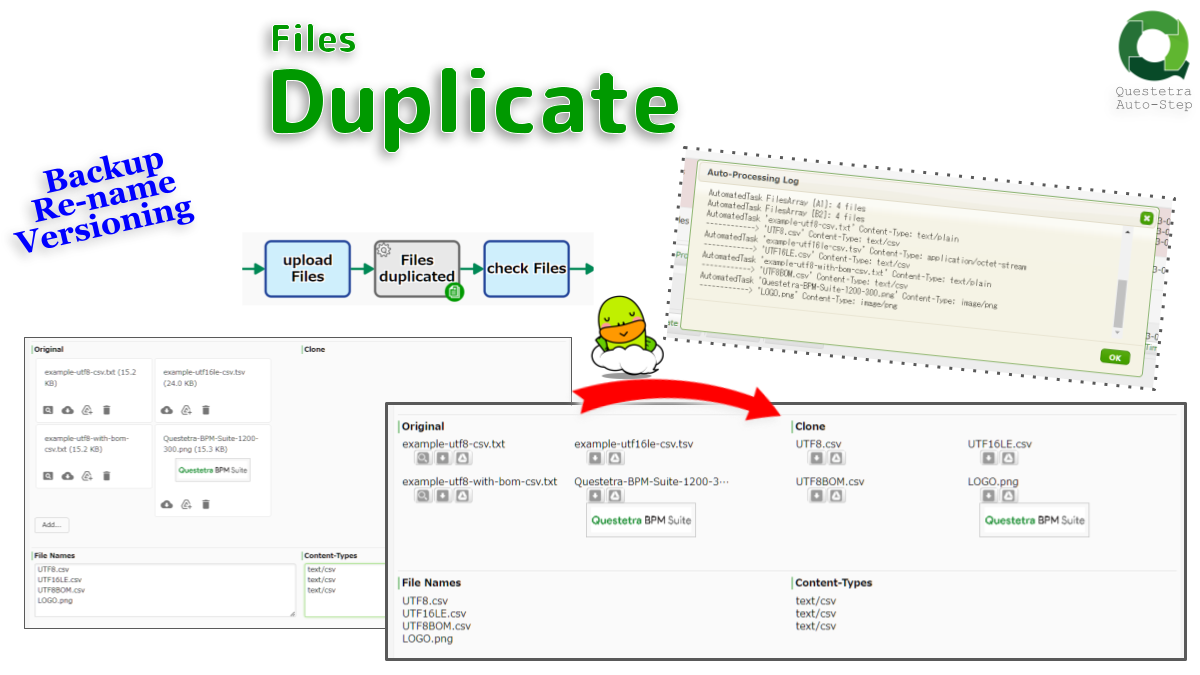
Files, Duplicate
Duplicates File-type data. All files stored in Data Item A1 (Original Files) will be copied over to Data Item B1 (Clone Files). Also possible to change the file name or Content-Type. If the same Data Item is specified as A1 and B1,…
-
●

Text Files, Convert Character Encoding
Converts text files charset (Coded Character Set). For example, converts UTF-8 encoding to Shift_JIS or UTF-16. If multiple files are attached, all will be converted according to the same rules.
-
●
Files Duplicate From Multi Items
Duplicates File-type data to other File-type Data Items. All files stored in File-type Data Item A is copied over to File-type Data Item B
-
●

TSV String, Convert
Changes the column order of TSV text. The new order is specified by enumerating the column IDs of the original TSV, like “0,1,3,0”. The new TSV text can also be stored in formats such as TSV file format and CSV file format.
-
●

Text Files, Convert Character Encoding
Converts text files charset (Coded Character Set). For example, converts UTF-8 encoding to Shift_JIS or UTF-16. If multiple files are attached, all will be converted according to the same rules.
-
●

Converter (JapanZipCsv to JapanZipXml)
Generates a postal code master. The zip data “KEN_ALL.CSV” (120k lines) of Japan Post is converted to “Japan-Zip.xml”. You can refer to postal code master in input form settings such as “Select (Search Select box)”
-
●

Converter (JigyosyoZipCsv to JigyosyoZipXml)
Generates a postal code master. The business zip “JIGYOSYO.CSV” (20k lines) by Japan Post Co., Ltd. is converted to “Jigyosyo-Zip.xml”. If “Japan-Zip.xml” (120k lines) is specified, “Jigyosyo-Zip.xml” (140k lines) will be created.
-
●

Converter (TSV to Excel-CSV FILE) sjis
A tab delimited text (TSV) stored in a String type data item is saved as an Excel compatible CSV file in a File-type Data Item.
-
●
Converter (TSV to Excel-CSV FILE)
A tab-delimited text (TSV) stored in a String type data item is saved as an Excel-compatible CSV file in a File type Data Item
-
●
Files, Duplicate
Duplicates File-type data. All files stored in File-type Data Item A will be copied over to File-type Data Item B.
-
●
Google Drive #File: Download
Imports any file in Google Drive as Workflow data. It is also possible to change the file name. If a Google file (Docs/Sheets/Slides, etc.) is specified, an error will occur (use GFile Export addon instead).
Workflow Apps: Add-ons
-
Google Drive #File: Download
Imports any file in Google Drive as Workflow data. It is also possible to change the file name. If a Google file (Docs/Sheets/Slides, etc.) is specified, an error…
-
Converter: #TSV String to #SVG File
Converts a numeric TSV string into a stacked bar chart SVG file. The first TSV column is used as the aggregation unit, such as “YYYYMM”, and the first…
-
#Files: Filter by FileName
Extract only files to match the conditions from the files stored in FILE type. The conditions can be specified as “equal to”, “contains”, “starts with”, or “ends with”.…
-
OpenAI #Images: Edit Specific Area
Completes the transparent areas of an original image with a PROMPT, by default 1024×1024. The areas to be edited can also be specified in another file. The given…
-
OpenAI #Images: Create Variation
Creates a variation of a given image. By default a 1024×1024 image is created. 256×256 or 512×512 are also creatable. The given image must be a square image…
-
OpenAI #Images: Generate
Creates an image given a prompt. By default a 1024×1024 image is generated, but you can change it to 256×256 or 512×512. Note that PROMPT must be defined…
-
OpenAI #Audio: Transcribe to WebVTT
Transcribes audio and video files in caption format WebVTT, using the OpenAI API “whisper-1” model by default (configurable) to convert audio data into text data. Set abbreviations and…
-
Files, Duplicate
Duplicates File-type data. All files stored in Data Item A1 (Original Files) will be copied over to Data Item B1 (Clone Files). Also possible to change the file…
-
Text Files, Convert Character Encoding
Converts text files charset (Coded Character Set). For example, converts UTF-8 encoding to Shift_JIS or UTF-16. If multiple files are attached, all will be converted according to the…
-
Files Duplicate From Multi Items
Duplicates File-type data to other File-type Data Items. All files stored in File-type Data Item A is copied over to File-type Data Item B
-
TSV String, Convert
Changes the column order of TSV text. The new order is specified by enumerating the column IDs of the original TSV, like “0,1,3,0”. The new TSV text can…
-
Text Files, Convert Character Encoding
Converts text files charset (Coded Character Set). For example, converts UTF-8 encoding to Shift_JIS or UTF-16. If multiple files are attached, all will be converted according to the…
-
Converter (JapanZipCsv to JapanZipXml)
Generates a postal code master. The zip data “KEN_ALL.CSV” (120k lines) of Japan Post is converted to “Japan-Zip.xml”. You can refer to postal code master in input form…
-
Converter (JigyosyoZipCsv to JigyosyoZipXml)
Generates a postal code master. The business zip “JIGYOSYO.CSV” (20k lines) by Japan Post Co., Ltd. is converted to “Jigyosyo-Zip.xml”. If “Japan-Zip.xml” (120k lines) is specified, “Jigyosyo-Zip.xml” (140k…
-
Converter (TSV to Excel-CSV FILE) sjis
A tab delimited text (TSV) stored in a String type data item is saved as an Excel compatible CSV file in a File-type Data Item.
-
Converter (TSV to Excel-CSV FILE)
A tab-delimited text (TSV) stored in a String type data item is saved as an Excel-compatible CSV file in a File type Data Item
-
Files, Duplicate
Duplicates File-type data. All files stored in File-type Data Item A will be copied over to File-type Data Item B.
-
Google Drive #File: Download
Imports any file in Google Drive as Workflow data. It is also possible to change the file name. If a Google file (Docs/Sheets/Slides, etc.) is specified, an error…