-
Google Drive #File: Copy
Creates a copy of a file and saves it in Google Drive. You can save it with any name you like. Note that the name of the file…
-
Google Docs #Document: Replace All
Replaces all instances of text matching the FindWhat string with the ReplaceWith string in a case-sensitive way. It is also possible to replace multiple replacement patterns at once.…
-

Google Drive #GFile: Export as PDF
Stores a Google file as Workflow data after converting it to a PDF file. It is also possible to change the file name. If a file other than…
-

Google Drive #GFile: Export as MS-Office
Stores a Google file as Workflow data after converting it to an MS-Office file. It is also possible to change the file name. If a file other than…
-

Google Drive #GFile: Export as Text
Stores a Google file as Workflow data after converting it to a Text file. It is also possible to change the file name. If a file other than…
-

Google Drive #File: Download
Imports any file in Google Drive as Workflow data. It is also possible to change the file name. If a Google file (Docs/Sheets/Slides, etc.) is specified, an error…
-

Google Drive #File: Convert
Converts any file in Google Drive to another MimeType file and saves as a new one. Supports not only Google files but also common files. Converting image files…
-

Google Translate #Translation_API_Basic: Translate
Translates using Google Translation API v2. Specifying the target language is mandatory, but specifying the source language is optional (Detected). The NMT model is applied, but in some…
-
Expense Record Flow
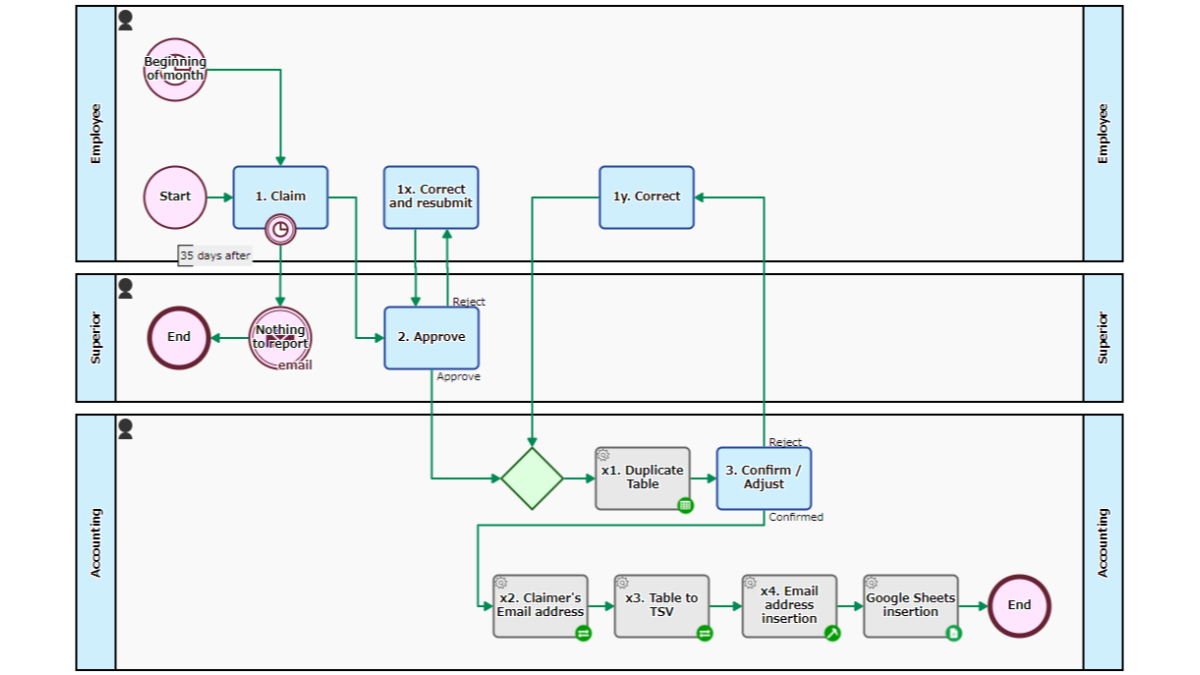
Reports and records expenses after approval/correction. The Process for all employees is automatically started at the beginning of every month. The employee holds the [1. Report] Task until…
-
Google Sheets: Spreadsheets Value, Update
Overwrites a cell of a spreadsheet. The value will be parsed as if user typed text into the Google Sheets UI. For example, if date formatted, the value…
-

Google Sheets: Values, Export as TSV
Exports the values in the rectangular range as TSV text, which has the same number of tab delimiters on each line. Empty cells are regarded as the null…
-

Google Groups #Members: List
Retrieves a list of all members’ email addresses (2000 addresses at a maximum) in a Google Groupe. It is also possible to narrow down to email addresses of…
-

Google Groups #Members: Insert
Adds an email address to the specified group which is created in Google Groups. Adding the email address to multiple groups at once is also possible. You can…
-

Google Groups #Members: Delete
Removes an email address from the specified group which is created in Google Groups. Removing the email address from multiple groups at once is also possible. You can…
-

Google Calendar Get events list (schedules)
Accesses to Google Calendar and retrieves a list of events (schedules) registered in the specified period. Combining this Task with Workflows will make it possible to get the…
-

Utilizing Google Drive from Workflow – Sending files to people outside the company
Google Drive is a cloud storage service offered by Google. I will explain automatic Step for utilizing Google Drive in a Workflow App.
-
Google Sheets: Sheet Row, Update with Singleline TSV
Updates a Google Sheet with a single line of TSV data. Searches for an A-Column cell that exactly matches the first value of the TSV and overwrite only…
-

Google Sheets: Sheet, Append TSV
Adds the TSV dataset after the last row. New rows will be inserted into the sheet if necessary. Only the specified columns of TSV are added, column ID…
-

Google Drive #File_Permissions: Add Reader
Creates a Reader permission. A Google account email address is required. It is also possible to retain the Permission ID.
-
Google Drive #File_Permissions: Remove Reader
Deletes a Reader permission. The permissionId is required.
-

Google Drive #File_Permissions: Add AnyoneWithLink
Creates AnyoneWithLink permission (a Reader permission to anyone who has the link) to the file. Viewers who are notified of the link do not need to sign in…