// GraalJS Script (engine type: 2)

//////// START "main()" /////////////////////////////////////////////////////////////////
main();
function main(){

//// == Config Retrieving / 工程コンフィグの参照 ==
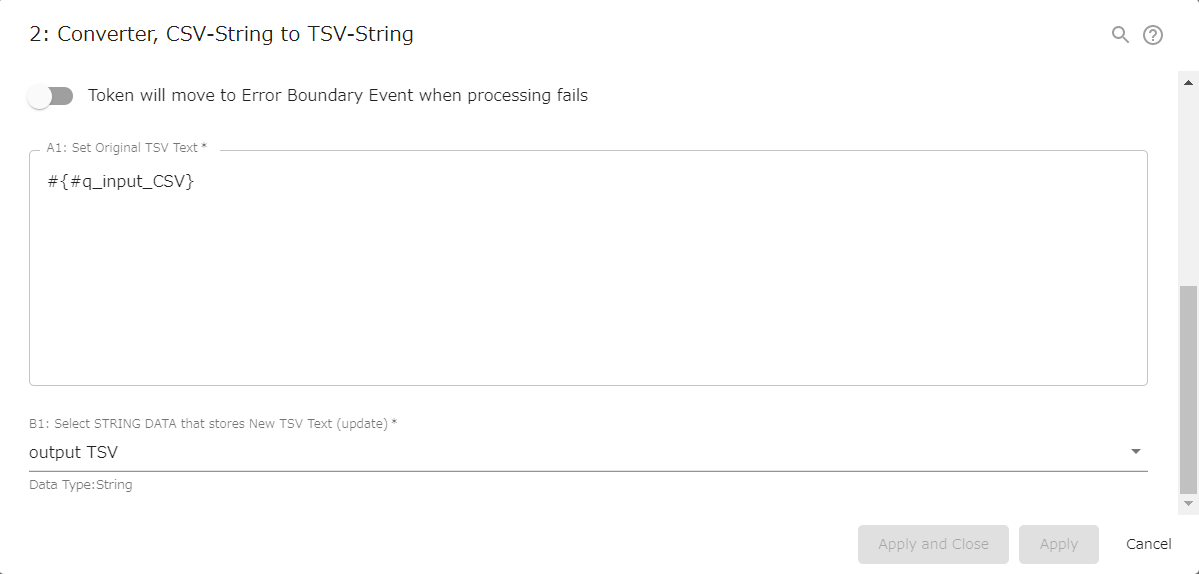
const strInputCsv      = configs.get( "StrConfA1" );         /// REQUIRED ///////////////
  if( strInputCsv    === "" ){
    throw new Error( "\n AutomatedTask ConfigError:" +
                     " Config {A1: CSV} is empty \n" );
  }

const strPocketOutputTsv    = configs.getObject( "SelectConfB1" ); /// REQUIRED /////////


//// == Data Retrieving / ワークフローデータの参照 ==
// (Nothing. Retrieved via Expression Language in Config Retrieving)


//// == Calculating / 演算 ==

/// Replace TAB to " "
let strTmp = strInputCsv.replace( /\t/g, " " );

/// Replace '\n' in the field to ' '
// '\n': LINEBREAKS followed by an odd number of double-quotes
// '\n': その後ろにあるダブルクオートが奇数個となる改行コード
    strTmp = strTmp.replace( /\n(?=([^"]*"[^"]*")*"[^"]*$)/g, ' ' );

/// Split into each line
const regEnclosure = /^"(.*)"$/;
let strOutputTsv = "";

let arrTmpLines = strTmp.split( "\n" );
engine.log( " AutomatedTask CsvDataCheck: " +
            arrTmpLines.length + " lines" );

for( let i = 0; i < arrTmpLines.length; i++ ){
  if( arrTmpLines[i] === "" ){ continue; } // Skip blank lines

  /// Replace ',' to '\t' followed by an even number of double-quotes
  // ',': COMMA followed by an even number of double-quotes
  // ',': その後ろにあるダブルクオートが偶数個となるカンマ
  let strTmpLine = arrTmpLines[i].replace( /,(?=([^"]*"[^"]*")*[^"]*$)/g, '\t' );

  let arrTmpCells = strTmpLine.split( '\t' );
  engine.log( "  #" + i + ": " + arrTmpCells.length + " cells" );

  for( let j = 0; j < arrTmpCells.length; j++ ){
    /// Remove '"' for enclosure and espaced '""'
    if( regEnclosure.test(arrTmpCells[j]) ){
      strOutputTsv += arrTmpCells[j].slice(1,-1).replace( /""/g, '"' );
    }else{
      strOutputTsv += arrTmpCells[j].replace( /""/g, '"' );
    }
    if( j !== arrTmpCells.length - 1 ){
      strOutputTsv += "\t";
    }
  }
  strOutputTsv += "\n";
}
strOutputTsv = strOutputTsv.slice( 0, -1 ); // delete last "\n"


//// == Data Updating / ワークフローデータへの代入 ==
engine.setData( strPocketOutputTsv,    strOutputTsv );

} //////// END "main()" /////////////////////////////////////////////////////////////////

/*
Notes:
- When the process arrives, the CSV text saved in String data is automatically converted to TSV.
    - If CSV file, it must be stored in String in advance.
        - Converter (Text File to String type data)
            - https://support.questetra.com/bpmn-icons/converter-textfile-to-string/
        - Text Files, Convert Character Encoding
            - https://support.questetra.com/addons/text-files-convert-character-encoding-2021/
- Even if there are TAB codes or line feed codes in the field of CSV, no error will occur.
    - Parsing a CSV with Line Breaks in the Data Fields
    - However, TAB codes and line feed codes are converted to `" "` (space).
        - `2004` ⇒ `2004`
        - `"3,000"` ⇒ `3,000`
        - `"SEA\nNYY"` ⇒ `SEA NYY`
        - `"In the interview, ""If I ever get fat"` ⇒ `In the interview, "If I ever get fat`
- Output TSV text is output as the simplest tab-delimited string.
    - MIME type: `text/tab-separated-values; charset = UTF-8`
    - Double-quotes are also preserved unescaped.

APPENDIX:
- If an odd number of double-quotes after the line feed, be judged as "in the cell" and replaced.
     - Regular expressions are used to replace line feed codes in cell data. (RFC 4180 2-6 2-7)
        - 2004,SEA,161,762,262,262 hits in a single season
        - 2008,SEA,162,749,213,"3,000 top-level professional hits"
        - 2012,"SEA
        - NYY",162,663,178,"In the interview, ""If I ever get fat, I'll quit baseball immediately."""
    - `[^"]*`: Characters other than double-quote, 0 or more times
    - `([^"]*"[^"]*")*[^"]*$`: Contains an even number of double-quotes by the end of the sentence
    - `([^"]*"[^"]*")*"[^"]*$`: Contains an odd number of double-quotes by the end of the sentence
    - `(?:x)`: Non-capturing group: Matches "x" but does not remember the match.
- If there is a blank line in the input CSV text, it will be skipped.
    - The line feed code for the last line is not added either.


Notes-ja:
- 案件(プロセス)が到達した際、文字列型データに保存されているCSVテキストが自動的にTSV変換されます。
    - CSVデータがファイルとして存在している場合、予め文字列型データ項目に格納する必要があります。
        - コンバータ (テキストファイル to 文字型データ)
            - https://support.questetra.com/ja/bpmn-icons/converter-textfile-to-string/
        - Text ファイル, 文字エンコーディングの変換
            - https://support.questetra.com/ja/addons/text-files-convert-character-encoding-2021/
- 入力CSVテキストのセルデータ内(フィールド内)に、TABや改行が存在してもエラーにはなりません。
    - セル内改行に対応した CSV-Parser (Parsing a CSV with Line Breaks in the Data Fields)
    - ただし、TABコードや改行コードは `" "` (半角スペース)に変換されます。 CSVパーサー
        - `2004` ⇒ `2004`
        - `"3,000"` ⇒ `3,000`
        - `"SEA\nNYY"` ⇒ `SEA NYY`
        - `"In the interview, ""If I ever get fat"` ⇒ `In the interview, "If I ever get fat`
- 出力TSVテキストは「もっともシンプルなタブ区切り文字列」として出力されます。
    - MIME type: `text/tab-separated-values; charset=UTF-8`
    - ダブルクオート文字も、エスケープされていない状態で保持されます。

APPENDIX-ja:
- その改行コード以降に奇数個のダブルクオートが存在する場合、「セル内の改行」と判定され変換されます。
    - セルデータ内(フィールド内)にある改行コードの変換には正規表現が利用されます。
        - 2004,SEA,161,762,262,262 hits in a single season
        - 2008,SEA,162,749,213,"3,000 top-level professional hits"
        - 2012,"SEA
        - NYY",162,663,178,"In the interview, ""If I ever get fat, I'll quit baseball immediately."""
    - `[^"]*`: ダブルクオート以外の文字が0回以上繰り返す
    - `([^"]*"[^"]*")*[^"]*$`: 文末までにダブルクオート文字が偶数回出現する
    - `([^"]*"[^"]*")*"[^"]*$`: 文末までにダブルクオート文字が奇数回出現する
    - `(?:x)`: 非キャプチャグループ: x にマッチしますが、マッチした内容は記憶しません。
- 入力CSVテキストに空行がある場合、スキップされます。
    - 最終行の改行コードも付与されません。
*/