// (c) 2019, Questetra, Inc. (the MIT License)

//// == OAuth2 Setting example ==
// Authorization Endpoint URL:
//  "https://accounts.google.com/o/oauth2/auth?access_type=offline&approval_prompt=force"
// Token Endpoint URL:
//  "https://accounts.google.com/o/oauth2/token"
// Scope:
//  "https://www.googleapis.com/auth/presentations https://www.googleapis.com/auth/spreadsheets.readonly"
// Client ID:
//  ( from https://console.developers.google.com/ )
// Consumer Secret:
//  ( from https://console.developers.google.com/ )
//  *Redirect URLs: "https://s.questetra.net/oauth2callback"


//////// START "main()" ////////
main();
function main(){

//// == Config Retrieving / 工程コンフィグの参照 ==
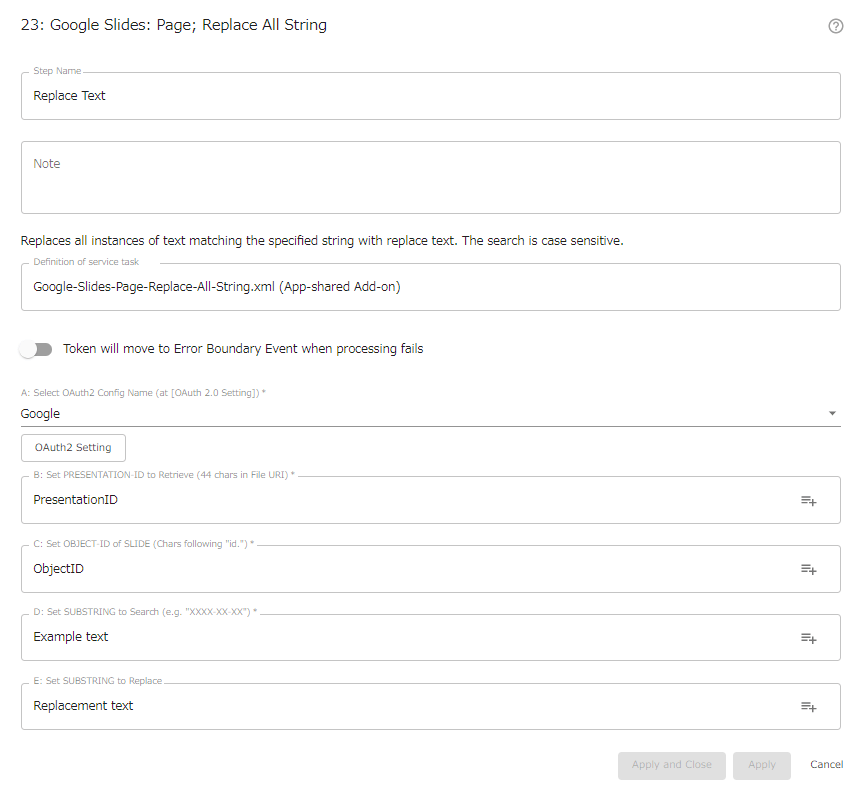
const oauth2   = configs.get( "conf_OAuth2"  ) + "";
const presentationId = configs.get( "conf_PresentationId") + "";
const objectId       = configs.get( "conf_ObjectId") + "";
const substring      = configs.get( "conf_Substring" ) + "";
const newSubstring   = configs.get( "conf_NewSubstring" ) + "";
// 'java.lang.String' (String Obj) to javascript primitive 'string'

engine.log( " AutomatedTask Config: Presentation ID: " + presentationId );
engine.log( " AutomatedTask Config: Object ID: " + objectId );
engine.log( " AutomatedTask Config: Substring: " + substring );
engine.log( " AutomatedTask Config: NewSubstring: " + newSubstring );


//// == Data Retrieving / ワークフローデータの参照 ==
// (nothing)


//// == Calculating / 演算 ==
/// obtain OAuth2 Access Token
const token   = httpClient.getOAuth2Token( oauth2 );

/// post ReplaceAllTextRequest
let requestObj = {};
    requestObj.requests = [];
    requestObj.requests[0] = {};
    requestObj.requests[0].replaceAllText = {};
    requestObj.requests[0].replaceAllText.replaceText = newSubstring;
    requestObj.requests[0].replaceAllText.pageObjectIds = [];
    requestObj.requests[0].replaceAllText.pageObjectIds[0] = objectId;
    requestObj.requests[0].replaceAllText.containsText = {};
    requestObj.requests[0].replaceAllText.containsText.text = substring;
    requestObj.requests[0].replaceAllText.containsText.matchCase = true;
let apiRequest = httpClient.begin(); // HttpRequestWrapper
apiRequest = apiRequest.bearer( token );
apiRequest = apiRequest.body( JSON.stringify( requestObj ), "application/json" );
const apiUri = "https://slides.googleapis.com/v1/presentations/"
                + presentationId + ":batchUpdate";
engine.log( " AutomatedTask Trying: POST " + apiUri );
const response = apiRequest.post( apiUri );
const responseCode = response.getStatusCode() + "";
engine.log( " AutomatedTask ApiResponse: Status " + responseCode );
if( responseCode !== "200"){
  throw new Error( "\n AutomatedTask UnexpectedResponseError: "
         + responseCode + "\n" + response.getResponseAsString() + "\n" );
}
const responseStr = response.getResponseAsString() + "";
const responseObj = JSON.parse( responseStr );
if( responseObj.replies[0].replaceAllText.occurrencesChanged == undefined ){
  engine.log( " AutomatedTask ApiResponse: Occurrences Changed 0" );
}else{
  engine.log( " AutomatedTask ApiResponse: Occurrences Changed " +
             responseObj.replies[0].replaceAllText.occurrencesChanged );
}


//// == Data Updating / ワークフローデータへの代入 ==
// (nothing)

} //////// END "main()" ////////