-
●
-
●

Google Sheets: Spreadsheets Multiple Cells Value, Update
Overwrites mulitiple cells of a spreadsheet. The value will be parsed as if user typed text into the Google Sheets UI. For example, if date formated, the value “12-24” will be converted to “12/24/2021”. Or, “’12-31″…
-
●

Slack: Slack Message JSON Parsing
Extract text from Message JSON data received from Slack. Download the file if there is an attachment. (only one attachment is supported)
-
●

Google Calendar: Get events list (schedules)
Accessing to Google Calendar and retrieves a list of events (schedules) registered during the specified time period.
-
●

Questetra BPMS #Process: Batch Extract by Filter as TSV
Extracts process data that match the specified saved filter. Stores the extracted data list as a TSV string. The filter is specified by ReportID which must be saved in the target platform in advance.
-
●

Microsoft Teams Chat: Message Post (API)
Posts a message to Microsoft Teams Chat using the API (Microsoft Graph REST API).
-
●
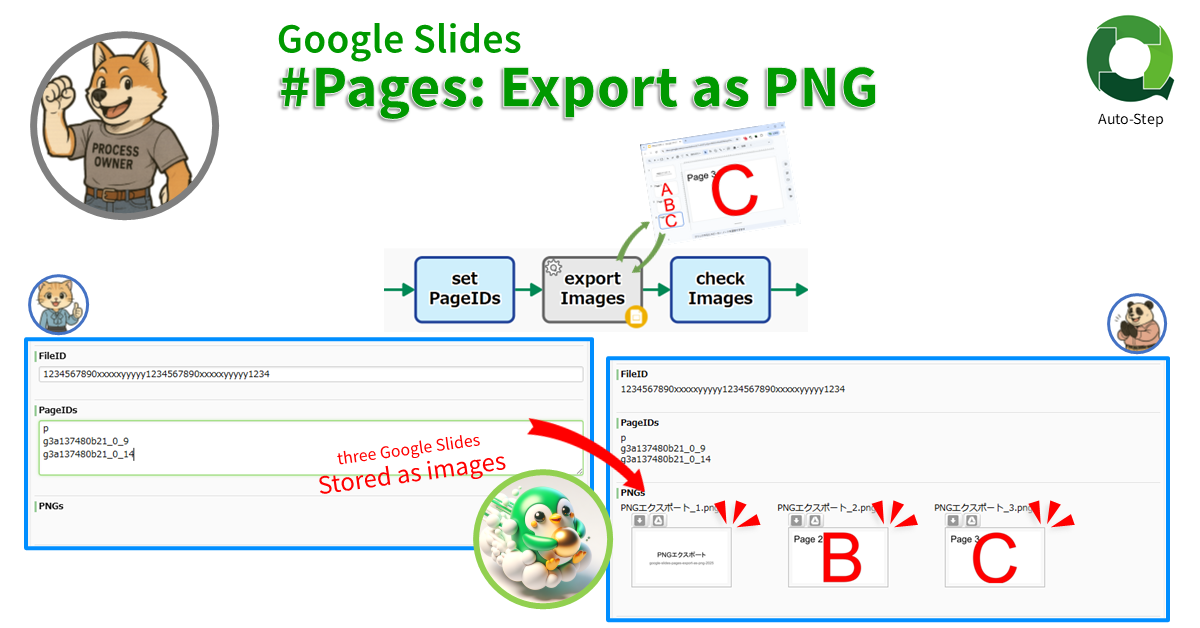
Google Slides #Pages: Export as PNG
Stores one or multiple PNG image files as Workflow data by converting specified slide pages. If not specified, only the last page will be converted into PNG. If “all” is specified, all pages will be converted.…
-
●
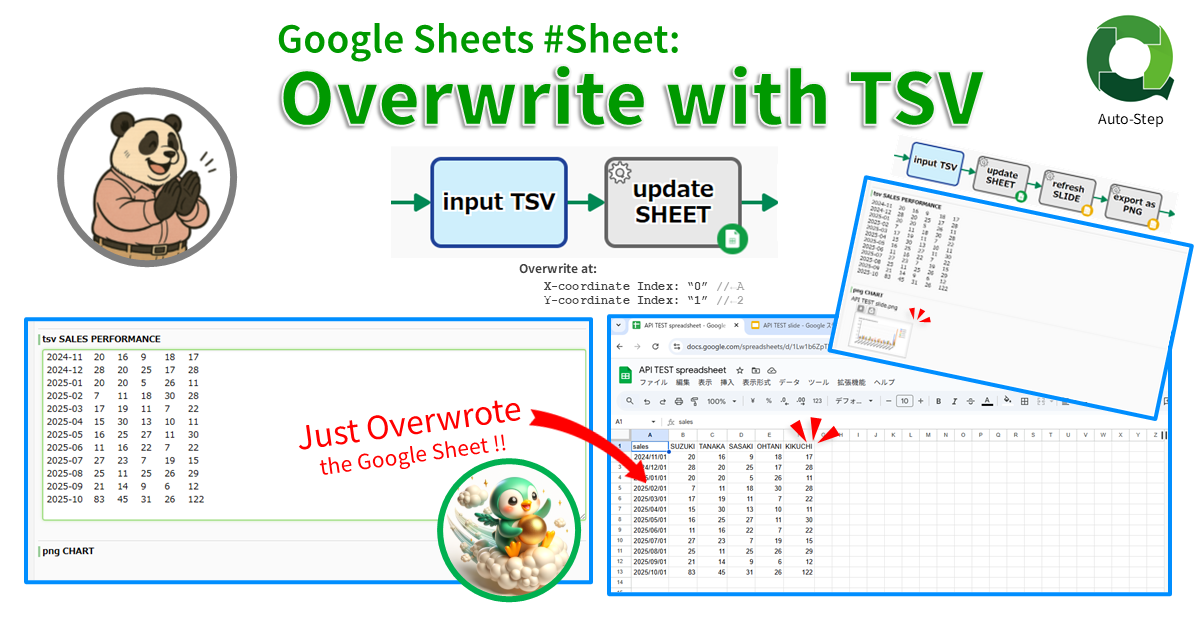
Google Sheets #Sheet: Overwrite with TSV
Pastes TSV data to the specified coordinates in the specified sheet. Only the selected columns can be pasted. Specify the column ID with “d” for datetime data and “n” for numeric data. Example of column specification:…
-
●
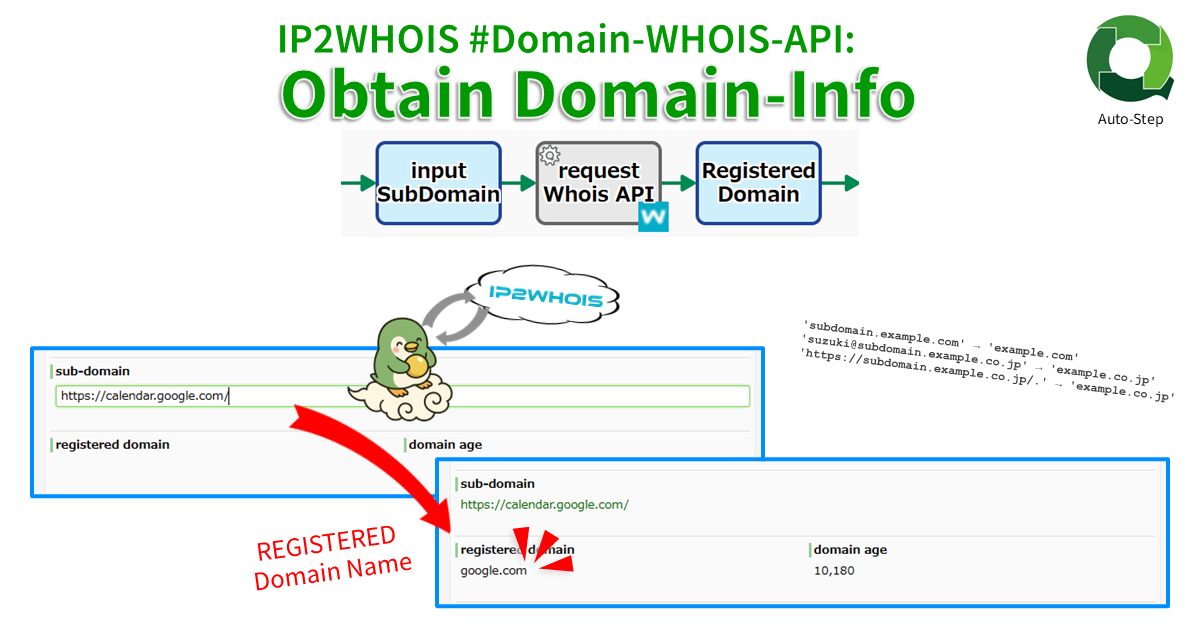
IP2WHOIS #Domain-WHOIS-API: Obtain Domain-Info
Obtains domain information (WHOIS records: “Registered Domain Name” and “Domain Age”) from domain names including subdomains. Returns an error if the domain is not registered. Free API license is limited to a maximum of 500 queries…
-
●

Google Sheets: Find Row Number By Specified Value
Finds the row number that contains a specified value in the target column of a Google Sheet.
-
●
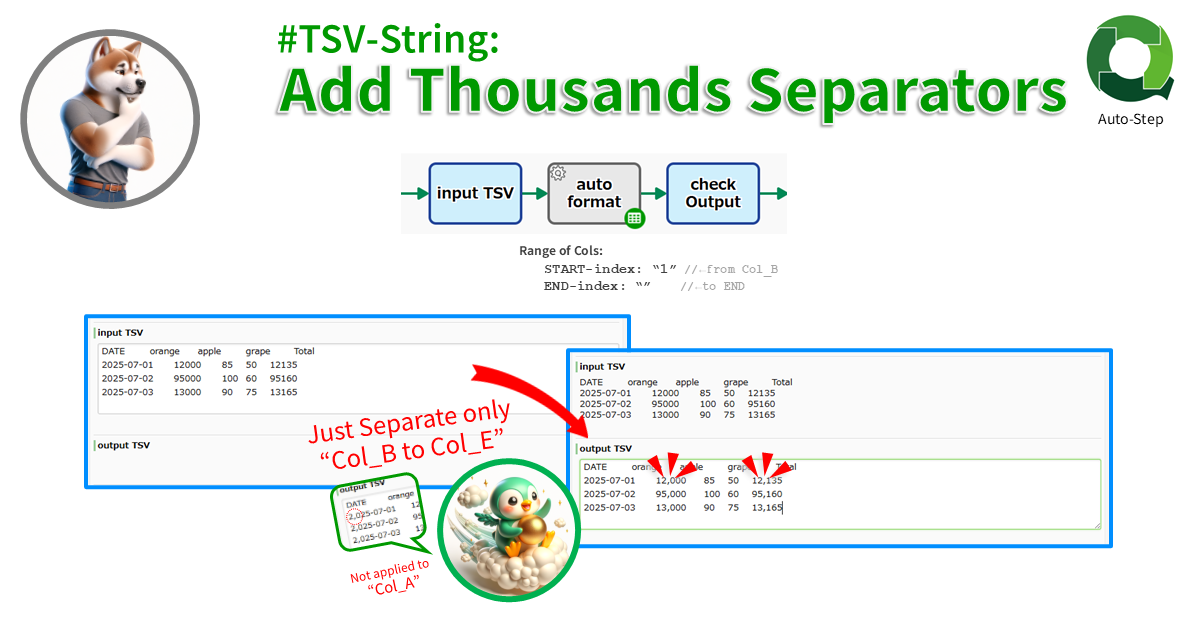
#TSV-String: Add Thousands Separators
Formats the specified range of columns from START index to END index of the TSV (END not included). The index starts from “0”. Negative index counts back from the end. If START is omitted “from the…
-
●
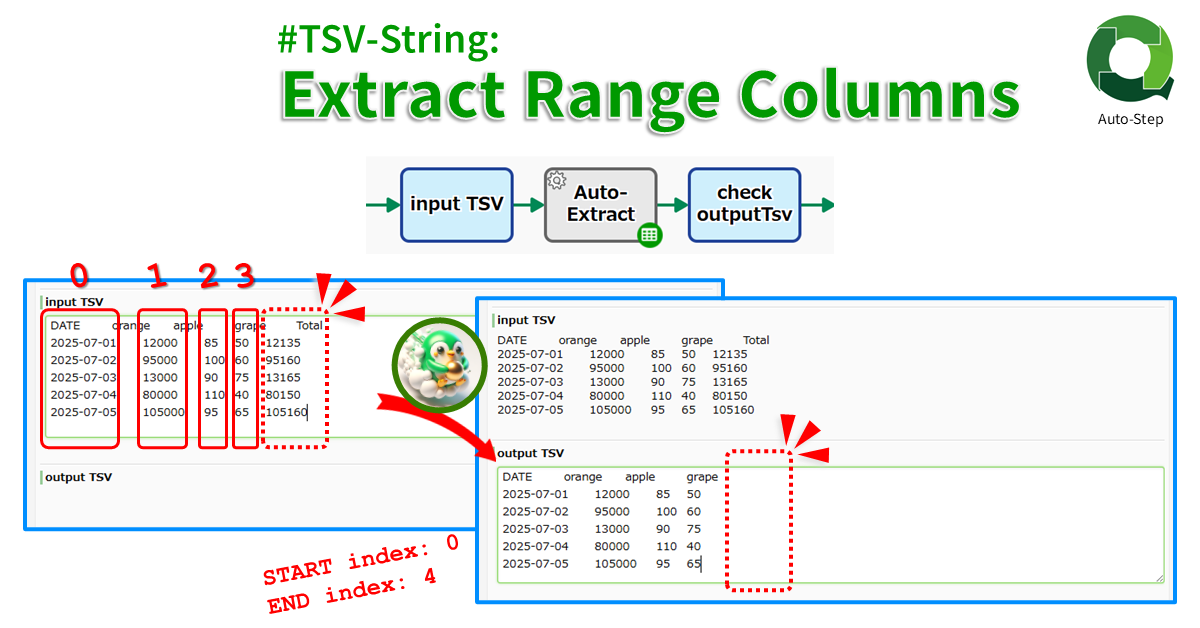
#TSV-String: Extract Range Columns
Extracts the specified range of columns from START index to END index of the TSV (END not included). The index starts from “0”. Negative index counts back from the end. If START is omitted “from the…
-
●
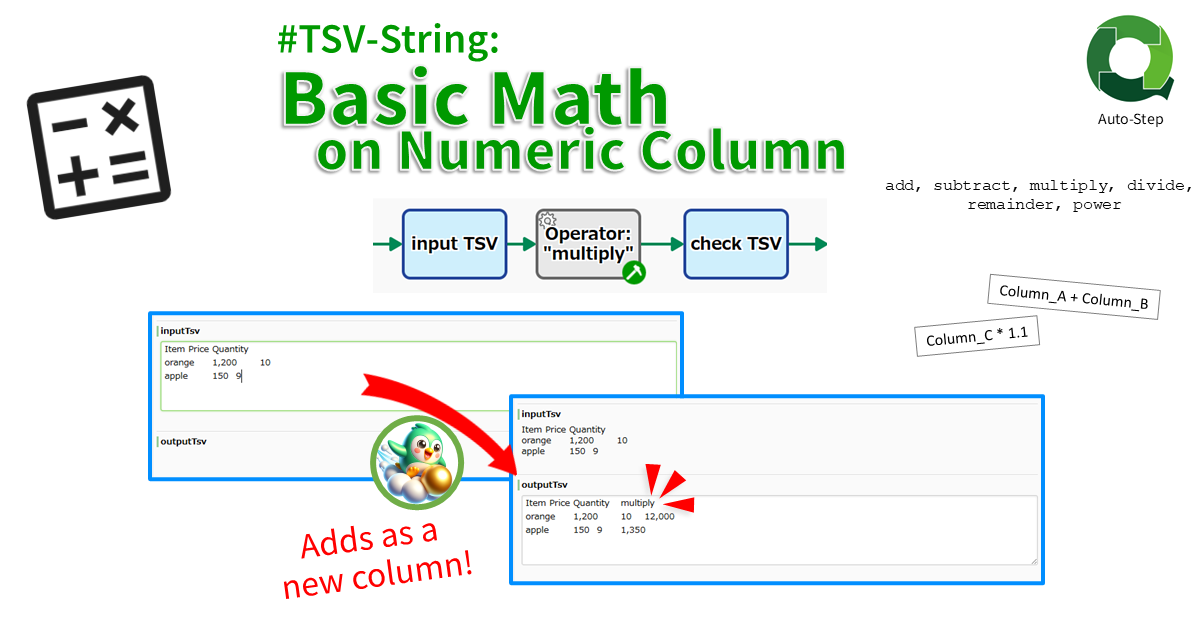
#TSV-String: Basic Math on Numeric Strings
Adds the calc result as a new column. The result of binary calculations such as “adding column A and column B” or “multiplying column C by 1.1” are added to the end of each TSV row.…
-
●

#Files: Filter by FileName
Extract only files to match the conditions from the files stored in FILE type. The conditions can be specified as “equal to”, “contains”, “starts with”, or “ends with”. A case-insensitive can be specified. You can also…
-
●

#String: Extract Subpattern by RegExp
Extracts one string that matches the regular expression and extracts its subpatterns (Capturing groups). If “(\d{4})-(\d{2})-(\d{2})”, the first YYYY-MM-DD that matches perfectly in the text will be extracted. Then the YYYY MM DD are extracted.
-
●
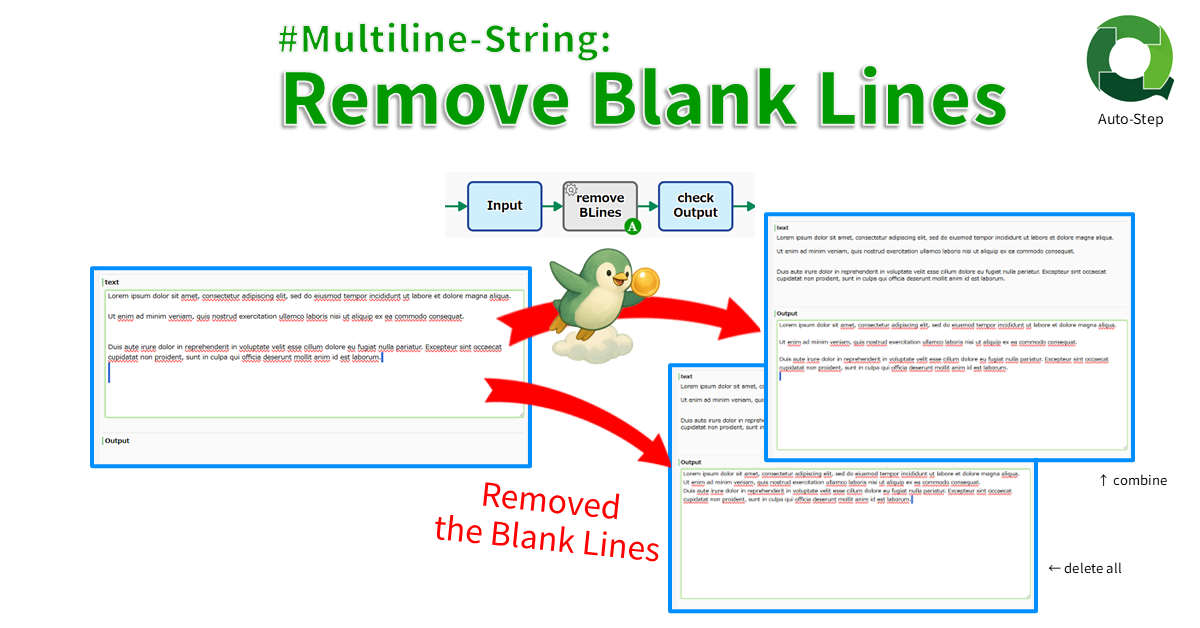
#Multiline-String: Remove Blank Lines
Deletes blank lines. There are two modes: delete all blank lines and combine consecutive blank lines into one line.
-
●

#Collab-Chat: Post
Posts any text to CollabChat in the Questetra Platform by specifying the channel. To post to an organization channel or a process channel, specify the ID (eg. “g12” or “p123”), and to a user-created channel, the…
-
●
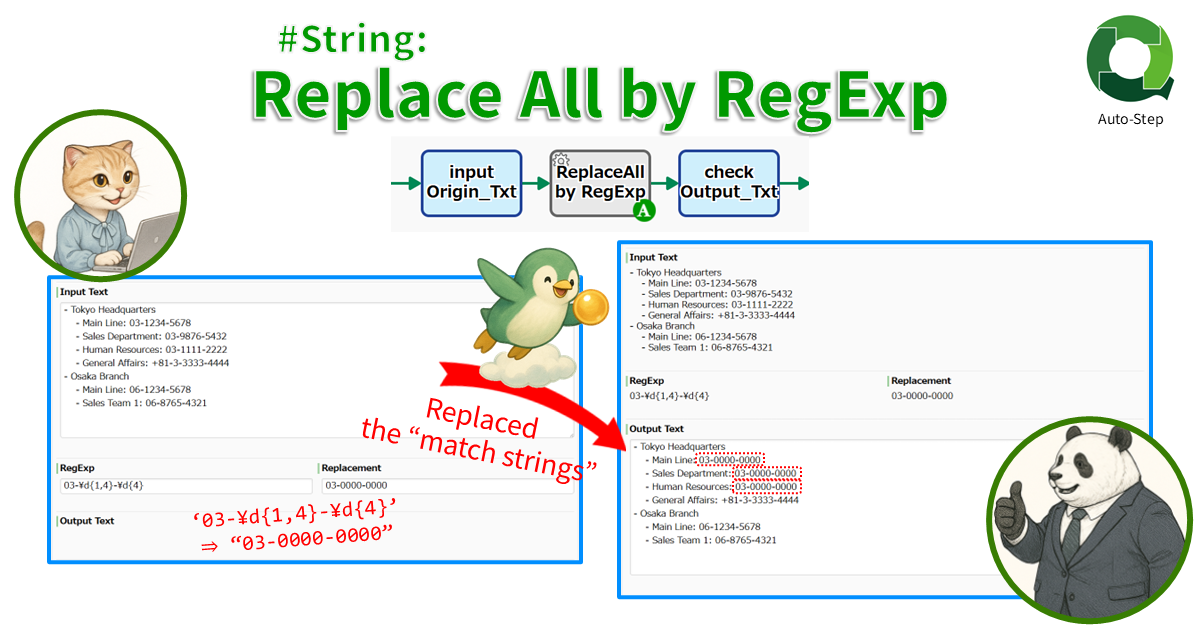
#String: Replace All by RegExp
Replaces all strings that match the regular expression. For example, all Phone Numbers ‘\d{3}-\d{3}-\d{4}’ in a text string can be replaced with “999-999-9999”.
-
●
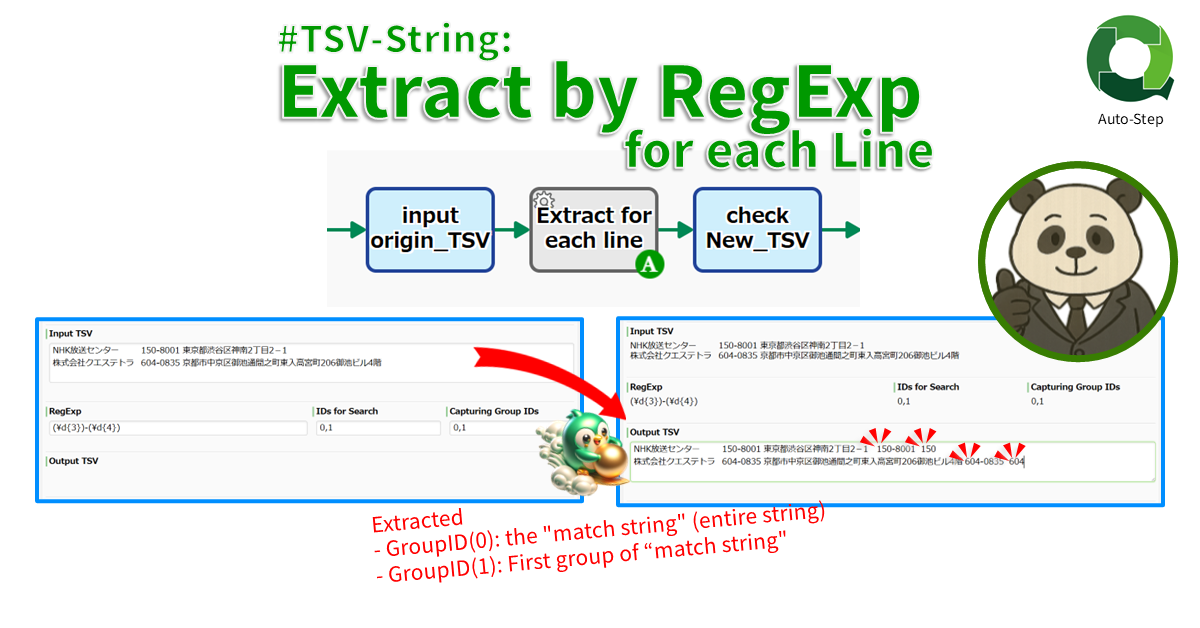
#TSV-String: Extract by RegExp for each Line
Extracts a string that match the RegExp for each line. If set an “Email String”, the email address in the specified cell will be added as a new cell at the end of the line. If…
-
●
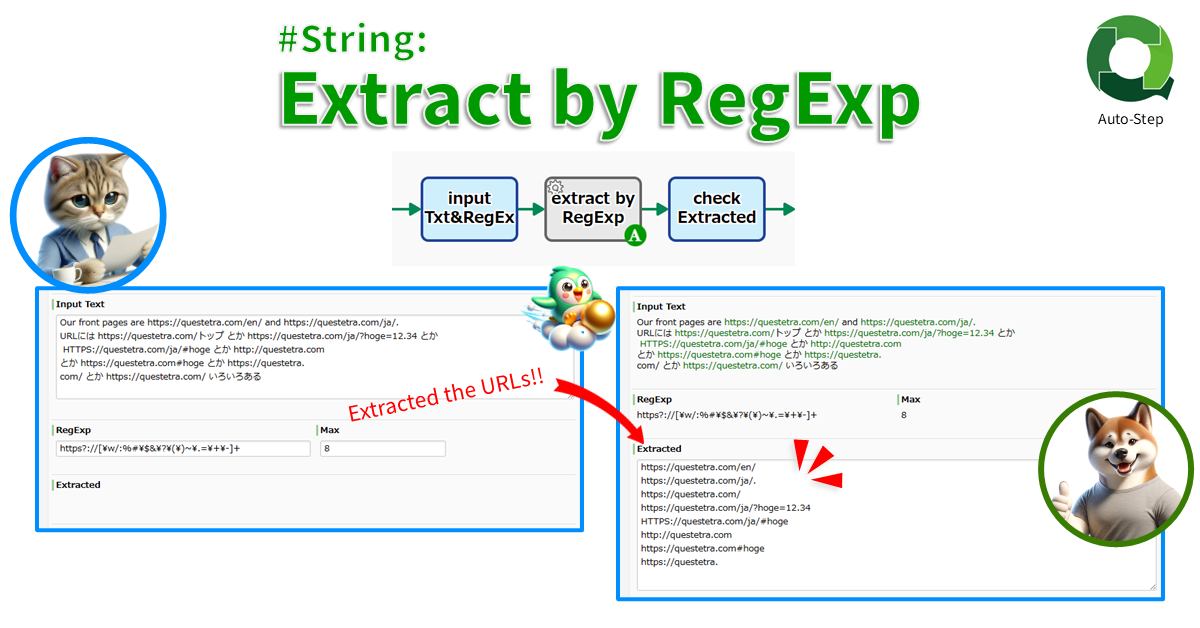
#String: Extract by RegExp
Extracts all strings that match the regular expression. For example, if set “URL regular expression”, all URLs in the text will be extracted.
-
●
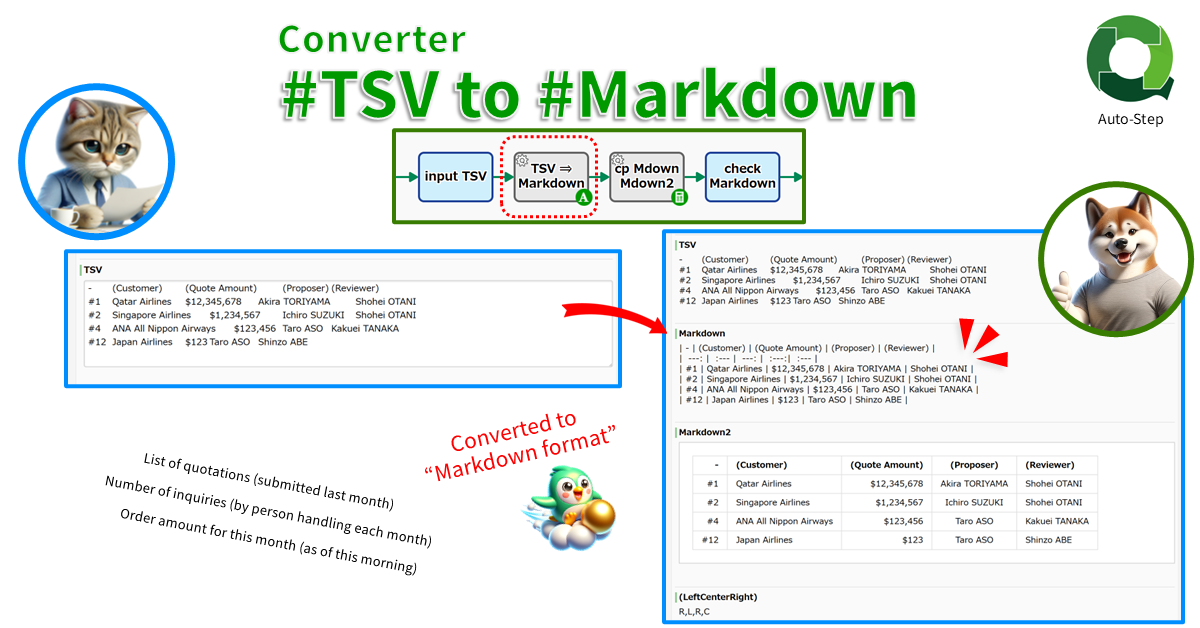
Converter: #TSV String to #Markdown String
Converts a TSV string to a Markdown string. The first line of the TSV is recognized as a header line, and the second and subsequent lines are recognized as data lines. Also supports column settings such…
Add-ons
-
Google Sheets: Find Row Number By Specified Value
Google スプレッドシートの対象列から指定値が入っている行番号を特定します。
-
Google Sheets: Spreadsheets Multiple Cells Value, Update
Overwrites mulitiple cells of a spreadsheet. The value will be parsed as if user typed text into the Google Sheets…
-
Slack: Slack Message JSON Parsing
Extract text from Message JSON data received from Slack. Download the file if there is an attachment. (only one attachment…
-
Google Calendar: Get events list (schedules)
Accessing to Google Calendar and retrieves a list of events (schedules) registered during the specified time period.
-
Questetra BPMS #Process: Batch Extract by Filter as TSV
Extracts process data that match the specified saved filter. Stores the extracted data list as a TSV string. The filter…
-
Microsoft Teams Chat: Message Post (API)
Posts a message to Microsoft Teams Chat using the API (Microsoft Graph REST API).
-
Google Slides #Pages: Export as PNG
Stores one or multiple PNG image files as Workflow data by converting specified slide pages. If not specified, only the…
-
Google Sheets #Sheet: Overwrite with TSV
Pastes TSV data to the specified coordinates in the specified sheet. Only the selected columns can be pasted. Specify the…
-
IP2WHOIS #Domain-WHOIS-API: Obtain Domain-Info
Obtains domain information (WHOIS records: “Registered Domain Name” and “Domain Age”) from domain names including subdomains. Returns an error if…
-
Google Sheets: Find Row Number By Specified Value
Finds the row number that contains a specified value in the target column of a Google Sheet.
-
#TSV-String: Add Thousands Separators
Formats the specified range of columns from START index to END index of the TSV (END not included). The index…
-
#TSV-String: Extract Range Columns
Extracts the specified range of columns from START index to END index of the TSV (END not included). The index…
-
#TSV-String: Basic Math on Numeric Strings
Adds the calc result as a new column. The result of binary calculations such as “adding column A and column…
-
#Files: Filter by FileName
Extract only files to match the conditions from the files stored in FILE type. The conditions can be specified as…
-
#String: Extract Subpattern by RegExp
Extracts one string that matches the regular expression and extracts its subpatterns (Capturing groups). If “(\d{4})-(\d{2})-(\d{2})”, the first YYYY-MM-DD that…
-
#Multiline-String: Remove Blank Lines
Deletes blank lines. There are two modes: delete all blank lines and combine consecutive blank lines into one line.
-
#Collab-Chat: Post
Posts any text to CollabChat in the Questetra Platform by specifying the channel. To post to an organization channel or…
-
#String: Replace All by RegExp
Replaces all strings that match the regular expression. For example, all Phone Numbers ‘\d{3}-\d{3}-\d{4}’ in a text string can be…
-
#TSV-String: Extract by RegExp for each Line
Extracts a string that match the RegExp for each line. If set an “Email String”, the email address in the…
-
#String: Extract by RegExp
Extracts all strings that match the regular expression. For example, if set “URL regular expression”, all URLs in the text…
-
Converter: #TSV String to #Markdown String
Converts a TSV string to a Markdown string. The first line of the TSV is recognized as a header line,…