-
●

TSV String: Extract Cells
Extracts the values of specified cells in A1 notation. The extracted string can be stored not only in the STRING type data but also in the NUMERIC type, DATE type, DATETIME type, SELECT type, USER type, and ORG type data if the…
-
●
Google Sheets: Spreadsheets Multiple Cells Value, Update
Overwrites multiple cells of a spreadsheet. The value will be parsed as if user typed text into the Google Sheets UI. For example, if date formatted, the value “12-24” will be converted to “12/24/2021”. Or, “’12-31” will be updated as the string…
-
●
Microsoft 365 OneDrive for Business: Create PDF
This process converts files on OneDrive to PDF for data item.
-
●

Microsoft 365 Excel: Multiple Cell Values, Bulk Update (Range Specification)
Bulk update cells data at the specified range in a sheet. (Values containing line breaks cannot be specified)
-
●

Microsoft 365 Excel: Multiple Cell Values, Update
Update multiple cells data at the specified position in a sheet.
-
●

Microsoft 365 OneDrive for Business: Create JPG image
warning PAGE UPDATED https://support.questetra.com/en/addons/onedrive-file-download-jpg-2026/ Microsoft 365 OneDrive for Business: Create JPG image Microsoft 365 OneDrive for Business: JPG画像作成 This process converts a file on OneDrive into a JPG image and saves it to a data item. Download warning Freely modifiable JavaScript (ECMAScript)…
-
●
GMO Sign: Retrieve Document File URL
This item retrieve document file URL specified control number from GMO Sign.
-
●
GMO Sign: Retrieve Timestamped File URL
This item retrive timestamp request status and timestamped PDF file URL from GMO Sign.
-
●
-
●
-
●
-
●
GMO Sign: Register Envelope Document
This item registers a file (document) for a sign request to GMO Sign.
-
●
Google Sheets: Two ValueRanges, Xlookup Reference
Converts string B to string C by referring to the two spreadsheet areas. Searches lookup_string in range B, and if there is an exact match it returns the corresponding string in range C. If there is no match an empty string is…
-
●

Microsoft 365 OneDrive for Business: Download File as PDF
This item downloads the specified file in OneDrive as a PDF.
-
●
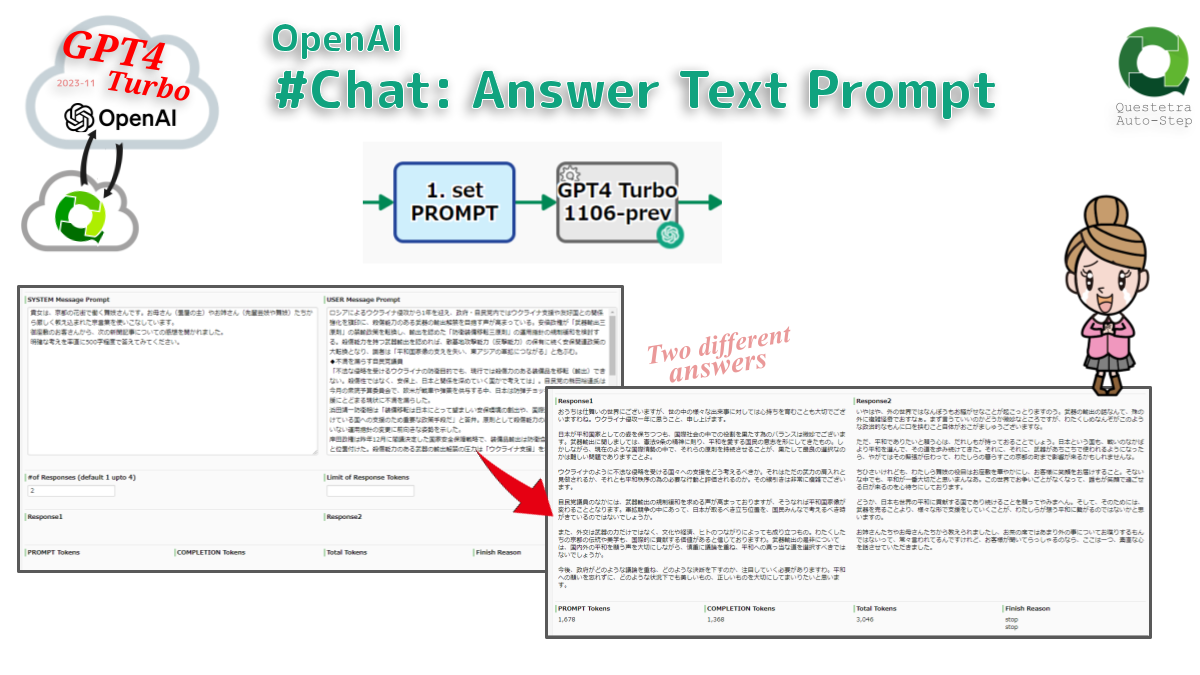
OpenAI #Chat: Answer Text Prompt
Generates a response to the Text Prompt. By default, it is generated by accessing “gpt-4-1106-preview MODEL” (can be changed to any MODEL). Text prompts for starting a conversation are defined separately for system messages and user messages. Generally, the system message contains…
-
●
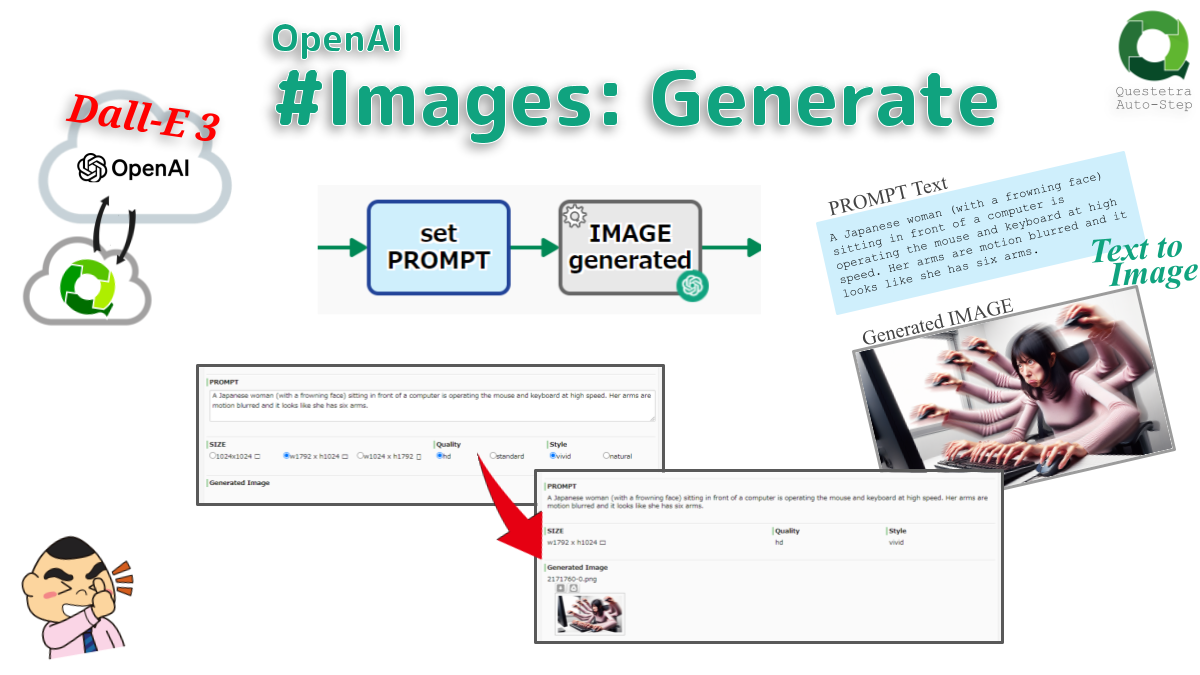
OpenAI #Images: Generate
Creates an image given a PROMPT text by the “DALL-E 3 MODEL” via OpenAI API. By default a 1024×1024 image is generated, but 1024×1792 or 1792×1024 are also available. Note that PROMPT must be defined within 4000 characters.
-
●

OpenAI #Chat: Answer Prompt with Images
Creates a response for a prompt with images. MODEL (GPT-4 with Vision) takes in images and answers questions related to them, such as what the image represents, what is in the image, and more (eg. ideas for dinner based on what is…
-
●
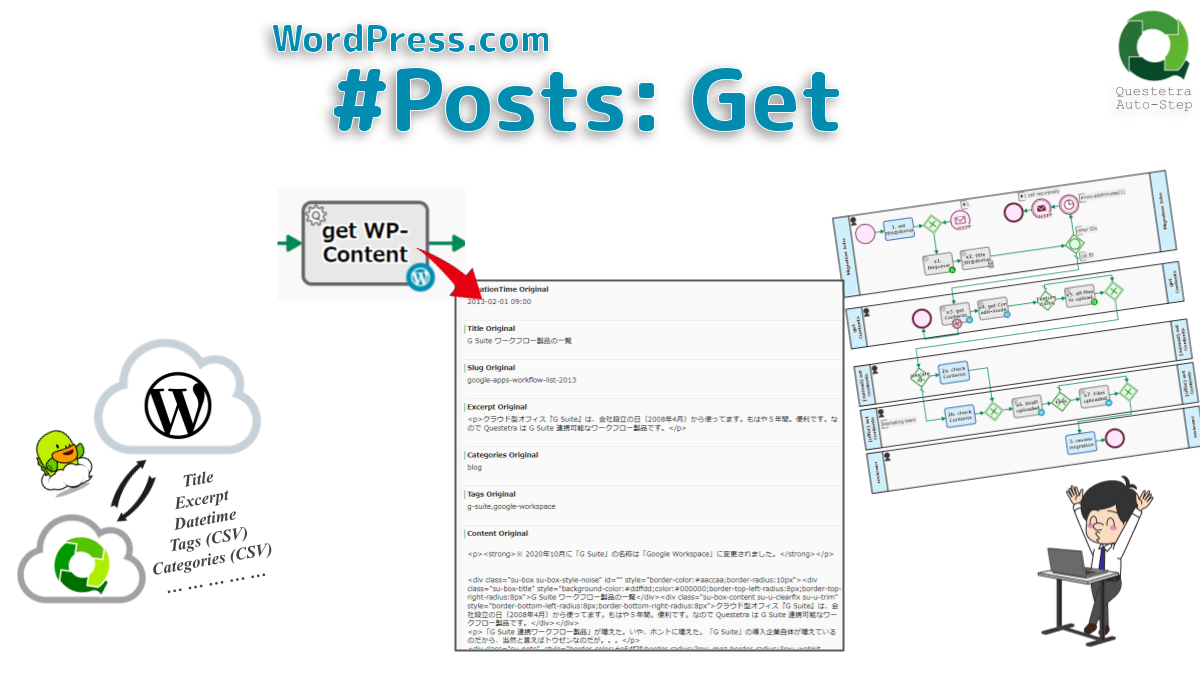
WordPress.com #Posts: Get
Gets an article on WordPress.com service. Specify the article (fixed page/post) by ID or Slug, and store HTML content, excerpt data, etc. You can automate tasks such as backup and transfer operations for website management.
-
●

String, Get Number of Characters
Gets the number of characters in the text. Consecutive blanks (including tabs and double-byte spaces) are counted as one character. The number of characters that do not count linefeed codes and blanks can also be obtained.
-
●

Azure OpenAI Service #Chat: Interact with Parameters
Communicates with Azure OpenAI Service API (ChatGPT running on Microsoft infrastructure). Supports the assignment of advanced parameters. Specifically, sampling temperature, upper % sampling, recurrence prohibition, frequency prohibition and Logit bias can be set.
-
●

Slack: Slack Message JSON Parsing
Extract text from Message JSON data received from Slack. If there are attached files, the files are downloaded. However, only one attachment file is supported.
Add-ons
-
TSV String: Extract Cells
Extracts the values of specified cells in A1 notation. The extracted string can be stored not only in the STRING type data but also in the NUMERIC type,…
-
Google Sheets: Spreadsheets Multiple Cells Value, Update
Overwrites multiple cells of a spreadsheet. The value will be parsed as if user typed text into the Google Sheets UI. For example, if date formatted, the value…
-
Microsoft 365 OneDrive for Business: Create PDF
This process converts files on OneDrive to PDF for data item.
-
Microsoft 365 Excel: Multiple Cell Values, Bulk Update (Range Specification)
Bulk update cells data at the specified range in a sheet. (Values containing line breaks cannot be specified)
-
Microsoft 365 Excel: Multiple Cell Values, Update
Update multiple cells data at the specified position in a sheet.
-
Microsoft 365 OneDrive for Business: Create JPG image
warning PAGE UPDATED https://support.questetra.com/en/addons/onedrive-file-download-jpg-2026/ Microsoft 365 OneDrive for Business: Create JPG image Microsoft 365 OneDrive for Business: JPG画像作成 This process converts a file on OneDrive into a JPG…
-
GMO Sign: Retrieve Document File URL
This item retrieve document file URL specified control number from GMO Sign.
-
GMO Sign: Retrieve Timestamped File URL
This item retrive timestamp request status and timestamped PDF file URL from GMO Sign.
-
GMO Sign: Request for Timestamp
This item send file and request add timestamp to GMO Sign.
-

GMO Sign: Send Sign Request
This item sends an envelope signature request to GMO Sign.
-
GMO Sign: Retrieve Envelope Status
This item retrieves the status of the sign request to GMO Sign.
-
GMO Sign: Register Envelope Document
This item registers a file (document) for a sign request to GMO Sign.
-
Google Sheets: Two ValueRanges, Xlookup Reference
Converts string B to string C by referring to the two spreadsheet areas. Searches lookup_string in range B, and if there is an exact match it returns the…
-
Microsoft 365 OneDrive for Business: Download File as PDF
This item downloads the specified file in OneDrive as a PDF.
-
OpenAI #Chat: Answer Text Prompt
Generates a response to the Text Prompt. By default, it is generated by accessing “gpt-4-1106-preview MODEL” (can be changed to any MODEL). Text prompts for starting a conversation…
-
OpenAI #Images: Generate
Creates an image given a PROMPT text by the “DALL-E 3 MODEL” via OpenAI API. By default a 1024×1024 image is generated, but 1024×1792 or 1792×1024 are also…
-
OpenAI #Chat: Answer Prompt with Images
Creates a response for a prompt with images. MODEL (GPT-4 with Vision) takes in images and answers questions related to them, such as what the image represents, what…
-
WordPress.com #Posts: Get
Gets an article on WordPress.com service. Specify the article (fixed page/post) by ID or Slug, and store HTML content, excerpt data, etc. You can automate tasks such as…
-
String, Get Number of Characters
Gets the number of characters in the text. Consecutive blanks (including tabs and double-byte spaces) are counted as one character. The number of characters that do not count…
-
Azure OpenAI Service #Chat: Interact with Parameters
Communicates with Azure OpenAI Service API (ChatGPT running on Microsoft infrastructure). Supports the assignment of advanced parameters. Specifically, sampling temperature, upper % sampling, recurrence prohibition, frequency prohibition and…
-
Slack: Slack Message JSON Parsing
Extract text from Message JSON data received from Slack. If there are attached files, the files are downloaded. However, only one attachment file is supported.