Converter: ISO-Datetime-String to Workflow Datetime
Converter: ISO-Datetime-String to Workflow Datetime
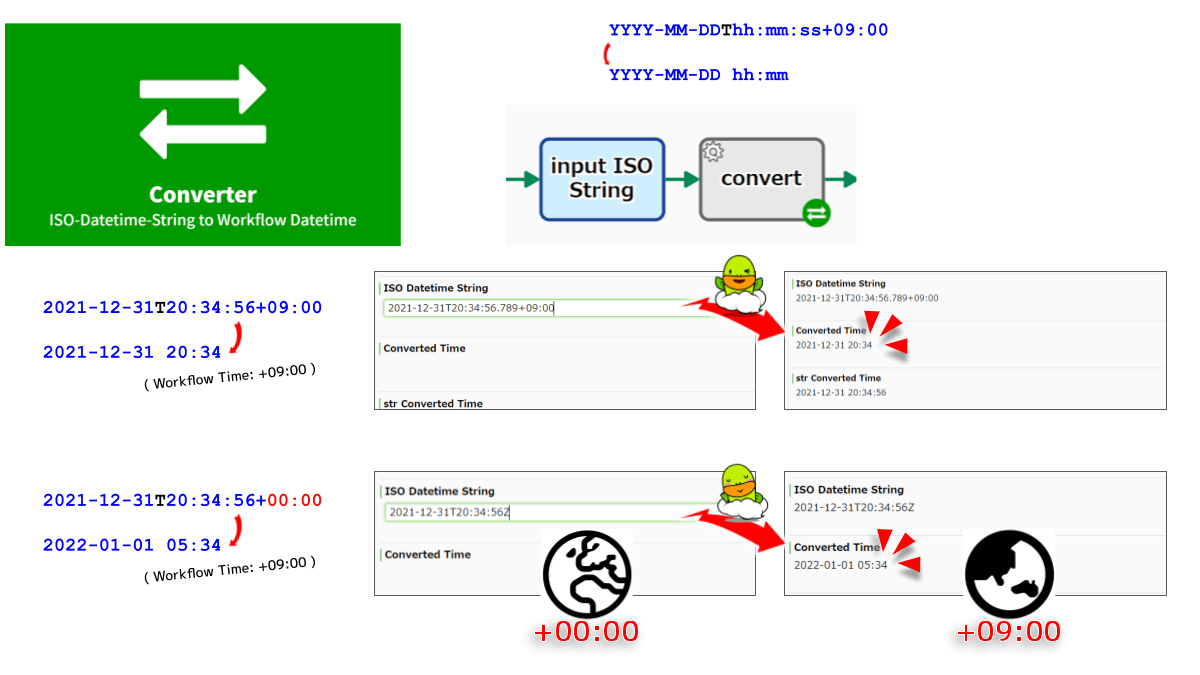
Converts ISO 8601 datetime string data (“2021-12-31T20:34:56+09:00”, “2021-12-31T11:34:56.789Z”, etc.) to Datetime type data (“2021-12-31 20:34”). The Datetime type data is based on the time zone configured for your Workflow Platform.
Configs
A: Set ISO Datetime String *#{EL}
B: Select the DATETIME or STRING type Data that stores Converted Time (update) *
C: Select the NUMERIC type Data that stores Timestamp (in seconds) (update)
Script (click to open)
// GraalJS Script (engine type: 2)

//////// START "main()" /////////////////////////////////////////////////////////////////
main();
function main(){

//// == Config Retrieving / 工程コンフィグの参照 ==
const strIsoDatetime      = configs.get( "StrConfA" ); // required
  if( strIsoDatetime    === "" ){
    throw new Error( "\n AutomatedTask ConfigError:" +
                     " Config {A: ISO Datetime String} is empty \n" );
  }
const timePocketConverted = configs.getObject( "SelectConfB" ); // required
const numPocketTimestamp  = configs.getObject( "SelectConfC" );


//// == Data Retrieving / ワークフローデータの参照 ==
// (Nothing. Retrieved via Expression Language in Config Retrieving)


//// == Calculating / 演算 ==
// Parsing of date strings with the Date constructor
let dateUniversal    = new Date( strIsoDatetime );
let numMsecUniversal = dateUniversal.getTime();
engine.log( " AutomatedTask: Timestamp: " + numMsecUniversal );

// The getDate() etc returns number according to local time.
let strConverted   = dateUniversal.getFullYear() + "-";
if( dateUniversal.getMonth() + 1 < 10 ){
  strConverted    += "0" + (dateUniversal.getMonth() + 1) + "-";
}else{
  strConverted    +=       (dateUniversal.getMonth() + 1) + "-";
}
if( dateUniversal.getDate() < 10 ){
  strConverted    += "0" + dateUniversal.getDate() + " ";
}else{
  strConverted    +=       dateUniversal.getDate() + " ";
}
if( dateUniversal.getHours() < 10 ){
  strConverted    += "0" + dateUniversal.getHours() + ":";
}else{
  strConverted    +=       dateUniversal.getHours() + ":";
}
if( dateUniversal.getMinutes() < 10 ){
  strConverted    += "0" + dateUniversal.getMinutes() + ":";
}else{
  strConverted    +=       dateUniversal.getMinutes() + ":";
}
if( dateUniversal.getSeconds() < 10 ){
  strConverted    += "0" + dateUniversal.getSeconds() + "";
}else{
  strConverted    +=       dateUniversal.getSeconds() + "";
}
engine.log( " AutomatedTask: Workflow Platform offset: " +
            (engine.getTimeZoneOffsetInMinutes() /60) );


//// == Data Updating / ワークフローデータへの代入 ==
if( timePocketConverted.matchDataType( "STRING" ) ){
  engine.log( " AutomatedTask: Pocket for Converted is STRING type" );
  engine.setData( timePocketConverted, strConverted );
}else{
  engine.log( " AutomatedTask: Pocket for Converted is DATETIME type" );
  engine.setData( timePocketConverted, new java.sql.Timestamp( numMsecUniversal ) );
}
if( numPocketTimestamp !== null ){
  engine.setData( numPocketTimestamp,  new java.math.BigDecimal( numMsecUniversal /1000 ) );
} // Millisec will exceed the numerical limit of workflow platform

} //////// END "main()" /////////////////////////////////////////////////////////////////


/*
Notes:
- Converts datetime string to datetime data in Workflow Platform.
    - YYYY-MM-DDThh:mm:ss±hh:mm
    - YYYY-MM-DD hh:mm
- Returns time with considering timezone of Workflow Platform.
- Strings other than the ISO 8601 format may also be parsed.
- Timezone of Workflow Platform: "+09:00(JST)"
    - ISO String: "2021-12-31T20:34:56Z"
        - return: "2022-01-01 05:34"
    - ISO String: "2021-12-31T20:34:56.789+09:00"
        - return: "2021-12-31 20:34"
    - ISO String: "February 1, 2021 3:27:00 PM PST"
        - return: "2021-02-02 08:27"
- Timezone of Workflow Platform: "-08:00(PST)"
    - ISO String: "2021-12-31T20:34:56Z"
        - return: "2021-12-31 12:34"
    - ISO String: "2021-12-31T20:34:56.789+09:00"
        - return: "2021-12-31 03:34"

Notes-ja:
- 時刻を表す文字列を、ワークフロー基盤の時刻データに変換します。
    - YYYY-MM-DDThh:mm:ss±hh:mm
    - YYYY-MM-DD hh:mm
- ISO 8601 フォーマット以外の文字列も解析可能な場合があります。
- 格納される時刻は、ワークフロー基盤のタイムゾーンに従います。
- ワークフロー基盤が「+09:00(JST)」で運用されている場合
    - ISO String: 2021-12-31T20:34:56Z
        - return: 2022-01-01 05:34
    - ISO String: 2021-12-31T20:34:56.789+09:00
        - return: 2021-12-31 20:34
    - ISO String: "February 1, 2021 3:27:00 PM PST"
        - return: "2021-02-02 08:27"
- ワークフロー基盤が「-08:00(PST)」で運用されている場合
    - ISO String: "2021-12-31T20:34:56Z"
        - return: "2021-12-31 12:34"
    - ISO String: "2021-12-31T20:34:56.789+09:00"
        - return: "2021-12-31 03:34"
*/


/*
APPENDIX
- Wikipedia "ISO 8601"
    - https://en.wikipedia.org/wiki/ISO_8601
- Parsing depends on Javascript Date() constructor (Date.parse, they are equivalent)
- The timestamp obtained by this Addon is Unix epoch.
    - Seconds since 1 January 1970 UTC
    - Not the same as the ECMAScript epoch (elapsed Milliseconds), value of 1/1000

APPENDIX-ja
- ウィキペディア "ISO 8601"
    - https://ja.wikipedia.org/wiki/ISO_8601
- 文字列解析は、Javascript Date() コンストラクタ(Date.parse と等価)に依存します。
- このAddonによって取得されるタイムスタンプは Unix epoch ("経過秒数")です。
    - 協定世界時 (UTC) の1970年1月1日からの経過秒数
    - ECMAScript epoch("経過ミリ秒数")の1000分の1となります
*/