
Converter: Date-or-Datetime-String to Workflow Datetime
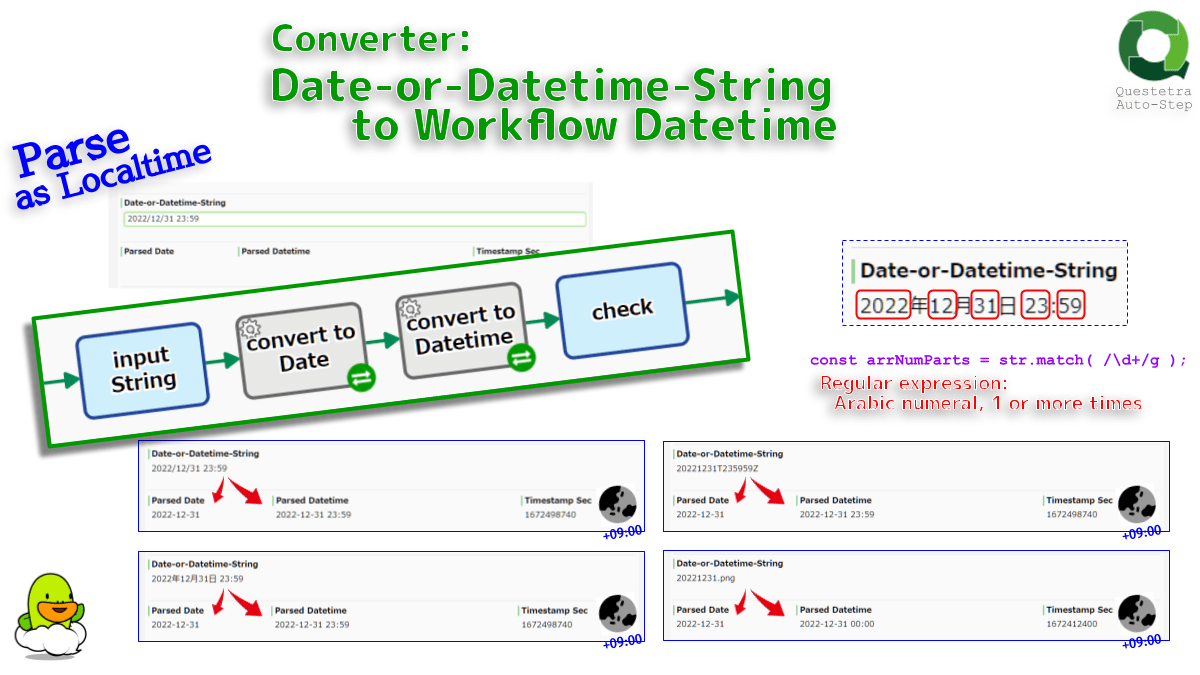
Converts strings such as “2022-12-31” or “2022-12-31 00:00” to Datetime (or Date) data. Also supports strings like “2022/12/31” and “19700101”. Any string is evaluated as local time. The timestamp value (seconds since 1 Jan 1970) is also gettable.
Configs for this Auto Step
- StrConfA
- A: Set Datetime String (like “2022-12-31 00:00”) *#{EL}
- SelectConfB1
- B1: Select DATETIME/DATE DATA (update) *
- SelectConfB2
- B2: Select NUMERIC DATA for Timestamp Sec (update)
Script (click to open)
// GraalJS Script (engine type: 2)

//////// START "main()" /////////////////////////////////////////////////////////////////

main();
function main(){

//// == Config Retrieving / 工程コンフィグの参照 ==
const strInput          = configs.get      ( "StrConfA" );     /// REQUIRED
  if( strInput        === "" ){
    throw new Error( "\n AutomatedTask ConfigError:" +
                     " Config {A: String} is empty \n" );
  }
const dtPocketOutput    = configs.getObject( "SelectConfB1" ); /// REQUIRED
const numPocketUnixtime = configs.getObject( "SelectConfB2" ); // NotRequired


////// == Data Retrieving / ワークフローデータの参照 ==
// (Nothing. Retrieved via Expression Language in Config Retrieving)


//// == Calculating / 演算 ==
const dateInput     = parseAsLocalDate ( strInput ); // strDateOrDatetime
const numMsecInput  = dateInput.getTime();


//// == Data Updating / ワークフローデータへの代入 ==
if( dtPocketOutput.matchDataType( "DATETIME" ) ){
  engine.setData( dtPocketOutput, new java.sql.Timestamp( numMsecInput ) );
    // setData() -- R2301: Script Data Retrieving / Updating
    // https://questetra.zendesk.com/hc/en-us/articles/360024574771-R2301
    // https://questetra.zendesk.com/hc/en-us/articles/360024574771-R2301
    //  `java.sql.Timestamp (msec)` to `com.questetra.bpms.util.AddableTimestamp`
}else{
  engine.setData( dtPocketOutput, new java.sql.Date( numMsecInput ) );
    //  `java.sql.Date (msec)`      to `com.questetra.bpms.util.AddableDate`
}

if( numPocketUnixtime !== null ){
  engine.setData( numPocketUnixtime, new java.math.BigDecimal( numMsecInput /1000 ) );
}

} //////// END "main()" /////////////////////////////////////////////////////////////////


function parseAsLocalDate ( str ){ // strDateOrDatetime
  //
  // Searches a Date-or-Datetime String for YYYY, MM, DD, hh:mm in that order and
  //  returns JavaScript `Date` object.
  // Any format is forcibly recognized as LOCAL DATETIME. -- UNIQUE --
  // Supports "ISO 8601 format", "BPMS date format", "BPMS datetime format", etc,,,
  //
  // String "2022-12-31 23:59"          (Questetra BPMS datetime format)
  // ⇒ Date 2022-12-31T23:59:00+XX:00
  // String "2022-12-31 23:59:59"       (SQL Time format)
  // ⇒ Date 2022-12-31T23:59:00+XX:00
  // String "2022-12-31T23:59:59.999Z"  (ISO 8601 format)
  // ⇒ Date 2022-12-31T23:59:00+XX:00   // UNIQUE: Timezone not evaluated
  // String "2022-12-31"                (Questetra BPMS date format)
  // ⇒ Date 2022-12-31T00:00:00+XX:00   // UNIQUE: not UTC
  // String "2022/12/31"                (Windows date-ja format)
  // ⇒ Date 2022-12-31T00:00:00+XX:00   // UNIQUE: not UTC
  // String "2022年12月31日"            (日本語/Japanese)
  // ⇒ Date 2022-12-31T00:00:00+XX:00
  //
  // String "20221231"
  // ⇒ Date 2022-12-31T00:00:00+XX:00   // UNIQUE: not UTC
  // String "20221231T235959Z"          (ISO 8601 format)
  // ⇒ Date 2022-12-31T23:59:00+XX:00   // UNIQUE: Timezone not evaluated
  // String "20221231T2359"
  // ⇒ Date 2022-12-31T23:59:00+XX:00

  if( str === "" ){
    throw new Error( "\n AutomatedTask ParseDateError:" +
                     " String is empty \n" );
  }
  const arrNumParts = str.match( /\d+/g );
  if( arrNumParts === null ){
    throw new Error( "\n AutomatedTask ParseDateError:" +
                     " No numeric characters in: " + str + "\n" );
  }

  /// function default
  let numYear    = 0; // limit in QBPMS: 1900 to 2100 (asof 2022-12)
  let indexMonth = 0;
  let numDay     = 0;
  let numHours   = 0;
  let numMinutes = 0;

  /// case: startsWith YYYYMMDD
  if( arrNumParts[0].length === 8 ){
    numYear      = parseInt( arrNumParts[0].slice( 0, 4 ), 10 );
    indexMonth   = parseInt( arrNumParts[0].slice( 4, 6 ), 10 ) - 1;
    numDay       = parseInt( arrNumParts[0].slice( 6, 8 ), 10 );
    if( arrNumParts.length > 1 ){ // "20221231T2359"
      numHours   = parseInt( arrNumParts[1].slice( 0, 2 ), 10 );
      numMinutes = parseInt( arrNumParts[1].slice( 2, 4 ), 10 );
    }

  /// case: not startsWith YYYYMMDD, like "2022-12-31 23:59"
  }else{
    if( arrNumParts.length < 3){
      throw new Error( "\n AutomatedTask ParseDateError:" +
                       " 3 Parts of numeric characters are needed in: " + str + "\n" );
    }
    numYear      = parseInt( arrNumParts[0], 10 );
    indexMonth   = parseInt( arrNumParts[1], 10 ) - 1;
    numDay       = parseInt( arrNumParts[2], 10 );
    if( arrNumParts.length > 4){
      numHours   = parseInt( arrNumParts[3], 10 );
      numMinutes = parseInt( arrNumParts[4], 10 );
    }
  }

  /// return JavaScript `Date` object
  return new Date( numYear, indexMonth, numDay, numHours, numMinutes );
}


/*
Notes:
- This function evaluates both "2022-12-31" and "2022-12-31 00:00" as local time. UNIQUE
    - In JST platform, both are interpreted as "2022-12-30T15:00:00Z" (2022-12-31T00:00:00+09:00).
    - BTW, many systems consider "2022-12-31" as UTC time. (ES5, ECMAScript 2015, etc.)
- The 1st numeric part is assumed to be the "year". The 2nd "month" and the 3rd "day". (separator independent)
    - The 4th numeric part is considered "hour", the 5th "minute". (separator independent)
    - "2022-12-31 23:59" ⇒ `2022-12-31T23:59:00+XX:00`
- However, it will be regarded as "YYYYMMDD" only if the 1st is an 8-digit. (assuming the 2nd is "hhmm...")
    - "19700101" ⇒ `1970-01-01T00:00:00+09:00`
    - "19700101T012345" ⇒ `1970-01-01T01:23:00+09:00`
- BTW, "Date.parse()" is danger (strongly discouraged). Not used in this function.
    - new Date( "2022-12-31") // 2022-12-31T00:09:00+09:00 // Basically as UTC.
    - new Date( 2022, 11, 31) // 2022-12-31T00:00:00+09:00 // Parameter values as Localtime
    - If you want "Date.parse(str)" to interpret the timezone,
        - "Converter: ISO-Datetime-String to Workflow Datetime"
        - https://support.questetra.com/addons/converter-iso-datetime-string-to-workflow-datetime/
APPENDIX:
- Unix time is the number of seconds that have elapsed since the Unix epoch, minus leap seconds.
    - The Unix epoch is 00:00:00 UTC on 1 January 1970 (an arbitrary date).
    - Unix time is also known as Epoch time, POSIX time, seconds since the Epoch, or UNIX Epoch time.
    - ECMAScript epoch time ("milliseconds") is 1000 times the value of Unix time ("seconds").
- Wikipedia: Unix Time, UTC
    - https://en.wikipedia.org/wiki/Unix_time
    - https://en.wikipedia.org/wiki/Coordinated_Universal_Time
- Note, the "Serial Number" in Spreadsheet or Excel is the number of days since 1899-12-30 00:00.
    - https://developers.google.com/sheets/api/reference/rest/v4/DateTimeRenderOption

Notes-ja:
- この関数(自動工程)では "2022-12-31" も "2022-12-31 00:00" もローカルタイムとして評価します。UNIQUE
    - つまりJST基盤では、どちらも "2022-12-30T15:00:00Z" (2022-12-31T00:00:00+09:00) と解釈されます。
    - なお多くの処理系は "2022-12-31" を UTC 時刻と見なします。(ES5、ECMAScript 2015 等)
- 第1番目の数字部は「年」とみなされます。第2番目は「月」、第3番目は「日」とみなされます。(セパレータ非依存)
    - 第4番目の数字部は「時」、第5番目は「分」とみなされます。(セパレータ非依存)
    - "2022-12-31 23:59" ⇒ `2022-12-31T23:59:00+XX:00`
- ただし第1番目の数字部が8桁数字の場合に限り「YYYYMMDD」とみなし、第2番目を「hhmm…」とみなします。
    - "19700101" ⇒ `1970-01-01T00:00:00+09:00`
    - "19700101T012345" ⇒ `1970-01-01T01:23:00+09:00`
- なお、曖昧仕様の "Date.parse(str)" は、この関数では利用されていません。
    - new Date( "2022-12-31") // 2022-12-31T00:09:00+09:00 // DANGER: Basically as UTC.
    - new Date( 2022, 11, 31) // 2022-12-31T00:00:00+09:00 // Parameter values as Localtime
    - "Date.parse(str)" にタイムゾーンを解釈させたい場合は
        - 自動工程 "コンバータ: ISO日時文字列 to ワークフロー日時"
        - https://support.questetra.com/ja/addons/converter-iso-datetime-string-to-workflow-datetime/
APPENDIX-ja:
- Unix時間は「Unixエポック」からの経過秒数です。(うるう秒の存在は排除されます)
    - Unixエポックは、協定世界時(UTC)の1970年1月1日00:00:00を指します。(意味のある日ではない)
    - Unix時間は、Unixタイム、エポックタイム、POSIXタイム、Unixエポックタイムなどとも呼ばれます。
    - ECMAScript epoch time("経過ミリ秒数")は、Unix time("経過秒数")の1000倍の値になります。
- Wikipedia: Unix Time, UTC
    - https://ja.wikipedia.org/wiki/UNIX%E6%99%82%E9%96%93
    - https://ja.wikipedia.org/wiki/%E5%8D%94%E5%AE%9A%E4%B8%96%E7%95%8C%E6%99%82
- なお、Spreadsheet や Excel における "Serial Number" は、1899-12-30 00:00 からの経過日数です。
    - https://developers.google.com/sheets/api/reference/rest/v4/DateTimeRenderOption
*/
Download
- converter-date-or-datetime-string-to-workflow-datetime-2022.xml
- 2022-12-25 (C) Questetra, Inc. (MIT License)
Freely modifiable JavaScript (ECMAScript) code. No warranty of any kind.
(Installing Addon Auto-Steps are available only on the Professional edition.)
(Installing Addon Auto-Steps are available only on the Professional edition.)
Notes
- This function evaluates both “2022-12-31” and “2022-12-31 00:00” as local time. UNIQUE
- In JST platform, both are interpreted as “2022-12-30T15:00:00Z” (2022-12-31T00:00:00+09:00).
- BTW, many systems consider “2022-12-31” as UTC time. (ES5, ECMAScript 2015, etc.)
- The 1st numeric part is assumed to be the “year”. The 2nd “month” and the 3rd “day”. (separator independent)
- The 4th numeric part is considered “hour”, the 5th “minute”. (separator independent)
- “2022-12-31 23:59” ⇒
2022-12-31T23:59:00+XX:00
- However, it will be regarded as “YYYYMMDD” only if the 1st is an 8-digit. (assuming the 2nd is “hhmm…”)
- “19700101” ⇒
1970-01-01T00:00:00+09:00 - “19700101T012345” ⇒
1970-01-01T01:23:00+09:00
- “19700101” ⇒
- BTW, “Date.parse()” is danger (strongly discouraged). Not used in this function.
- new Date( “2022-12-31”) // 2022-12-31T00:09:00+09:00 // Basically as UTC.
- new Date( 2022, 11, 31) // 2022-12-31T00:00:00+09:00 // Parameter values as Localtime
- If you want “Date.parse(str)” to interpret the timezone,
- “Converter: ISO-Datetime-String to Workflow Datetime”
- https://support.questetra.com/addons/converter-iso-datetime-string-to-workflow-datetime/
Capture

Appendix
- Unix time is the number of seconds that have elapsed since the Unix epoch, minus leap seconds.
- The Unix epoch is 00:00:00 UTC on 1 January 1970 (an arbitrary date).
- Unix time is also known as Epoch time, POSIX time, seconds since the Epoch, or UNIX Epoch time.
- ECMAScript epoch time (“milliseconds”) is 1000 times the value of Unix time (“seconds”).
- Wikipedia: Unix Time, UTC
- Note, the “Serial Number” in Spreadsheet or Excel is the number of days since 1899-12-30 00:00.


