Workflow Apps
-
■
Product Shipping App
This app directs the shipping of orders. Shipping tasks are automatically assigned to a team member in a sequential order. If the work is not completed within 2 hours, it is automatically assigned to another team…
-
■

Product Demo Application Reception
This workflow accepts product demo applications via web form. Application responders are randomly selected based on the remainder of the current time (milliseconds) divided by the number of candidates.
-
■
Order Delivery App, can be triggered by other apps
This app manages the setup work up to delivery after receiving an order for Web services. Work is assigned to the necessary personnel according to the options selected. Alert notifications prior to work deadlines prevent work…
-
■
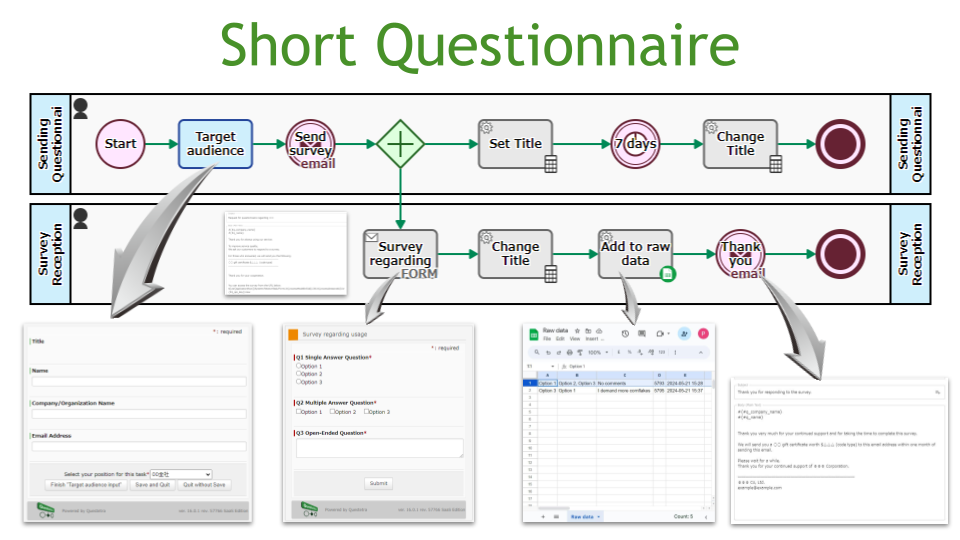
Short Questionnaire
Conduct simple surveys. By simply creating a survey and entering the mailing address, you can automate the process of requesting and collecting survey responses, creating raw data, and sending out thank you emails.
-
■
Web Page Effectiveness Measurement App
Web page creators register the date of publication and PagePath. One month after the publication date, the results (PV/session count/overall evaluation) are automatically obtained via Google Analytics API and automatically evaluated on a 5-point scale. The…
-
■

Post with Slack Mention, Triggered by Open Chat Post
This is an app that automatically posts content posted in open chat to Slack. Open chat posting notification emails are automatically received and analyzed, and forwarded to Slack with a mention.
-
■
Weekly Reporting App, Mandatory Submission
Every Monday at 7am, the task “Write Report” will be added to all employees’ My Tasks list. Employees fill out weekly reports by 5pm on Fridays. If it remains in My Tasks as of 5pm on…
-
■
Generic Work Request App, Guest Initiation Permitted
This is a general-purpose request flow that can be applied for even by guests (temporary or part-time employees who do not have a login account). Requests are accepted via an open web form. In case the…
-
■
Survey Request Response App
This app allows us to clearly identify an individual who is responsible for the customer’s survey request and proceed to respond to the request. A reminder email is sent based on the desired delivery date. In…
-
■
Attendance and Daily Report Application App
This app simultaneously processes an employee’s attendance and daily report application. On workdays the attendance and daily report application flow is launched. The application and report can also be submitted for vacation and sick leave. Simultaneous…
-
■
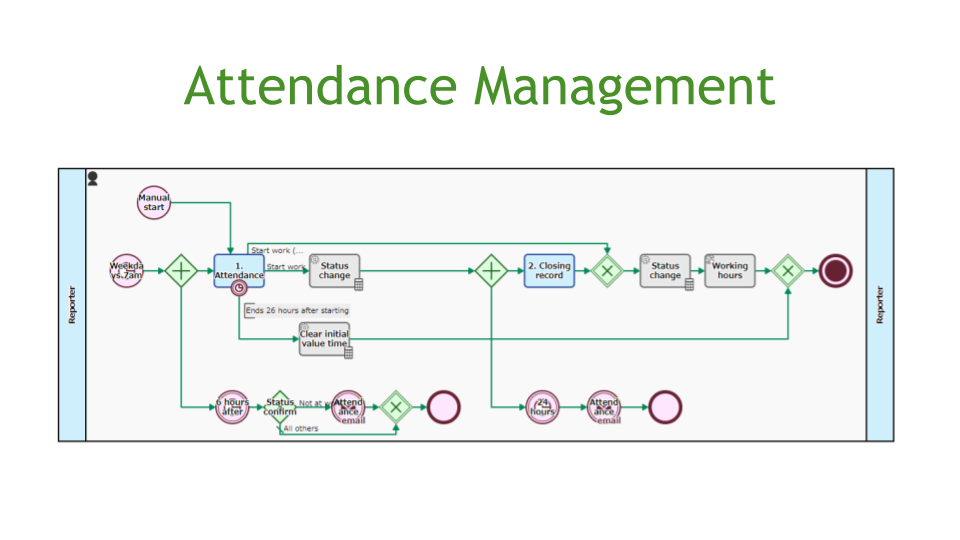
Attendance Management
The system automatically starts at 7:00 a.m. on weekdays and sends a reminder email if the arrival/leaving time has not been entered. The system also automatically calculates work hours based on arrival/leaving/rest times. Default value settings…
-
■
Attendance Reporting App, Automatic Overtime Calculation
At 7 o’clock every day, the request for arrival and departure times will be automatically added to “My Tasks” (however, company holidays will not be added). Applicant enters work time, clock out time, and break time…
-
■
Daily Report App, Scheduled/Actual Simultaneous Reporting
This is the app of reporting daily work schedules and results. Employees will be asked to write a report at 17:00 on their performance for the day and their plans for the next day. When a…
-
■
Expense Reimbursement App
This is an expense reimbursement app that allows you to apply for 10 items at once. The screen is vertically long due to the large number of input items. To compensate for this, the screen is…
-
■
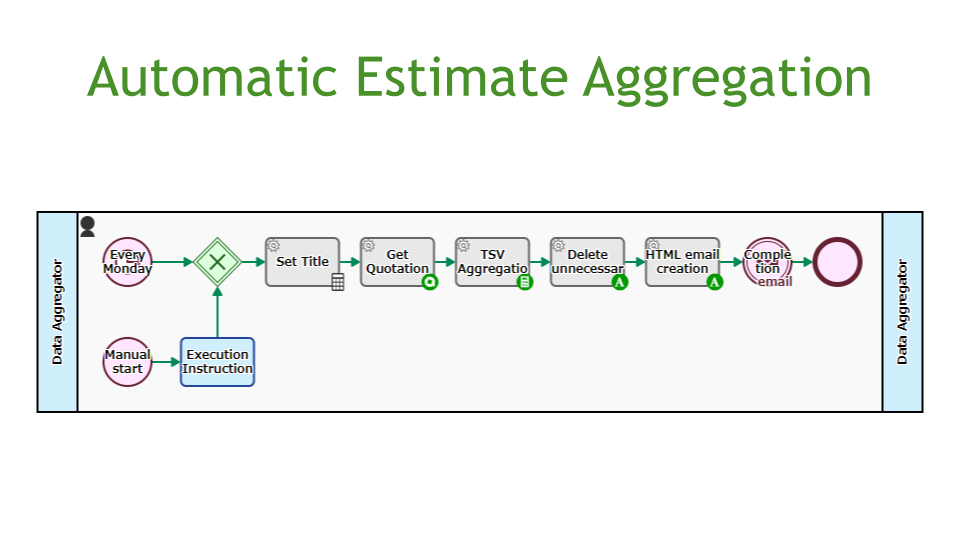
Automatic Estimate Aggregation
Retrieves data from the Quotation Process and sends an email with a list of the total number and value of quotes issued in the last week. This is automatically initiated every Monday morning. Uses pre-saved quotation…
-
■
Recurring Payment App, Stripe Payment
This workflow accepts subscription applications online. The customer makes a provisional application online using the trial version ID as a key. After the provisional subscription, the customer enters credit card information to make a full subscription.…
-
■
PayPal Billing App, Supervisor Approval
This is a workflow where PayPal invoices are sent automatically. The sales representative enters the billing details and the sales manager approves the details. The accounting department then reviews the automatically generated PayPal invoice draft as…
-
■
Application/Regular Payment App, Stripe Payment
This workflow accepts subscription contract applications. The customer makes a provisional subscription through a web form and clicks on the URL in the acceptance email to complete the subscription. At the time of subscription, the credit…
-
■

General Purpose Request Workflow
This is a general purpose business application and approval workflow for nursing care leave notification, leave of absence notification, business card creation, etc. Templates of application contents are automatically set according to the application work. The…
-
■
Troubleshooting App, SMS Notification
This app is used to manage internal notification and recovery response after a fault has occurred. Notification is sent via SMS to the person in charge of the IT Department so that they are notified of…
-
■
Maintenance Service Request Registration App
This is a workflow for registering maintenance service requests (SRs) to the central system. SRs are automatically added to a Google Sheet after being checked by the person in charge, and the RPA tool reads the…
-
Product Shipping App
This app directs the shipping of orders. Shipping tasks are automatically assigned to a team member in a sequential order.…
-
Product Demo Application Reception
This workflow accepts product demo applications via web form. Application responders are randomly selected based on the remainder of the…
-
Order Delivery App, can be triggered by other apps
This app manages the setup work up to delivery after receiving an order for Web services. Work is assigned to…
-
Short Questionnaire
Conduct simple surveys. By simply creating a survey and entering the mailing address, you can automate the process of requesting…
-
Web Page Effectiveness Measurement App
Web page creators register the date of publication and PagePath. One month after the publication date, the results (PV/session count/overall…
-
Post with Slack Mention, Triggered by Open Chat Post
This is an app that automatically posts content posted in open chat to Slack. Open chat posting notification emails are…
-
Weekly Reporting App, Mandatory Submission
Every Monday at 7am, the task “Write Report” will be added to all employees’ My Tasks list. Employees fill out…
-
Generic Work Request App, Guest Initiation Permitted
This is a general-purpose request flow that can be applied for even by guests (temporary or part-time employees who do…
-
Survey Request Response App
This app allows us to clearly identify an individual who is responsible for the customer’s survey request and proceed to…
-
Attendance and Daily Report Application App
This app simultaneously processes an employee’s attendance and daily report application. On workdays the attendance and daily report application flow…
-
Attendance Management
The system automatically starts at 7:00 a.m. on weekdays and sends a reminder email if the arrival/leaving time has not…
-
Attendance Reporting App, Automatic Overtime Calculation
At 7 o’clock every day, the request for arrival and departure times will be automatically added to “My Tasks” (however,…
-
Daily Report App, Scheduled/Actual Simultaneous Reporting
This is the app of reporting daily work schedules and results. Employees will be asked to write a report at…
-
Expense Reimbursement App
This is an expense reimbursement app that allows you to apply for 10 items at once. The screen is vertically…
-
Automatic Estimate Aggregation
Retrieves data from the Quotation Process and sends an email with a list of the total number and value of…
-
Recurring Payment App, Stripe Payment
This workflow accepts subscription applications online. The customer makes a provisional application online using the trial version ID as a…
-
PayPal Billing App, Supervisor Approval
This is a workflow where PayPal invoices are sent automatically. The sales representative enters the billing details and the sales…
-
Application/Regular Payment App, Stripe Payment
This workflow accepts subscription contract applications. The customer makes a provisional subscription through a web form and clicks on the…
-
General Purpose Request Workflow
This is a general purpose business application and approval workflow for nursing care leave notification, leave of absence notification, business…
-
Troubleshooting App, SMS Notification
This app is used to manage internal notification and recovery response after a fault has occurred. Notification is sent via…
-
Maintenance Service Request Registration App
This is a workflow for registering maintenance service requests (SRs) to the central system. SRs are automatically added to a…