Workflow Apps
-
■

Expense Reimbursement App
This is an expense reimbursement app that allows you to apply for 10 items at once. The screen is vertically long due to the large number of input items. To compensate for this, the screen is…
-
■

General Purpose Request Workflow
This is a general purpose business application and approval workflow for nursing care leave notification, leave of absence notification, business card creation, etc. Templates of application contents are automatically set according to the application work. The…
-
■
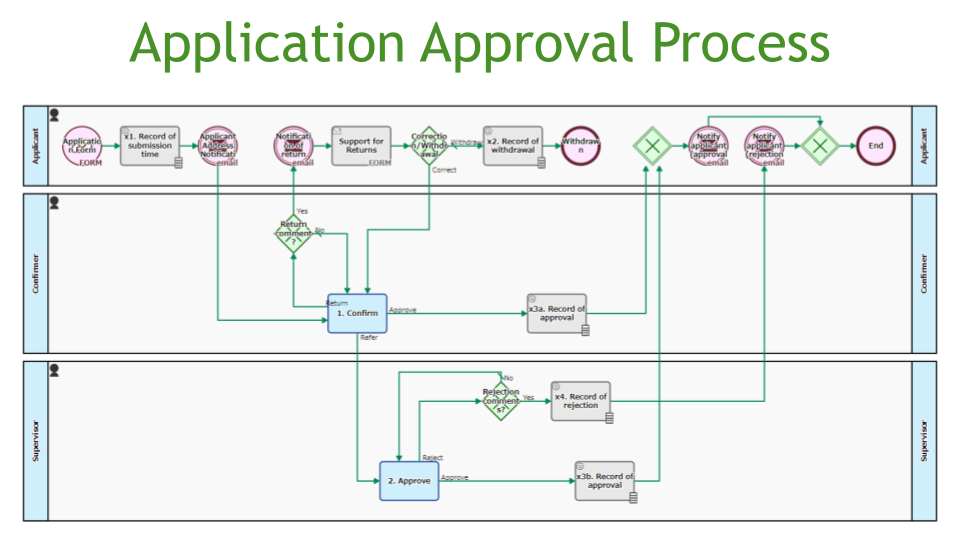
Application Approval Flow, Web Form
This approval flow accepts applications from people who do not have a login account. Applications are accepted via a public web form. In case of a return, the URL of the web form for corrections will…
-
■
Drawing Request Management App
This app manages the process from receipt of a request to issue drawings via a public web form to the distribution of the drawings. After receiving the request, the person in charge submits the drawing file…
-
■
Application Approval App – Proxy Approval/Split by Amount
The approval app allows for proxy decisions by deputy department heads. Applications worth between $6,000 and $30,000 are approved by the head of the department. However, after a period of 24 hours without approval, the deputy…
-
■

Approval Flow
This approval flow determines approvers based on an externally managed list. Approver information is obtained from an external list based on the project selected by the applicant and the approvers are determined. This makes it easy…
-
■
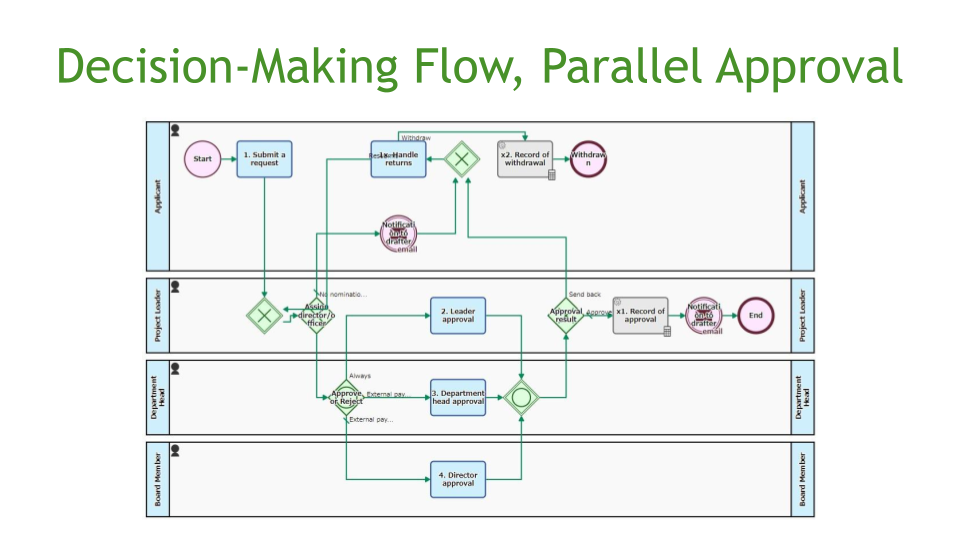
Decision-Making Flow, Parallel Approval
The approval flow is designed to speed up the approval process. Tasks are sent to several approvers in parallel. In addition, examples are pre-populated to make it easier to apply.
-
■

Decision-Making Request Flow, Amount Split
The approval process switches the decision-maker depending on the amount of the application. Applications of less than $5,000 are approved by the section manager; applications of more than $5,000 are approved by the department manager. The…
-
■

Decision-Making Flow, Majority Approval
Three approvers are requested to authorise the draft in parallel. When two or more approvals are received, the draft is considered approved. The applicant is notified of the result by email.
-
■

Approval Flow, ChatGPT Decision Assistance
The approval app supports decision-making. An item to be approved is automatically presented for each type and purpose, such as purchases, contracts and business entertainment. The decision-maker approves the request with reference to the items to…
-
■
Approval App, Azure OpenAI Service Creation Assistance
This is an approval app where AI reviews the draft content. The drafters can refine their drafts based on the results of the AI review.
-
■
Internal Regulation Revision App, SharePoint Online Output
The drafted internal regulation file is approved by the officer in charge and the board of directors makes a decision. After approval, the file is automatically saved in a designated folder on SharePoint Online and disseminated…
-
■
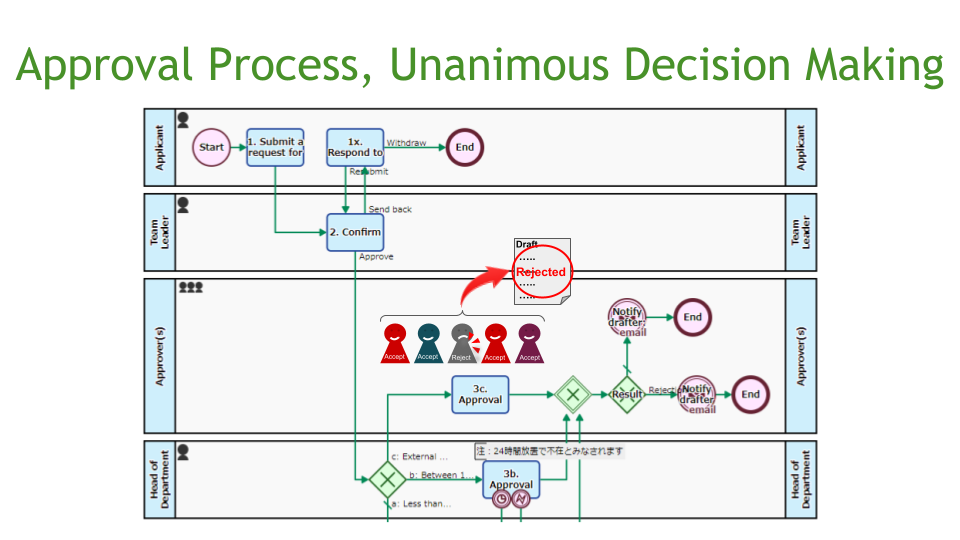
Approval Process, Unanimous Decision Making
The approval process is based on unanimous approval, where several decision-makers are designated when a proposal of more than 5 million yen is drafted. The decision is taken with the approval of all decision-makers.
-
■
Internal Regulation Revision App, Dropbox Output
The officer in charge approves the drafted internal regulation file, which is then approved by the board of directors. After approval, the file is automatically saved in a designated folder on Dropbox and disseminated via email.
-
■
Travel Request App, Teams Chat Notification
This is the app to apply for and approve business travel. During the application process, the address to be visited can be searched by postcode. After the application is submitted, an approval request is posted to…
-
■

Approval Request Flow (Skip Approval Step)
This is an approval process in which the general manager has to approve the application and the executive officer has to make the final decision. However, if the general manager himself applies for the approval, it…
-
■

Travel Request Flow
Allows multiple personnel to make an approval. By registering the deputy manager and assistant manager as “leader of the department (supervisor)”, other than the department manager become able to undertake the Task of [2. Approval on…
-
■
Internal Training Application App
This process manages applications for participation in in-house training programs. Once the application is received, the applicant is automatically added to the training schedule in the Outlook calendar.
-
■
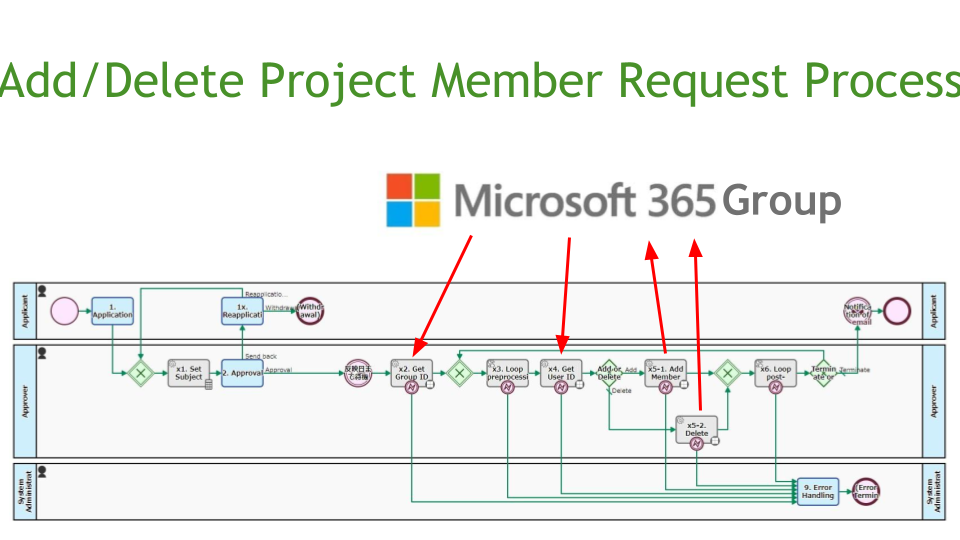
Add/Delete Project Member Request Process
This is the process to request the addition or deletion of a project member. After approval, the request is automatically reflected in the Microsoft365 Group on the specified date. Up to 50 members can be processed…
-
■
Travel Expenses Reimbursement App
This is a one-stop app from travel approval to post-travel reimbursement. For regular business travel that does not require approval, the applicant can apply for reimbursement only.
-
■
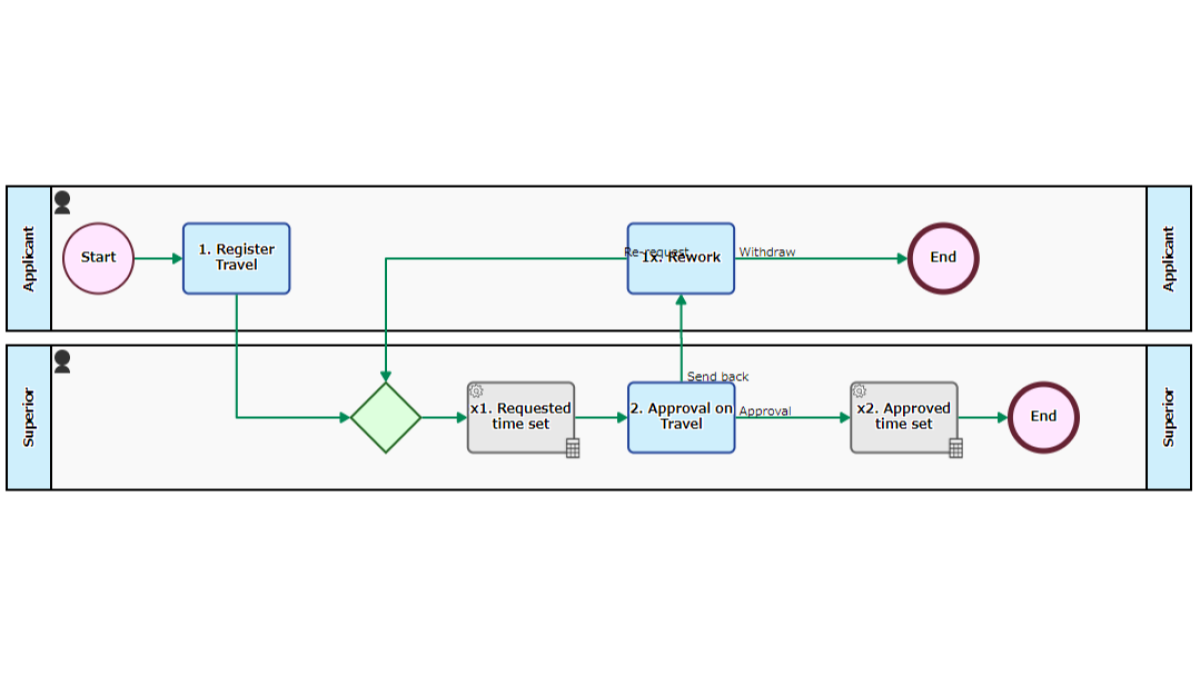
Travel Request Flow
Allows multiple personnel to make an approval. By registering the deputy manager and assistant manager as “leader of the department (supervisor)”, other than the department manager become able to undertake the Task of [2. Approval on…
-
Expense Reimbursement App
This is an expense reimbursement app that allows you to apply for 10 items at once. The screen is vertically…
-
General Purpose Request Workflow
This is a general purpose business application and approval workflow for nursing care leave notification, leave of absence notification, business…
-
Application Approval Flow, Web Form
This approval flow accepts applications from people who do not have a login account. Applications are accepted via a public…
-
Drawing Request Management App
This app manages the process from receipt of a request to issue drawings via a public web form to the…
-
Application Approval App – Proxy Approval/Split by Amount
The approval app allows for proxy decisions by deputy department heads. Applications worth between $6,000 and $30,000 are approved by…
-
Approval Flow
This approval flow determines approvers based on an externally managed list. Approver information is obtained from an external list based…
-
Decision-Making Flow, Parallel Approval
The approval flow is designed to speed up the approval process. Tasks are sent to several approvers in parallel. In…
-
Decision-Making Request Flow, Amount Split
The approval process switches the decision-maker depending on the amount of the application. Applications of less than $5,000 are approved…
-
Decision-Making Flow, Majority Approval
Three approvers are requested to authorise the draft in parallel. When two or more approvals are received, the draft is…
-
Approval Flow, ChatGPT Decision Assistance
The approval app supports decision-making. An item to be approved is automatically presented for each type and purpose, such as…
-
Approval App, Azure OpenAI Service Creation Assistance
This is an approval app where AI reviews the draft content. The drafters can refine their drafts based on the…
-
Internal Regulation Revision App, SharePoint Online Output
The drafted internal regulation file is approved by the officer in charge and the board of directors makes a decision.…
-
Approval Process, Unanimous Decision Making
The approval process is based on unanimous approval, where several decision-makers are designated when a proposal of more than 5…
-
Internal Regulation Revision App, Dropbox Output
The officer in charge approves the drafted internal regulation file, which is then approved by the board of directors. After…
-
Travel Request App, Teams Chat Notification
This is the app to apply for and approve business travel. During the application process, the address to be visited…
-
Approval Request Flow (Skip Approval Step)
This is an approval process in which the general manager has to approve the application and the executive officer has…
-
Travel Request Flow
Allows multiple personnel to make an approval. By registering the deputy manager and assistant manager as “leader of the department…
-
Internal Training Application App
This process manages applications for participation in in-house training programs. Once the application is received, the applicant is automatically added…
-
Add/Delete Project Member Request Process
This is the process to request the addition or deletion of a project member. After approval, the request is automatically…
-
Travel Expenses Reimbursement App
This is a one-stop app from travel approval to post-travel reimbursement. For regular business travel that does not require approval,…
-
Travel Request Flow
Allows multiple personnel to make an approval. By registering the deputy manager and assistant manager as “leader of the department…