Approval Process, Unanimous Decision Making 20230726
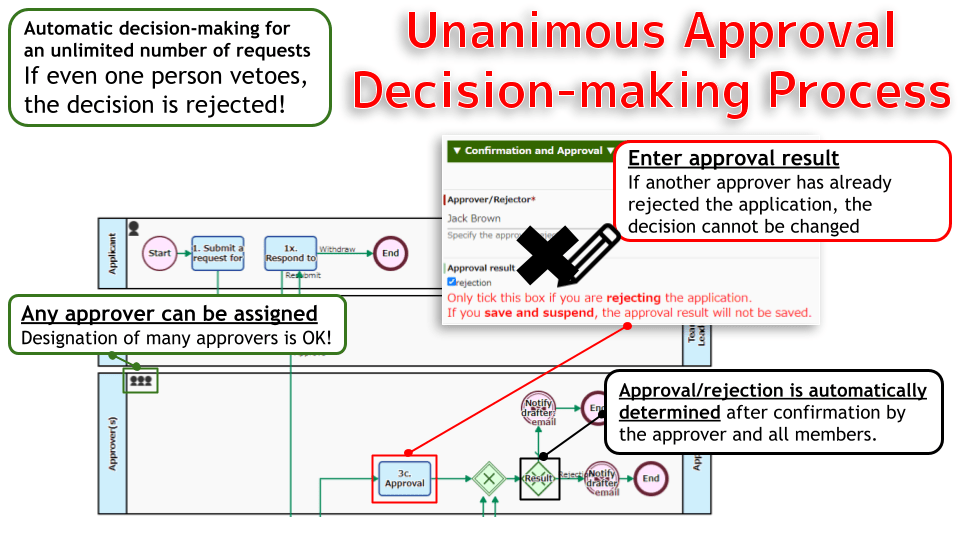
The approval process is based on unanimous approval, where several decision-makers are designated when a proposal of more than 5 million yen is drafted. The decision is taken with the approval of all decision-makers.
Workflow Diagram (click to open)

- BPMN Icons
- Start Event
- End Event
- Join Gateway
- XOR Gateway
- Throwing Message Intermediate Event (email)
- Human Task
Field Name, num, Initial Value
Download
- decision-making-request-flow2-unanimously-20230425-en.qar
- decision-making-request-flow2-unanimously-20230425-en.xml.csv (for Importing Data Item Definitions)
This archive can be imported as a Workflow App on BPMS.
Notes
- The data item “◆Script: Unanimous – Control” should only be set to “Viewable” in step 3c.
Arrangement Tips
(click to open) “3c. Approval Decision” process decoration JavaScript
<script>
const DECISION_FORM_NAME = 'data[13].selects'; // Character string containing the definition number of option "Approval result"
const DECISION_FORM_FIELD_NAME = 'q_decision_result'; // Specify the field name of the option "Approval result"
const DECISION_REJECT_VALUE = 'ng';   // Specify the ID of the option "Approval result"
const DECISION_JUDGEMENT_USER_LIST = 'q_judgement_user_list';   // Specify the field name of the string type "approval/rejection list"
const DECISION_JUDGEMENT_USER = 'q_judgement_user';   // Specify the field name of the user type "approver/rejector"
let userName;
let isChangeItem = false;
function user_readyHandler(e) {
	const submitBtn = document.getElementById('submitButton');
	const saveOnlyBtn = document.getElementById('saveOnlyButton');
	let selects = qbpms.form.get( DECISION_FORM_FIELD_NAME );
	qbpms.form.set( DECISION_JUDGEMENT_USER ,  null );
	if (selects.length !== 0){
		console.log("selects[0].value: " + selects[0].value );
		if ( selects[0].value === DECISION_REJECT_VALUE ){
			let items = document.getElementsByName( DECISION_FORM_NAME );
			items[1].disabled = true;
			alert("This request for approval has already been rejected. \nPlease check the contents of the draft and enter your comments. ");
			let decisionNote = document.getElementById('user_decision_description');
			decisionNote.innerHTML = "This petition has already been rejected. <br>Please check the contents of the draft and enter your comments.";
		}
	}

	submitBtn.addEventListener('click', function() {
		user_controlDecisionForm();
	});
	saveOnlyBtn.addEventListener('click', function() {
		user_controlRejectDecisionForm();
	});
}
function user_addedChangeItemEvent(e) {
	console.log("Decision Form Change");
	let selects = qbpms.form.get( DECISION_FORM_FIELD_NAME );
	if (selects.length !== 0){
		if ( qbpms.form.get(DECISION_JUDGEMENT_USER) === null ){
			isChangeItem = false;
			qbpms.form.set( DECISION_FORM_FIELD_NAME , null );
			alert("Register "Approve/Reject" and specify "Approve/Reject" again.");
		}else{
			isChangeItem = true;
			user_setJudgementUsersList("Rejected");
		}
	}
}
qbpms.form.on('ready', user_readyHandler);
qbpms.form.on('change', DECISION_FORM_FIELD_NAME ,user_addedChangeItemEvent);
function user_controlDecisionForm(){
	let checkForm = document.getElementsByName( DECISION_FORM_NAME );
	console.log(checkForm + " length:" + checkForm.length);
	selects = qbpms.form.get( DECISION_FORM_FIELD_NAME );
	if (selects.length !== 0){
		let items = document.getElementsByName( DECISION_FORM_NAME );
		if (items[1].disabled){
			checkForm[0].remove();
		}
		if (!isChangeItem){
			if ( qbpms.form.get(DECISION_JUDGEMENT_USER) === null ){
				qbpms.form.set( DECISION_FORM_FIELD_NAME , null );
				alert("Register "Approve/Reject" and specify "Approve/Reject" again.");
			}else{
				user_setJudgementUsersList("Approved");
			}
		}
		if ( selects[0].value === DECISION_REJECT_VALUE ){
		console.log( DECISION_FORM_FIELD_NAME + " not appoval!");
		}
	}else{
		console.log( DECISION_FORM_FIELD_NAME + " remove! not regist");
		//checkForm[0].remove();
		if ( qbpms.form.get(DECISION_JUDGEMENT_USER) === null ){
			qbpms.form.set( DECISION_FORM_FIELD_NAME , null );
			alert("Register "Approve/Reject" and specify "Approve/Reject" again.");
		}else{
			user_setJudgementUsersList("Approved");
		}
	}
}
function user_controlRejectDecisionForm(){
	let checkForm = document.getElementsByName( DECISION_FORM_NAME );
	console.log(checkForm + " length:" + checkForm.length);
	console.log("checkForm[0]:" + checkForm[0]);
	console.log("checkForm[1]:" + checkForm[1]);
	console.log( DECISION_FORM_FIELD_NAME + " remove! not regist");
	checkForm[1].remove();
	checkForm[0].remove();
}
function user_setJudgementUsersList( judgeText ){
	console.log("--user_setJudgementUsersList()--");
	userName = qbpms.form.get(DECISION_JUDGEMENT_USER).name;
	console.log("userName: " + userName);
	let list = (qbpms.form.get( DECISION_JUDGEMENT_USER_LIST ) + "\n" + judgeText + ":" + userName).trim();
	qbpms.form.set(DECISION_JUDGEMENT_USER_LIST ,  list );
}
</script>
Capture