Text Files, Convert Character Encoding
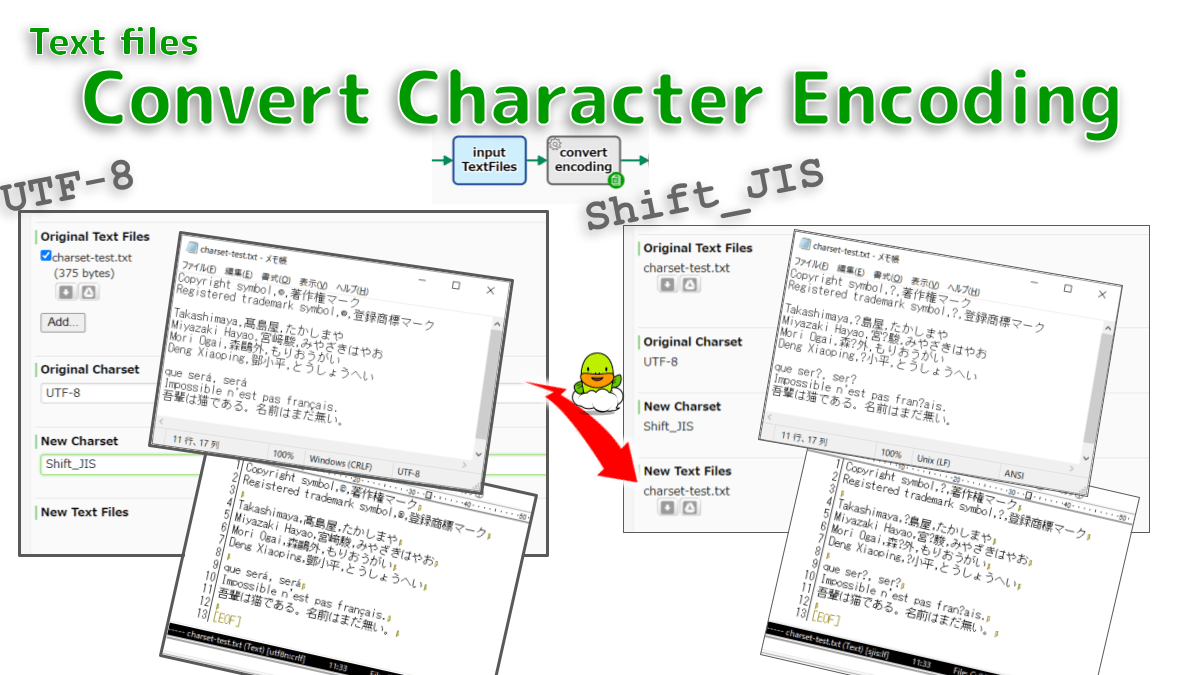
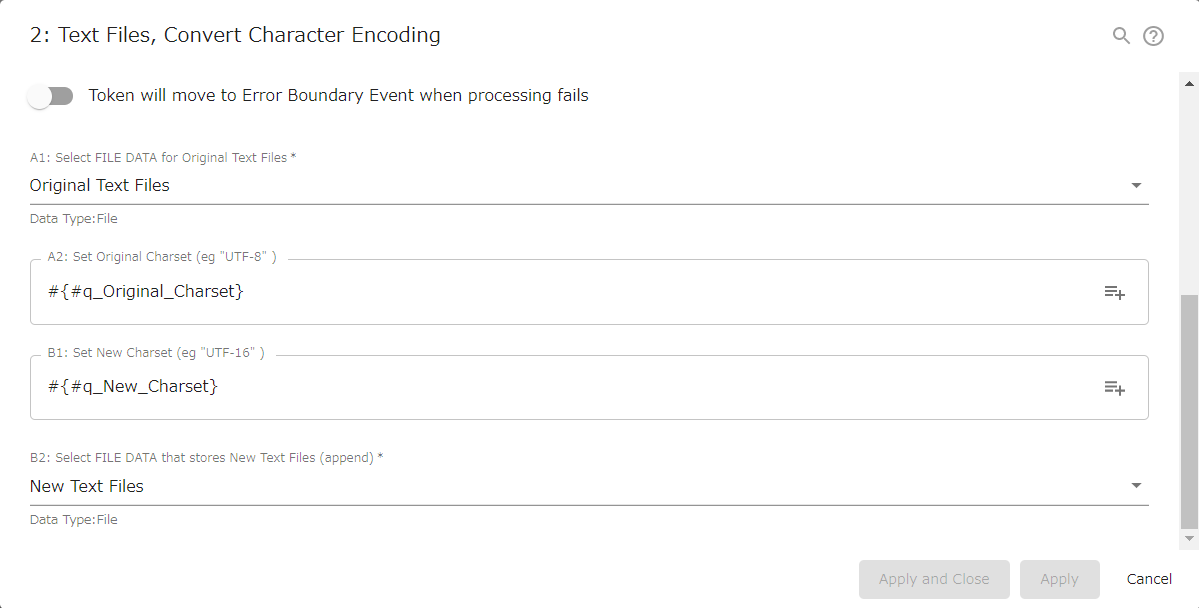
Converts text files charset (Coded Character Set). For example, converts UTF-8 encoding to Shift_JIS or UTF-16. If multiple files are attached, all will be converted according to the same rules.
* #{EL} #{EL} *
// GraalJS Script (engine type: 2)

//////// START "main()" /////////////////////////////////////////////////////////////////
main();
function main(){

//// == Config Retrieving / 工程コンフィグの参照 ==
const filesPocketInput    = configs.getObject( "SelectConfA1" );  /// REQUIRED ///////////////
  let filesInput          = engine.findData( filesPocketInput );  // java.util.ArrayList
  if( filesInput        === null ) {
    throw new Error( "\n AutomatedTask UnexpectedFileError:" +
                     " No File {A1} is attached \n" );
  }else{
    engine.log( " AutomatedTask FilesArray {A1}: " +
                filesInput.size() + " files" );
  }
let   strInputCharset     = configs.get( "StrConfA2" );           // NotRequired /////////////
  if( strInputCharset   === "" ){
      strInputCharset     = "UTF-8";
  }
let   strOutputCharset    = configs.get( "StrConfB1" );           // NotRequired /////////////
  if( strOutputCharset  === "" ){
      strOutputCharset    = "UTF-8";
  }
const filesPocketOutput   = configs.getObject( "SelectConfB2" );  /// REQUIRED ///////////////
  let filesOutput         = engine.findData( filesPocketOutput ); // java.util.ArrayList
  if( filesOutput       === null ) {
    engine.log( " AutomatedTask FilesArray {B2}: (empty)" );
    filesOutput           = new java.util.ArrayList();
  }else{
    engine.log( " AutomatedTask FilesArray {B2}: " +
                filesOutput.size() + " files" );
  }


//// == Data Retrieving / ワークフローデータの参照 ==
// (Nothing. Retrieved via Expression Language in Config Retrieving)


//// == Calculating / 演算 ==
const numFilesInput = filesInput.size() - 0;

for( let i = 0; i < numFilesInput; i++ ){
  const strInputFileName = filesInput.get(i).getName() + "";
  const strInputFileSize = filesInput.get(i).getLength() + " bytes";
  const strInputFileMime = filesInput.get(i).getContentType();

  let strInputText = "";
  let numLineCounter = 0;
  fileRepository.readFile( filesInput.get(i), strInputCharset, function(line) {
  // com.questetra.bpms.core.event.scripttask.FileRepositoryWrapper
  // https://questetra.zendesk.com/hc/ja/articles/360024574471-R2300#FileRepositoryWrapper
      strInputText += line + '\n';
      numLineCounter ++;
  });
  engine.log( " AutomatedTask FileLoaded: " + strInputFileName + " (" + strInputFileMime + ")" );
  engine.log( " AutomatedTask: " + strInputFileSize + " / " + numLineCounter + " lines" );

  filesOutput.add(
    new com.questetra.bpms.core.event.scripttask.NewQfile(
      strInputFileName,
      strInputFileMime + "; charset=" + strOutputCharset,
      strInputText
    )
  );
}


//// == Data Updating / ワークフローデータへの代入 ==
engine.setData( filesPocketOutput, filesOutput );

} //////// END "main()" /////////////////////////////////////////////////////////////////


/*
Notes:
- Used when incorporating "Step in which Text file Encoding is automatically changed" in the workflow.
    - Charset of Text file is automatically changed when the process reaches this automated task.
- The file name of the output file will be the same as the input file.
    - The line feed code is `LF`.
- Converts according to the specified Encodings.
    - No auto-detect feature.
    - If not specified, the default Encoding is `UTF-8`.

APPENDIX:
- `UTF-8`
    - Compactly encodes more than 1 million Unicode characters in the world with 1 to 4 bytes.
    - It became the most common character code in 2008 and is used in 97% of web pages as of 2021.
    - UTF-8 is superset of US-ASCII (single-byte characters). (upward compatible)
        - That is, ASCII files are also UTF-8 files. (US-ASCII is a subset of UTF-8)
        - Similarly, ASCII files are also Shift_JIS files.
- `UTF-16`
    - Encodes over 1 million Unicode characters in the world with 2-4 bytes.
    - If there are many Asian characters such as Japanese and Chinese, encode them compactly.
- Another encoding
    - `charset=UTF-16` (Unicode [characters around the world])
    - `charset=UTF-16BE` (Unicode [characters around the world])
    - `charset=UTF-16LE` (Unicode [characters around the world])
    - `charset=UTF-32` (Unicode [characters around the world])
    - `charset=x-UTF-32LE-BOM` (Unicode [characters around the world])
    - `charset=ISO-8859-1` (Western language characters)
    - `charset=Shift_JIS` (Japanese characters)
    - `charset=Big5` (Traditional Chinese characters)
    - `charset=GB2312` (Simplified Chinese EUC characters)
    - `charset=GBK` (Simplified Chinese GB characters)
    - `charset=KOI8-R` (Russian)
    - In addition, "UTF8B (UTF-8 with BOM)" cannot be output. (File for Windows / pray for its eradication)
    - https://docs.oracle.com/javase/9/intl/supported-encodings.htm


Notes-ja:
- ワークフロー内に「TextファイルEncodingが自動的に変更される工程」を組み込む際に利用します。
    - 案件が自動処理工程に到達した際、TextファイルのCharsetが自動的に変更されます。
- 出力ファイルのファイル名は、入力ファイルと同じファイル名になります。
    - 改行コードは `LF` です。
- 指定された Encoding に従って変換します。
    - 自動判別機能はありません。
    - 未指定の場合、デフォルトの Encoding は `UTF-8` です。

APPENDIX-ja:
- `UTF-8`
    - 世界100万種以上のUnicode文字を、1~4バイトでコンパクトにエンコードします。
    - 2008年に最も一般的な文字コードとなり、2021年時点で97%のウェブページで利用されています。
    - UTF-8 は US-ASCII(1バイト文字)の上位互換です。(US-ASCII は UTF-8 のサブセットです)
        - すなわち ASCII ファイルは UTF-8 ファイルでもあります。
        - 同様に ASCII ファイルは Shift_JIS ファイルでもあります。
- `UTF-16`
    - 世界100万種以上のUnicode文字を、2~4バイトでエンコードします。
    - 日本語や中国語などのアジア文字が多い場合は、コンパクトにエンコードします。
- その他のエンコーディング
    - `charset=UTF-16` (Unicode[世界中の文字])
    - `charset=UTF-16BE` (Unicode[世界中の文字])
    - `charset=UTF-16LE` (Unicode[世界中の文字])
    - `charset=UTF-32` (Unicode[世界中の文字])
    - `charset=x-UTF-32LE-BOM` (Unicode[世界中の文字])
    - `charset=ISO-8859-1` (ヨーロッパ言語の文字)
    - `charset=Shift_JIS` (日本語の文字)
    - `charset=Big5` (繁体中国語の文字)
    - `charset=GB2312` (簡体中国語EUC文字)
    - `charset=GBK` (簡体中国語GBの文字)
    - `charset=KOI8-R` (ロシア語)
    - なお "UTF8B (BOM付 UTF-8)" は出力できません。(Windows用ファイル/その撲滅を祈念)
    - https://docs.oracle.com/javase/9/intl/supported-encodings.htm
    - https://docs.oracle.com/javase/jp/9/intl/supported-encodings.htm
*/
2021-08-20 (C) Questetra, Inc. (MIT License)https://support.questetra.com/addons/text-files-convert-character-encoding-2021/ Professional
Used when incorporating a Step in which Text file Encoding is automatically changed in the workflow.
Charset of Text file is automatically changed when the process reaches this automated task.
The file name of the output file will be the same as the input file.
The line feed code is LF.
Converts according to the specified Encodings.
No auto-detect feature.
If not specified, the default Encoding is UTF-8.
UTF-8
Compactly encodes more than 1 million Unicode characters in the world with 1 to 4 bytes.
It became the most common character code in 2008 and is used in 97% of web pages as of 2021.
UTF-8 is superset of US-ASCII (single-byte characters). (upward compatible)
That is, ASCII files are also UTF-8 files. (US-ASCII is a subset of UTF-8)
Similarly, ASCII files are also Shift_JIS files.
UTF-16
Encodes over 1 million Unicode characters in the world with 2-4 bytes.
If there are many Asian characters such as Japanese and Chinese, encode them compactly.
Another encoding
charset=UTF-16 (Unicode [characters around the world])charset=UTF-16BE (Unicode [characters around the world])charset=UTF-16LE (Unicode [characters around the world])charset=UTF-32 (Unicode [characters around the world])charset=x-UTF-32LE-BOM (Unicode [characters around the world])charset=ISO-8859-1 (Western language characters)charset=Shift_JIS (Japanese characters)charset=Big5 (Traditional Chinese characters)charset=GB2312 (Simplified Chinese EUC characters)charset=GBK (Simplified Chinese GB characters)charset=KOI8-R (Russian)In addition, “UTF8B (UTF-8 with BOM)” cannot be output. (File for Windows / pray for its eradication)
https://docs.oracle.com/javase/9/intl/supported-encodings.htm
Like this: Like Loading...
Related


Pingback: TSV String, Convert – Questetra Support
Pingback: Converter, CSV-String to TSV-String – Questetra Support