Workflow Apps
-
■
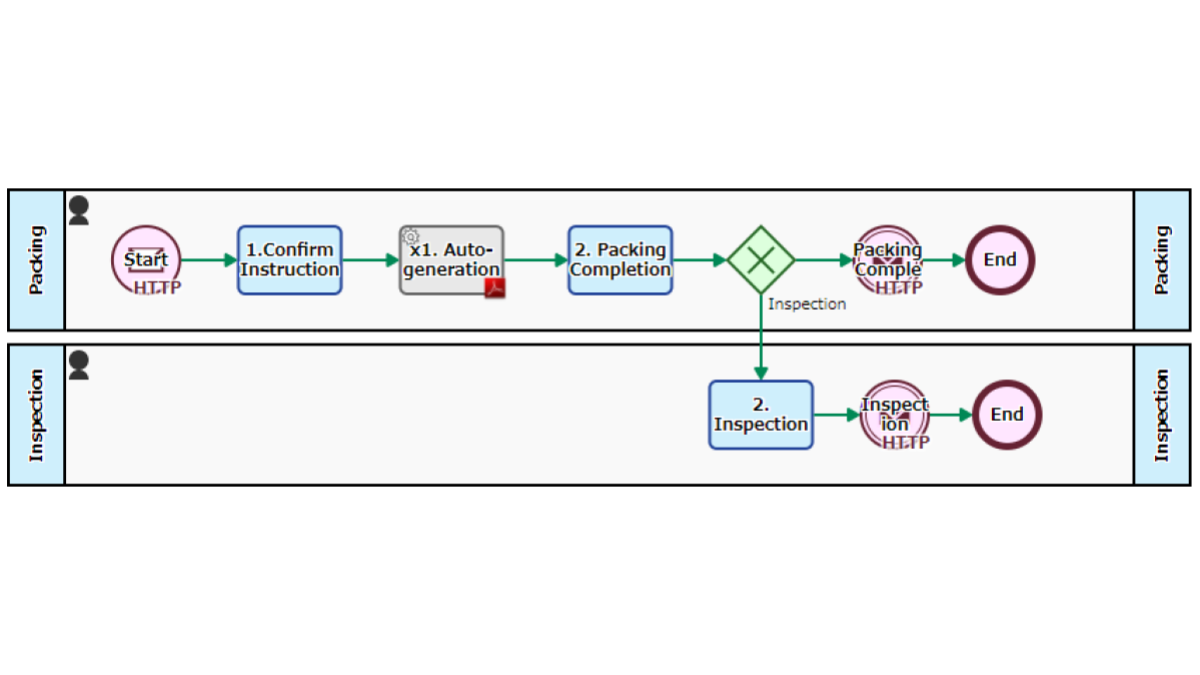
BPO Shipment App
Receive product delivery information, pack and ship. It is automatically started when delivery information is received from the consignor via HTTP communication. An invoice is automatically generated, and when the [1. Packing completion] process is completed,…
-
■
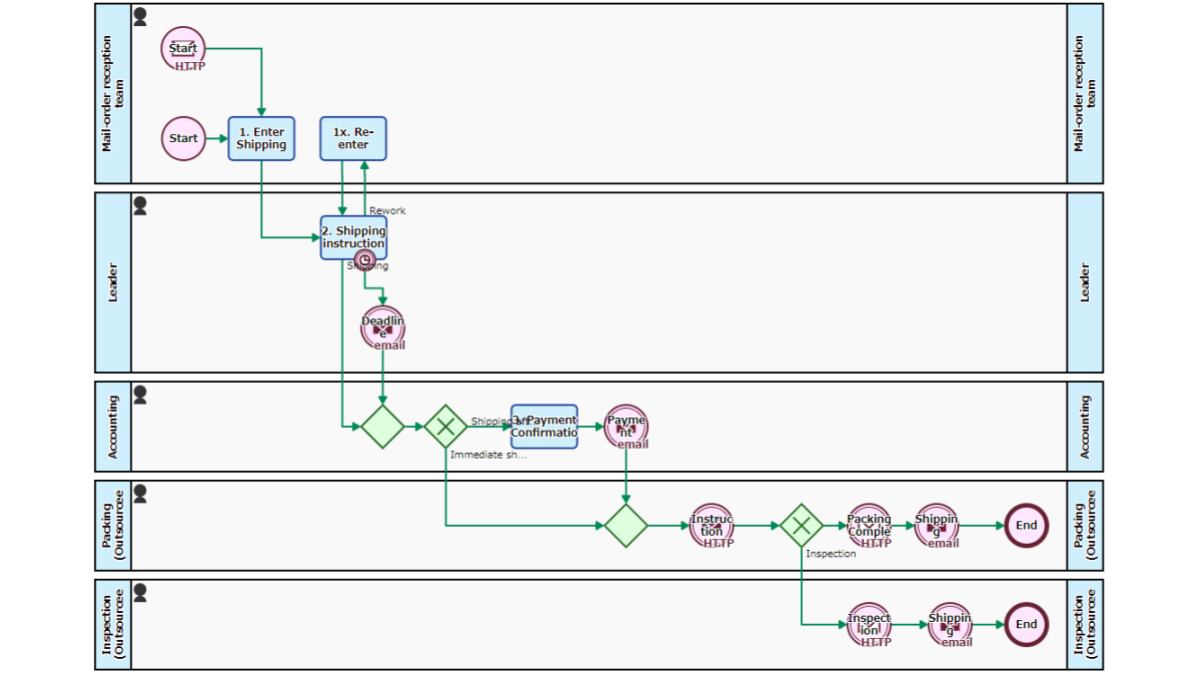
Pick, Pack and Ship flow-HTTP connect
Outsources the packaging, inspection and shipment operations. The destination and commodity are entered at the [1. Enter Shipping instruction] Task. Then, after confirmation by the Leader, the [4. Packing] and [5. Inspection] Tasks are outsourced to…
-
■
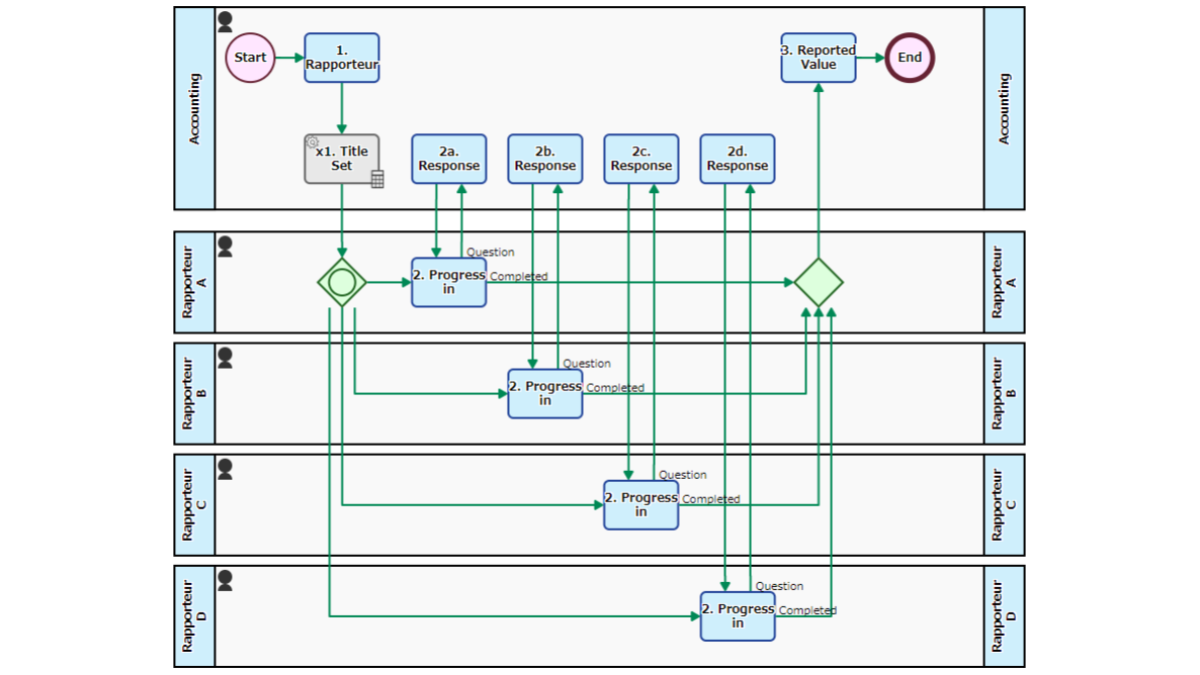
Progress Report App
Multiple people will report and summarize the progress of the project. Reporters appointed at the [1. Rapporteur Designation] Step make a report and handle the [2. Progress in Subjective]. With the aggregation of reported values will…
-
■
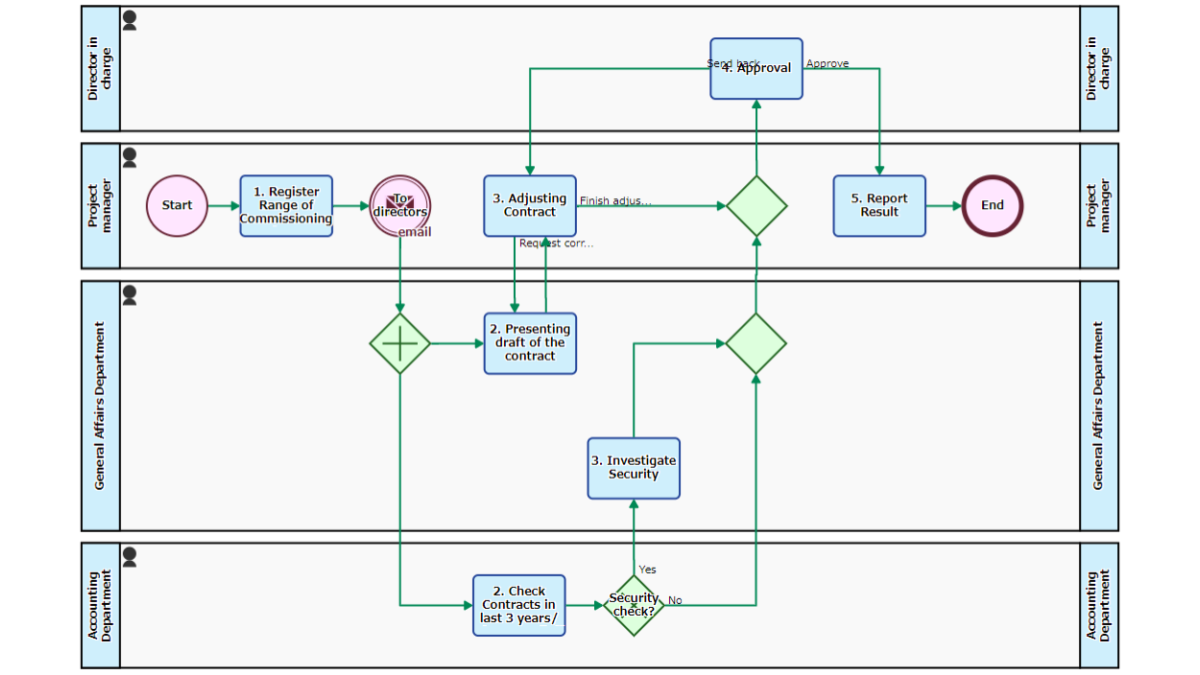
Subcontracting Flow
A flow for concluding a contract with a subcontractor. After entrustment information is registered at the Step of [1. Register Range of Commissioning and Target Outsourcer], the Process is split into drafting a contract in the…
-
■
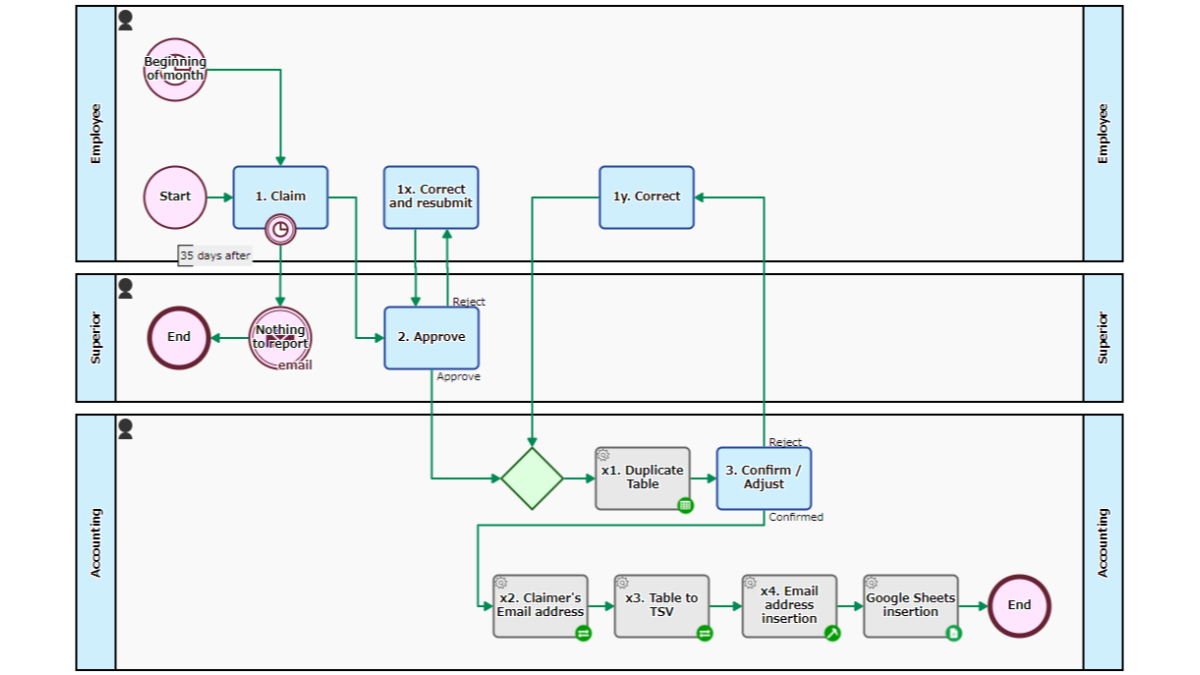
Expense Record Flow
Reports and records expenses after approval/correction. The Process for all employees is automatically started at the beginning of every month. The employee holds the [1. Report] Task until the closing date and inputs the expenses and…
-
■
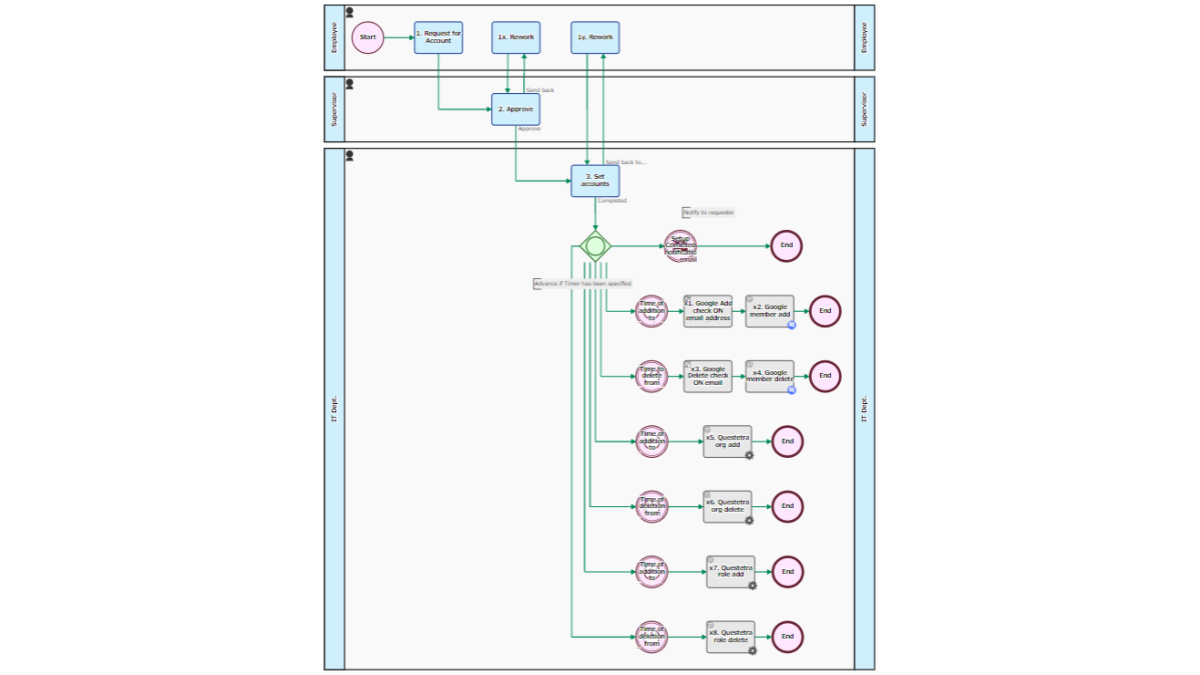
Account Registration Reservation Process
Issues user accounts and registers to/deletes from email lists and the Workflow platform/Roles. Information about a user is entered at the Step of [1. Request for Account], then after approval by the supervisor, it is passed…
-
■
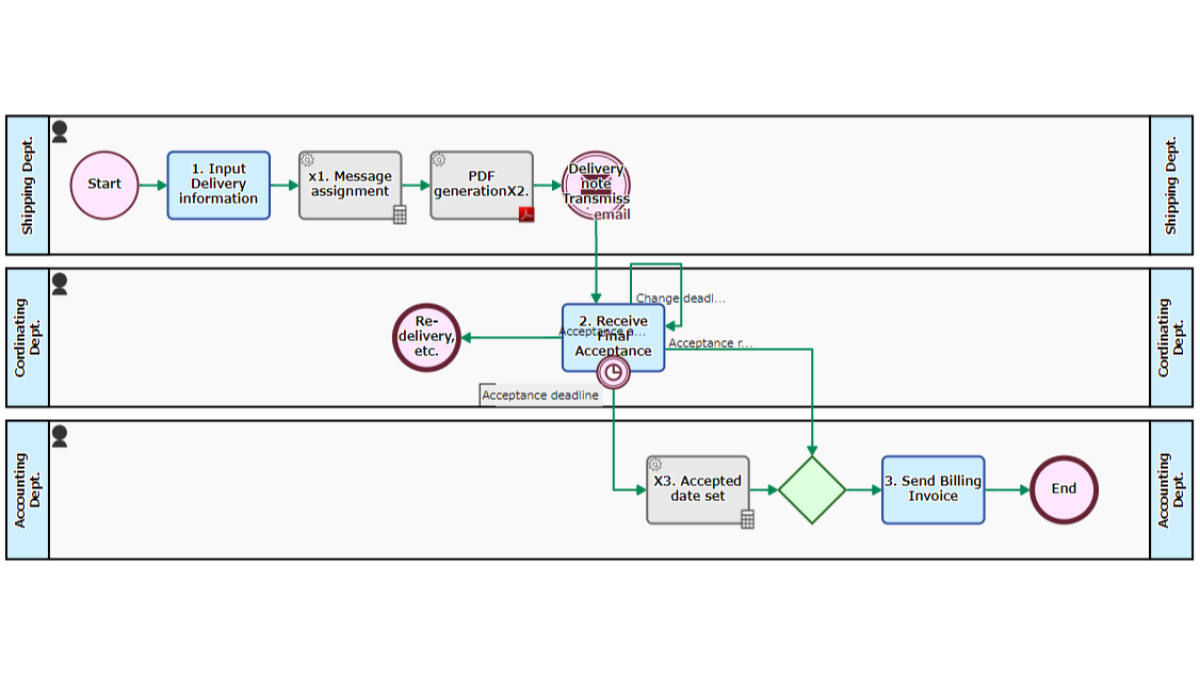
Acceptance Inspection Request Flow
Responds to inspection after delivery of consignment work. A delivery note PDF is automatically generated from the input information of [1. Delivery information input] and sent. In the Step of [2. Correspond Acceptance/Receiving Acceptance report], there…
-
■

Translation-Time Measurement
Translates the text of the manuscript. The sentences entered in [1 Translation request] will be delivered to the translator. On the Operating screen of [2 Translation work], scripts that are for measuring the working time by…
-
■

Product Demo Flow
Accepts product demo requests and carry out the demo. Started by the acceptance of an application via the web form or an email and person in charge will be assigned at the [1. Assignment of Representative]…
-
■
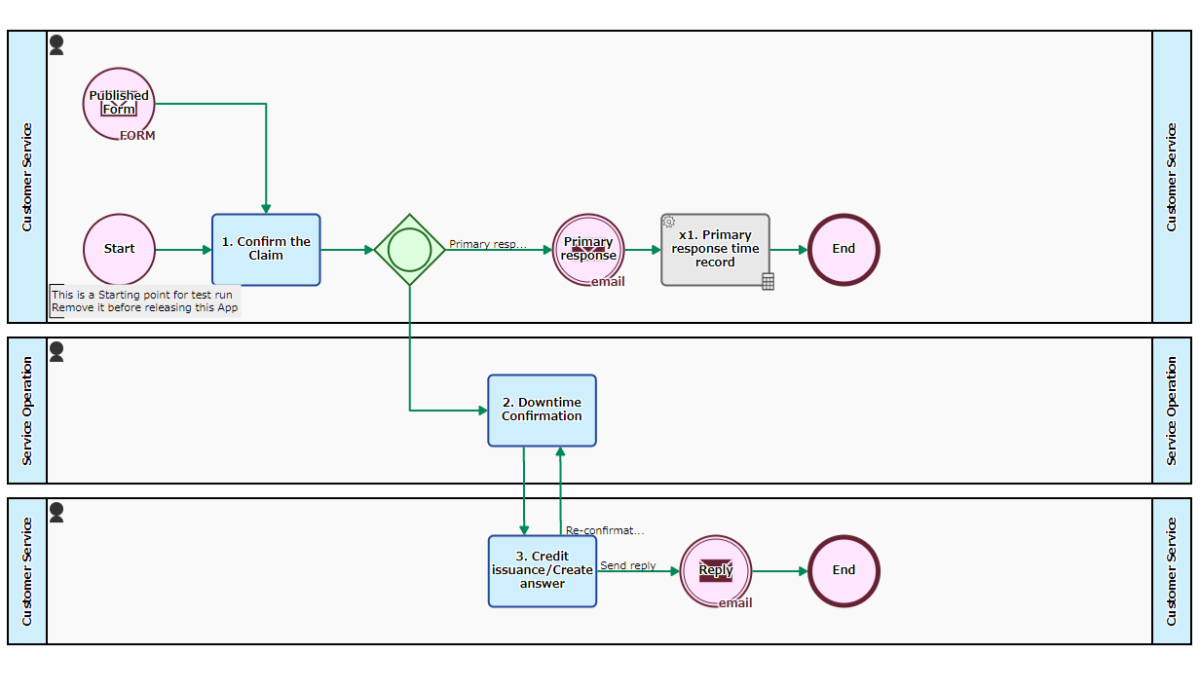
SLA Credits Issuance Flow
Accepts reduction claims based on SLA (Service Level Agreement) from customers and issues service credits. When there is an application via the Web form, the Workflow is Started, and the Service Operation manager confirms the results…
-
■

Manga Production Flow
Based on the original scenario, a manga is produced through the stages of rough-sketch, draft, and finish. At each stage, the cartoonist creates the deliverables and the requester confirms it. The status of production is recorded…
-
■
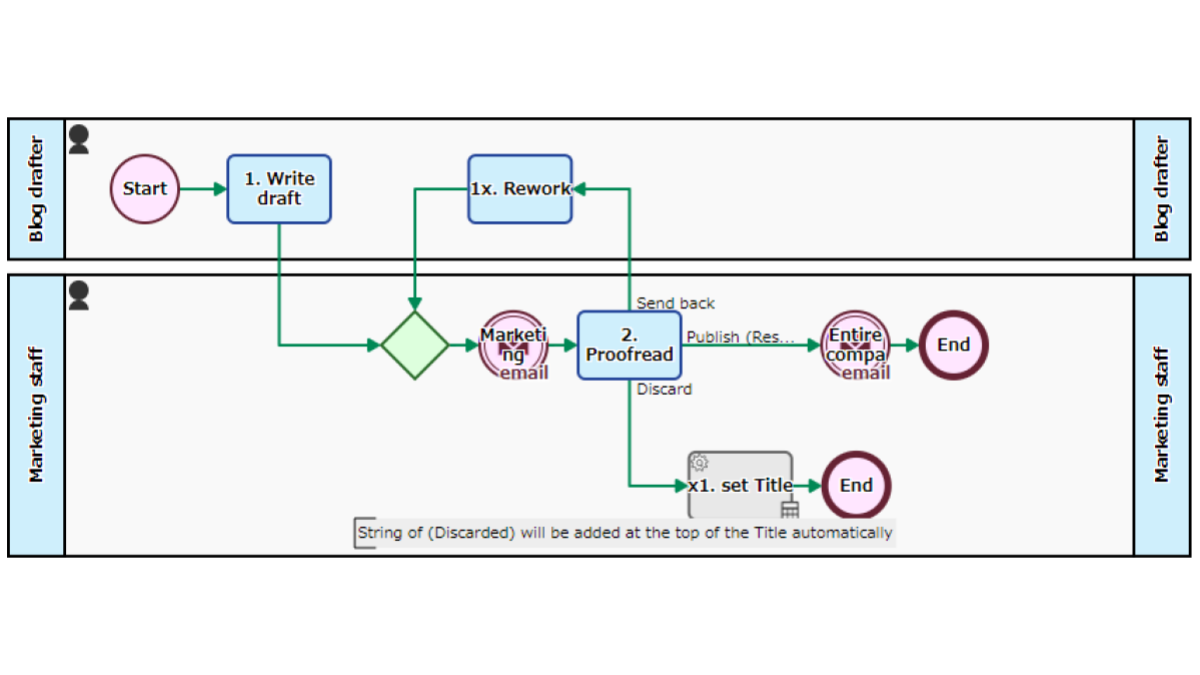
Blog Write-Post Flow
A draft of a blog post is registered, proofread and posted. Upon a draft being registered at the Step of [1. Write Draft], it notifies to relevant people by email. When a publishing staff proofs the…
-
■
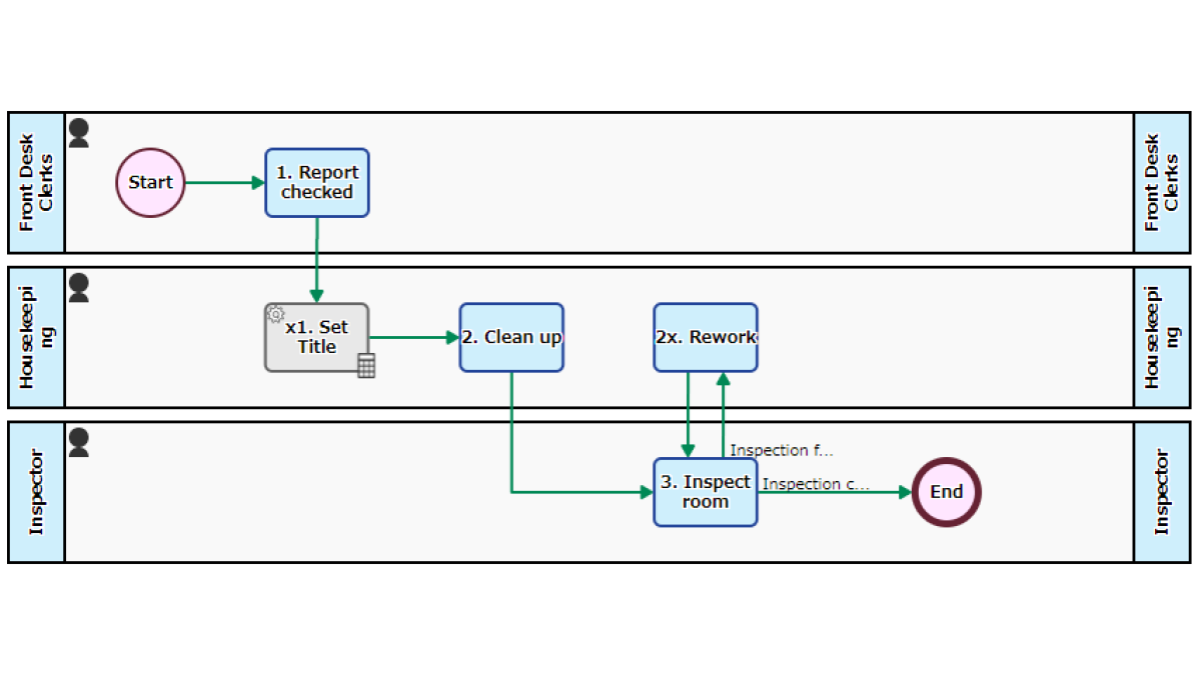
Human Multitasking Workflow
Cleaning work and cleaning inspection work are carried out. If there is a work in [2. Clean up] or [3. Inspect room], a person who can deal with it will respond. While “waiting time” was allowed…
-
■
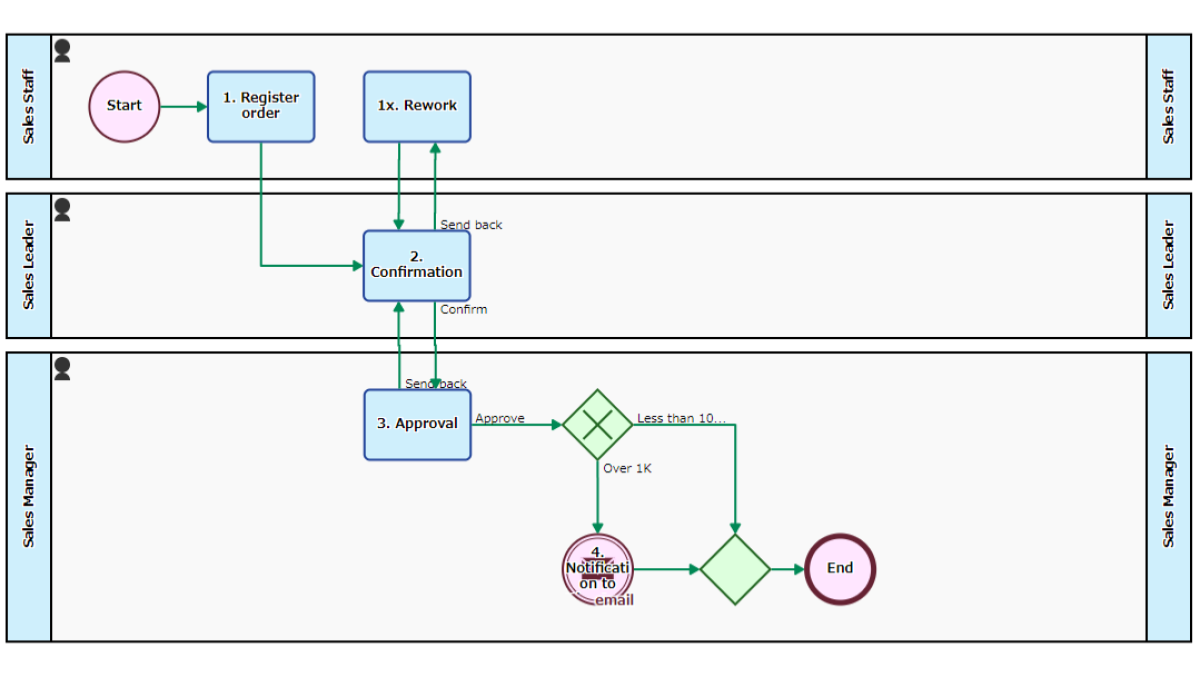
Order Reporting App, Email Notification
To be approved by the Sales Manager. Sales team leader makes [2. Confirmation], and then Sales Manager makes [3. Approval]. If the order value is over 1 million JPY, it will be also reported to the…
-
■
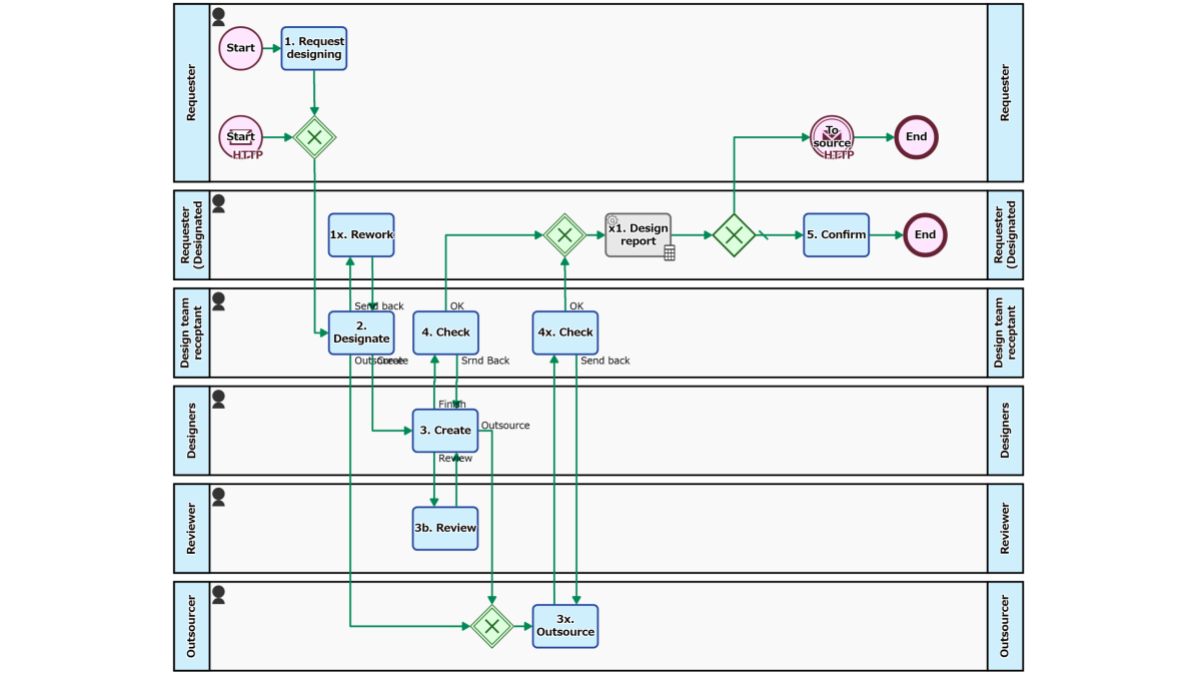
Design Request Handling (Outsource option)
Manages from accepting designing requests to producing deliverables and delivering. At the Step of [2. Designate], whether to assign a person in charge in the team or to outsource the production is determined. The person in…
-
■

Designing Request Handling Flow
Requests from within the company are processed. The designer in charge is appointed at [2. Designate], and the output such as jpeg file or ai file is attached at [3. Create]. It is also assumed to…
-
■
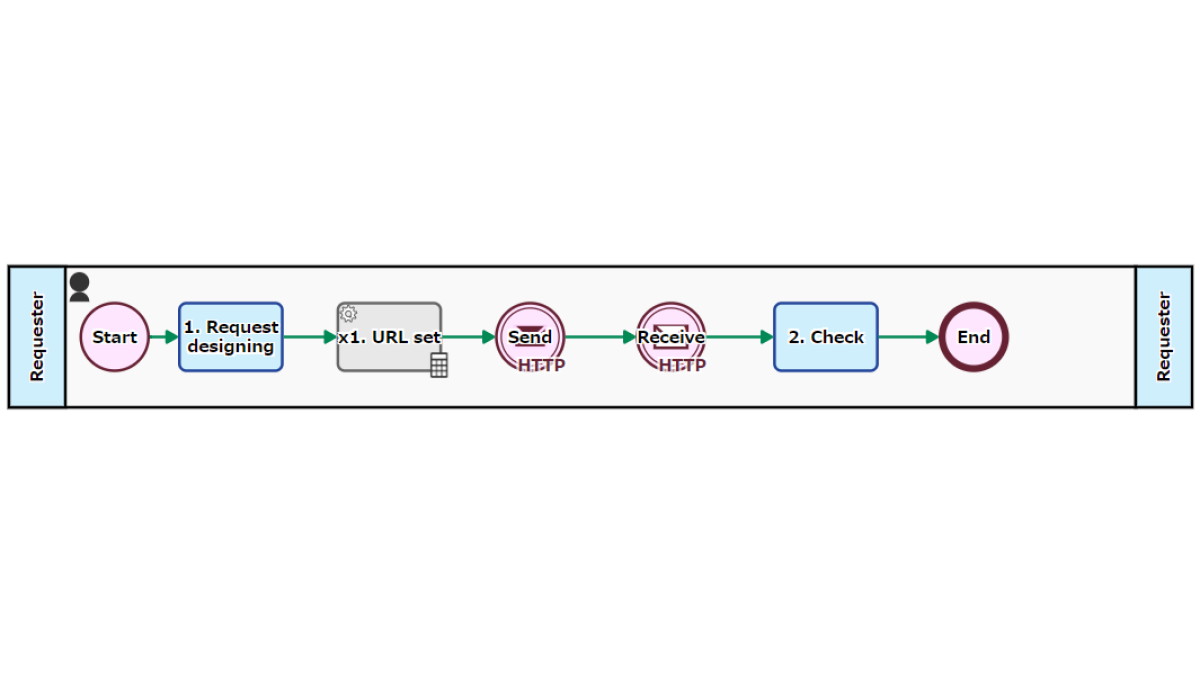
Design Request
Call the “Design request handling process” of the design team with an HTTP request and pass the request contents. Receive the deliverables from the “design request handling process” at the Catching Message Intermediate Event.
-
■
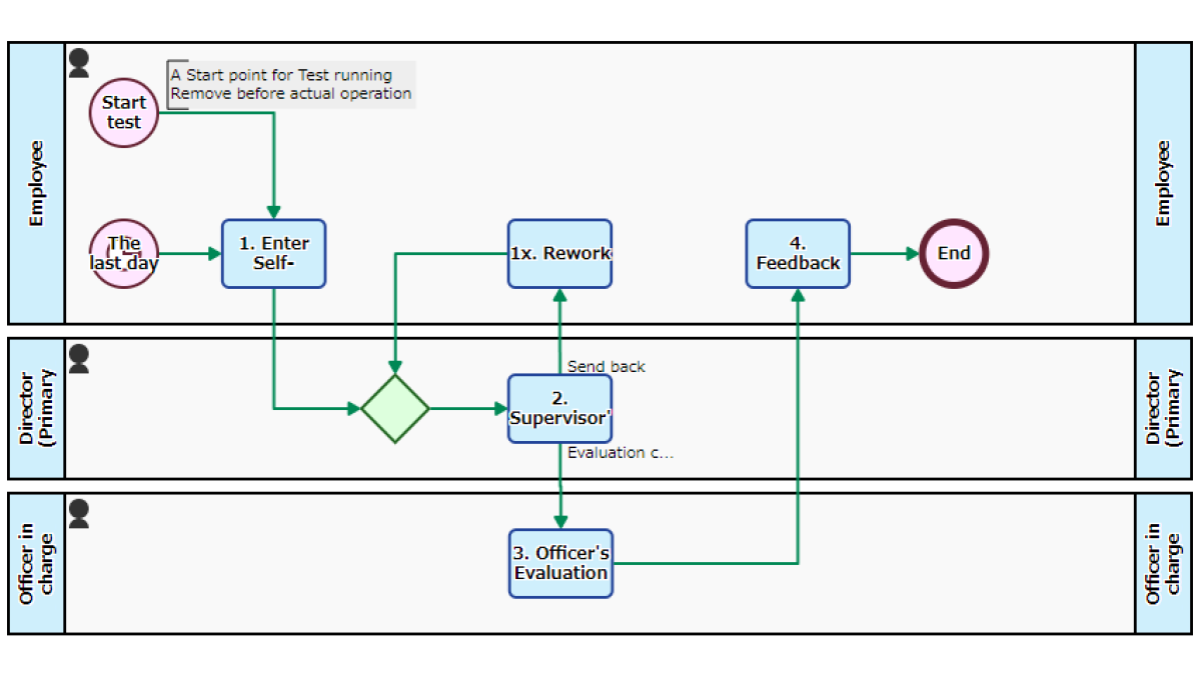
Personnel Evaluation App
Conducts performance appraisal and record as numerical values. Starts automatically at the end of every month, and the person enters self-assessment for each item at the Step of [1. Enter self-evaluation]. The entered numerical value is…
-
■
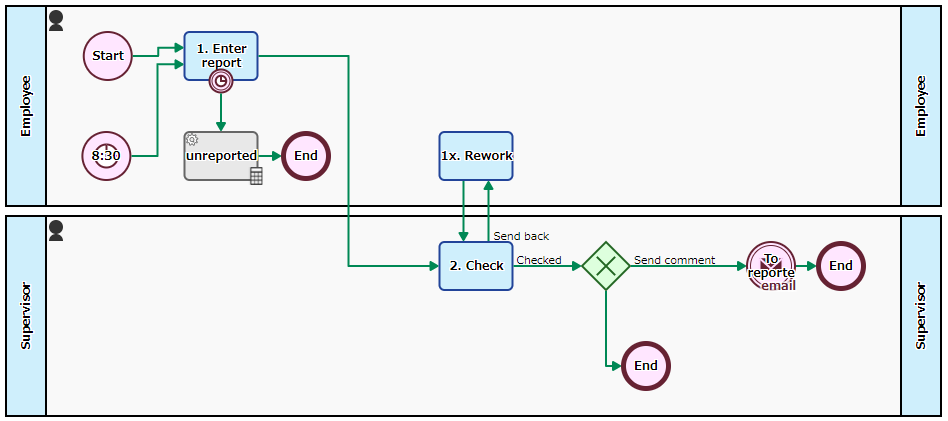
Daily Report Flow
Automatically starts up every morning for reporting daily business. After the Step of [1. Enter report] is handled, the superior confirms the content at the Step of [2. Daily report confirmation]. If there is a comment,…
-
■
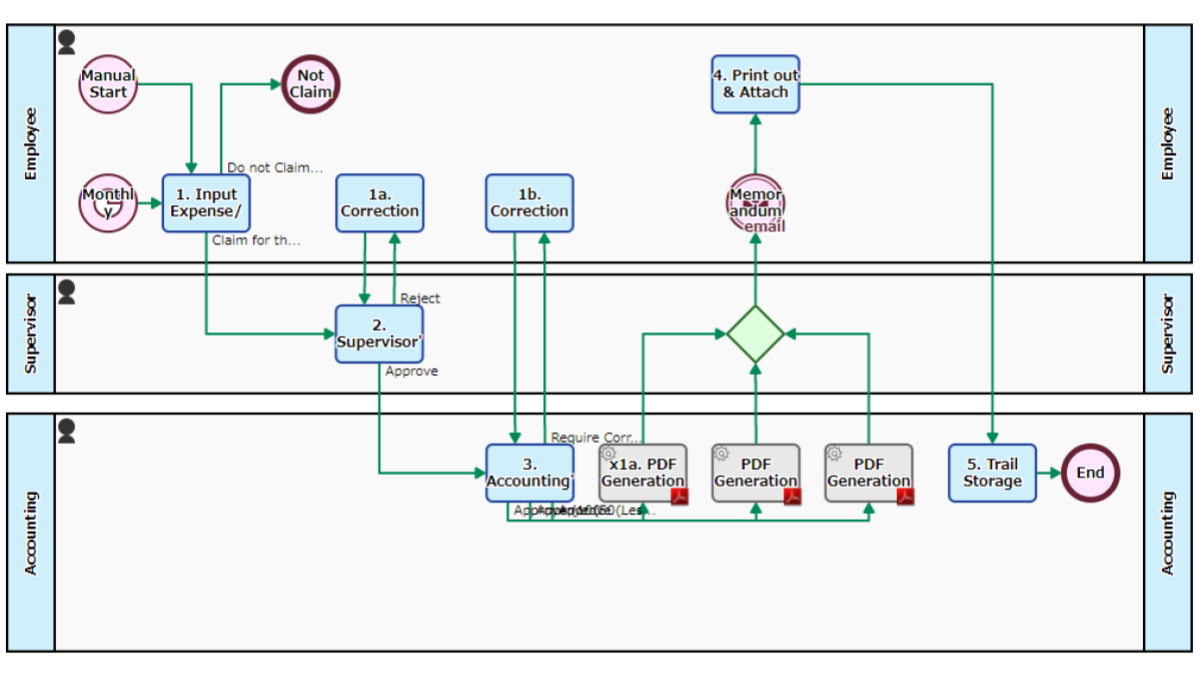
Expense Claim Monthly Flow
Expenses paid behalf are claimed collectively by month. Starts automatically in the “Morning of the 1st of every month”, and allocates the Step of [1. Input Expense/ Claim] to all employees. An employee inputs data of…
-
■
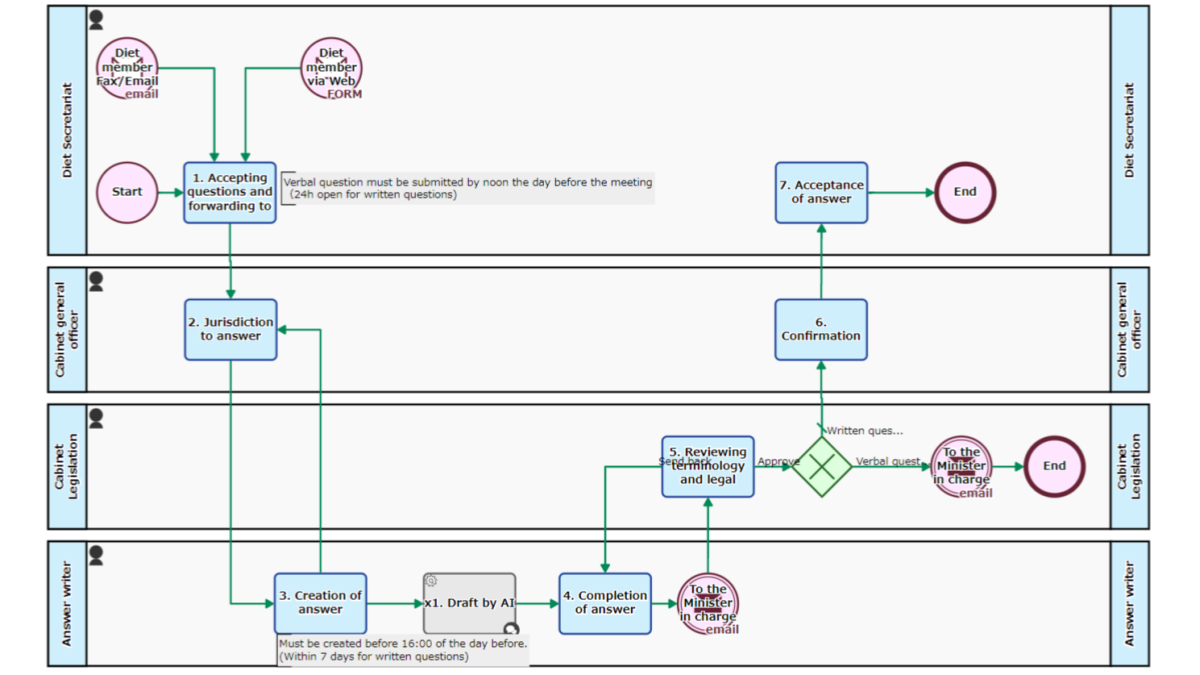
Answer Drafting Flow
Accepts questions and designates personnel to create the answer. After accepting the question with the Web form or email etc., the person in charge who will prepare the answer sentence will be appointed at the Step…
-
BPO Shipment App
Receive product delivery information, pack and ship. It is automatically started when delivery information is received from the consignor via…
-
Pick, Pack and Ship flow-HTTP connect
Outsources the packaging, inspection and shipment operations. The destination and commodity are entered at the [1. Enter Shipping instruction] Task.…
-
Progress Report App
Multiple people will report and summarize the progress of the project. Reporters appointed at the [1. Rapporteur Designation] Step make…
-
Subcontracting Flow
A flow for concluding a contract with a subcontractor. After entrustment information is registered at the Step of [1. Register…
-
Expense Record Flow
Reports and records expenses after approval/correction. The Process for all employees is automatically started at the beginning of every month.…
-
Account Registration Reservation Process
Issues user accounts and registers to/deletes from email lists and the Workflow platform/Roles. Information about a user is entered at…
-
Acceptance Inspection Request Flow
Responds to inspection after delivery of consignment work. A delivery note PDF is automatically generated from the input information of…
-
Translation-Time Measurement
Translates the text of the manuscript. The sentences entered in [1 Translation request] will be delivered to the translator. On…
-
Product Demo Flow
Accepts product demo requests and carry out the demo. Started by the acceptance of an application via the web form…
-
SLA Credits Issuance Flow
Accepts reduction claims based on SLA (Service Level Agreement) from customers and issues service credits. When there is an application…
-
Manga Production Flow
Based on the original scenario, a manga is produced through the stages of rough-sketch, draft, and finish. At each stage,…
-
Blog Write-Post Flow
A draft of a blog post is registered, proofread and posted. Upon a draft being registered at the Step of…
-
Human Multitasking Workflow
Cleaning work and cleaning inspection work are carried out. If there is a work in [2. Clean up] or [3.…
-
Order Reporting App, Email Notification
To be approved by the Sales Manager. Sales team leader makes [2. Confirmation], and then Sales Manager makes [3. Approval].…
-
Design Request Handling (Outsource option)
Manages from accepting designing requests to producing deliverables and delivering. At the Step of [2. Designate], whether to assign a…
-
Designing Request Handling Flow
Requests from within the company are processed. The designer in charge is appointed at [2. Designate], and the output such…
-
Design Request
Call the “Design request handling process” of the design team with an HTTP request and pass the request contents. Receive…
-
Personnel Evaluation App
Conducts performance appraisal and record as numerical values. Starts automatically at the end of every month, and the person enters…
-
Daily Report Flow
Automatically starts up every morning for reporting daily business. After the Step of [1. Enter report] is handled, the superior…
-
Expense Claim Monthly Flow
Expenses paid behalf are claimed collectively by month. Starts automatically in the “Morning of the 1st of every month”, and…
-
Answer Drafting Flow
Accepts questions and designates personnel to create the answer. After accepting the question with the Web form or email etc.,…